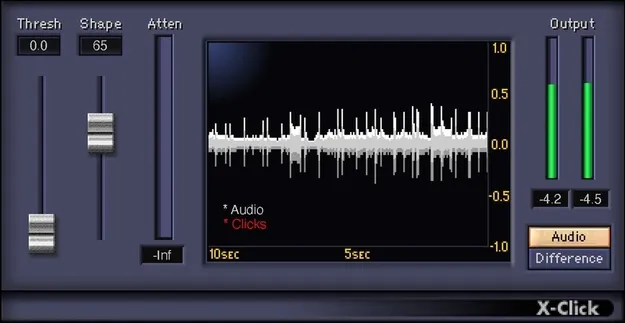
X-Click by Waves audio restoration plugin interface showing click display

X-Click: Click Removal Plugin for Audio Restoration by Waves

X-Click is a click removal plugin from Waves that isolates, displays and reduces strong, short clicks in audio recordings. It is designed for clicks from analog sources such as switching noise and worn vinyl, as well as digital issues like clocking errors.

VST2AUAAXWindowsmacOS
AVAILABLE ATPlugin Boutique
Opens the store in a new tab
01Overview

X-Click is aimed at audio restoration work where short, loud clicks spoil an otherwise usable take. Waves positions it as a focused tool for that one job rather than a general-purpose cleaning suite. Its display shows the last 10 seconds of processing with detected clicks marked in red, so you can see what is being changed as you adjust the settings.

Best for

  • Vinyl transfer cleanup
  • Removing switching noise
  • Fixing clock sync clicks
  • Sample rate mismatch pops
  • Audio restoration editing
Developer
Waves
Store
Plugin Boutique
02Key features

What you get

  • Isolates and reduces short, strong clicks in recordings
  • Monitor mode to hear only the detected clicks
  • Selectable click shape from sharp digital to wide analog
  • Display of the last 10 seconds of processing with clicks in red
  • Automatic click removal or manual processing of individual clicks
  • Parallel track option for heavier reduction using phase flip
  • Attenuation meter showing amount of click reduction
03In depth

Click Detection, Shape and Monitoring

X-Click gives you control over how clicks are found and handled. You can choose the click shape, from sharp digital transients to wider analog ones, which helps match the plugin to the kind of damage in the recording.

A monitor mode lets you hear only the clicks, so you can fine-tune parameter adjustments without the program material masking what is being removed. An attenuation meter shows how much click reduction is being applied.
Automatic and Manual Click Removal Workflow

You can use X-Click for automatic click removal or process individual clicks manually, depending on how much control a job needs. Waves also describes a parallel approach for heavier reduction: record a separate track containing only the clicks, then flip its phase to subtract them from the main track.

The large display is central to the workflow, since it makes the effect of each parameter change visible on the waveform rather than relying on listening alone.

04Specs

Will it run?

Formats, systems and requirements as listed by Plugin Boutique. Missing details are left out, not guessed.

DeveloperWaves
TypePlugin
CategoryAudio Restoration
FormatsVST2, AU, AAX
Operating systemsWindows, macOS
05FAQ

Questions, answered

What formats does X-Click support?

X-Click is available in VST2, AU and AAX formats. It runs on Windows and macOS.

What do I need to run X-Click?

On Mac, X-Click requires macOS Monterey 12, Ventura 13, Sonoma 14 or Sequoia 15, in VST, AU or AAX. On PC, it requires Windows 10 or later, in VST or AAX.

What kinds of clicks does X-Click remove?

X-Click is built for strong, short clicks. Waves says it targets clicks from analog sources such as switching noise and old vinyl records, and clicks and pops caused by digital issues like clocking errors and sample rate mismatches.

07Developer

More from Waves

All Waves products →