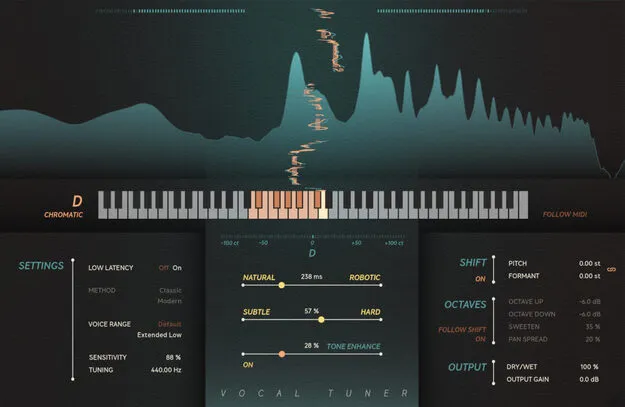
Vocal Tuner by Softube pitch correction plugin interface

Vocal Tuner: Real-Time Pitch Correction Plugin by Softube

Rated 4.7/5 on Plugin Boutique (50 ratings)

Vocal Tuner is a real-time automatic pitch correction plugin for vocals from Softube. It offers Classic and Modern correction methods, from subtle tuning to hard tuning with creative pitch and formant effects.

VST3VST2AUAAXWindowsmacOS64-bit
AVAILABLE ATPlugin Boutique
Opens the store in a new tab
01Overview

Vocal Tuner is built for tracking and mixing vocals in real time. Its Subtle/Hard slider controls how quickly pitch is corrected, and its Natural/Robotic slider sets how much correction is applied to note transitions. Pitch and formant shifting can be set independently or linked, and octave up and octave down layers can be blended with the corrected vocal to create a fuller ensemble sound. A Low Latency setting is included for live and tracking situations.

Best for

  • Vocal tuning
  • Hard-tuned vocal effects
  • Live vocal tracking
  • Harmony layering
  • Vocal polish in mixing
Developer
Softube
Store
Plugin Boutique
02Key features

What you get

  • Automatic real-time pitch correction for vocals
  • Classic method for traditional pitch correction sound
  • Modern method that preserves vocal formants while tuning
  • Subtle/Hard slider for speed of pitch correction
  • Natural/Robotic slider for correction on note transitions
  • Independent or linked pitch and formant shifting
  • Octave up and octave down layers with individual gain
  • Tone Enhance slider with dynamic processing and EQ
  • Low Latency setting with reported latency under 1 ms
03In depth

Classic and Modern Pitch Correction Methods

Vocal Tuner offers two pitch correction methods. The Classic method delivers the traditional automatic pitch correction sound. The Modern method uses a more advanced pitch-shifting algorithm designed to preserve the formants of the vocal while tuning, which helps keep the voice sounding natural.

The Subtle/Hard slider controls the speed of correction, so you can move from transparent tuning to an obvious hard-tuned effect.
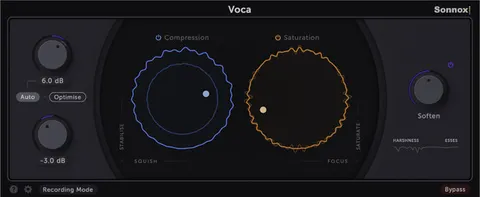
Effects, Tone Enhance and Low Latency Tracking

Beyond correction, Vocal Tuner includes independent or linked pitch and formant shifting, plus octave up and octave down layers with individual gain controls. The Tone Enhance slider adds dynamic processing and equalization after pitch correction to make the vocal sound more polished.

For tracking and live performance, the Low Latency setting reduces the reported latency of the plugin to under 1 millisecond. Precise metering shows how the processing affects the input signal.

04Specs

Will it run?

Formats, systems and requirements as listed by Plugin Boutique. Missing details are left out, not guessed.

DeveloperSoftube
TypePlugin
CategoryVocal Processing
FormatsVST3, VST2, AU, AAX
Operating systemsWindows, macOS
Architecture64-bit
05FAQ

Questions, answered

What formats does Vocal Tuner support?

Vocal Tuner is available in VST3, VST2, AU and AAX formats. It runs on Windows and macOS in 64-bit.

What do I need to use Vocal Tuner?

You need a Softube account and an iLok account, plus a computer with an AU, VST, VST3 or AAX compatible DAW host. An internet connection is required to download installers and manage licenses. Supported systems are macOS Big Sur 11, Monterey 12 and Ventura 13, and Windows 10 (64-bit) or Windows 11.

What is the difference between the Classic and Modern methods?

The Classic method gives a traditional automatic pitch correction sound. The Modern method uses a more advanced pitch-shifting algorithm that preserves the formants of the vocal while tuning.

Can Vocal Tuner be used for live performance?

The Low Latency setting is designed for tracking and live performance situations. In this mode, the reported latency is under 1 millisecond.

07Developer

More from Softube

All Softube products →