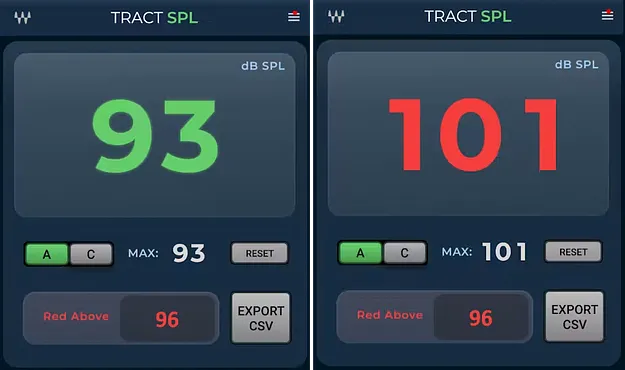
TRACT SPL Meter by Waves sound pressure level plugin interface

TRACT SPL Meter: Sound Pressure Level Plugin by Waves

TRACT SPL Meter is a Waves utility plugin that monitors sound pressure levels inside the eMotion LV1 mixer and SuperRack plugin host. It offers A- and C-weighted readings, a maximum-level hold, a user-set threshold warning and CSV logging.

VST2AUAAXWindowsmacOS
AVAILABLE ATPlugin Boutique
Opens the store in a new tab
01Overview

TRACT SPL Meter keeps sound level monitoring within the same environment where you mix. Rather than running a separate measurement application, you can watch current levels, see the highest peak reached and receive a warning when a set limit is crossed. Waves positions the plugin for live sound work, where a clear view of loudness during a performance matters. Logged readings can be exported to a CSV file, giving you a simple record of levels across an event.

Best for

  • Live sound level monitoring
  • Venue loudness compliance
  • Post-show level documentation
  • Concert sound reviews
  • Event SPL logging
Developer
Waves
Category
Utilities
Store
Plugin Boutique
02Key features

What you get

  • SPL monitoring inside Waves eMotion LV1 and SuperRack
  • Large, clear current SPL readout
  • Maximum SPL level hold
  • A- and C-weighted sound pressure measurement
  • User-defined SPL threshold
  • Clear warning when the threshold is exceeded
  • Continuous SPL measurement logging
  • Export SPL logs to CSV
03In depth

Live level readout and threshold alerts

The plugin shows the current sound pressure level on a large readout, so the figure is easy to read at a glance during a show. A maximum-level hold keeps the highest reading reached, which helps when you need to know how loud a set peaked.

You choose between A- and C-weighting depending on what you are measuring. Set your own SPL threshold, and the plugin gives a clear warning whenever the level goes over it.
Logging and post-event documentation

TRACT SPL Meter can log SPL measurements continuously. The logged data can be exported to CSV, which lets you review levels after an event or keep a record for documentation purposes.

Because it runs inside eMotion LV1 and SuperRack, the meter stays in the same session as your mixing tools rather than requiring a second application.

04Specs

Will it run?

Formats, systems and requirements as listed by Plugin Boutique. Missing details are left out, not guessed.

DeveloperWaves
TypePlugin
CategoryUtility
FormatsVST2, AU, AAX
Operating systemsWindows, macOS
05FAQ

Questions, answered

What do I need to run TRACT SPL Meter?

The plugin runs inside Waves eMotion LV1 or the SuperRack plugin host, so you need one of those hosts installed. It is offered in VST2, AU and AAX formats.

Which operating systems does TRACT SPL Meter support?

It supports Windows and macOS. On Mac, the listed requirements are macOS Monterey 12, Ventura 13, Sonoma 14 and Sequoia 15. On PC, Windows 10 or later is required, with VST and AAX formats available.

Can I weight the measurement and record levels?

Yes. You can choose A- or C-weighting, and the plugin can log SPL measurements and export them to a CSV file.

07Developer

More from Waves

All Waves products →