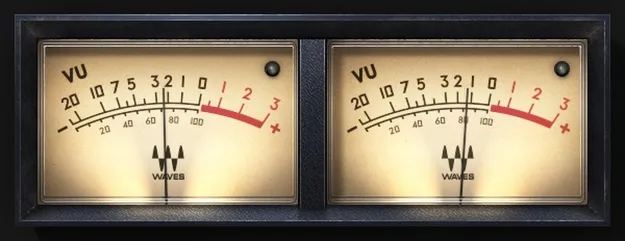
VU Meter by Waves studio metering plugin interface

VU Meter: Analog-Style VU Metering Plugin by Waves

Rated 5.0/5 on Plugin Boutique (8 ratings)

VU Meter by Waves is a metering plugin that emulates an analog VU meter, showing average signal level with needle ballistics rather than instant peaks. It is aimed at producers who want a level reading closer to perceived loudness.

VST2AUAAXWindowsmacOS
AVAILABLE ATPlugin Boutique
Opens the store in a new tab
01Overview

VU Meter by Waves is a studio utility that adds a software version of the classic VU meter to your session. Instead of reacting to every short peak, it averages the signal over time, so the needle reflects the average level of the audio. The developer says this tracks perceived musical energy more closely than a digital peak meter. The plugin can be inserted on as many channels as you like, and its stereo version offers small, medium and large meter sizes.

Best for

  • Mix bus level checking
  • Mastering level monitoring
  • Vocal level balancing
  • Drum bus metering
  • Reference level calibration
Developer
Waves
Category
Utilities
Store
Plugin Boutique
02Key features

What you get

  • Averages short peaks to show average signal level
  • Needle-style display smoother than DAW meters
  • LED-style clip indicator above -0.009 dBFS
  • Headroom calibration to your DAW's reference level
  • Volume Units and dB scales based on reference adjustment
  • Negligible CPU use, insert on as many channels as needed
  • Stereo version with small, medium or large meter size
03In depth

Average Level Metering and Needle Ballistics

Digital peak meters are useful for spotting overs, but they move quickly and can be hard to read while you mix. VU Meter smooths the display by averaging out short peaks, so the reading reflects how loud a passage sounds over time rather than its brief transients.

Waves describes the emulation as focused on mechanical realism, with the aim of reproducing how a real VU needle moves. Because the readings are steadier, it is easier to compare sections of a mix and judge overall level balance.

An LED-style clip indicator lights at levels above -0.009 dBFS, so you still get a clear warning when the signal reaches full scale.
Calibration, Scales and Workflow

VU Meter lets you calibrate headroom to your DAW's reference level, which helps align the meter with the level standards you use. You can display readings in Volume Units or in dB, with the scale depending on the reference adjustment you set.

The plugin is light on processing, so you can place it on many channels, such as buses, submixes and the master, without concern for CPU load.

04Specs

Will it run?

Formats, systems and requirements as listed by Plugin Boutique. Missing details are left out, not guessed.

DeveloperWaves
TypePlugin
CategoryUtility
FormatsVST2, AU, AAX
Operating systemsWindows, macOS
05FAQ

Questions, answered

What formats does VU Meter support?

VU Meter is available in VST2, AU and AAX formats. It runs on macOS and Windows.

What do I need to run VU Meter?

On Mac, the listed requirements are macOS Monterey 12, Ventura 13, Sonoma 14 or Sequoia 15, with VST, AU or AAX support. On PC, Windows 10 or later with VST or AAX is needed.

How is VU Meter different from a DAW's built-in meter?

VU Meter averages out short peaks, so its reading is smoother and shows average level rather than jittery peak movement. It also adds calibration to your DAW's reference level and Volume Unit scaling.

07Developer

More from Waves

All Waves products →