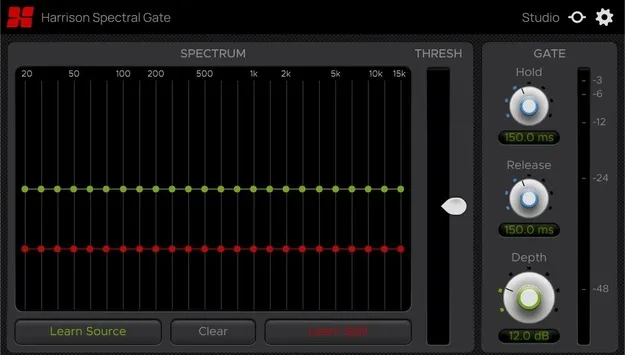
Spectral Gate by Harrison Consoles frequency-dependent noise gate plugin interface

Spectral Gate: Frequency-Dependent Noise Gate by Harrison Consoles

Spectral Gate is a frequency-dependent noise gate plugin by Harrison Consoles. It learns the spectral profile of audio you want to keep (Source) and audio you want to remove (Spill), then gates each frequency accordingly.

VST3VST2AUAAXWindowsmacOSLinux
AVAILABLE ATPlugin Boutique
Opens the store in a new tab
01Overview

Spectral Gate works differently from a standard gate. Instead of reacting only to level, it compares the frequency content of the signal you want to keep with the frequency content of the bleed or noise you want to remove. A real-time spectrum display shows the Source and Spill curves, so you can see what the plugin has captured before you adjust anything. It is available as a plugin in VST3, VST2, AU and AAX formats for Windows, macOS and Linux.

Best for

  • Drum overhead bleed reduction
  • Vocal rumble removal
  • Isolating individual drum hits
  • Cleaning up loops and samples
  • Frequency-dependent sidechain ducking
  • Dialogue cleanup in post-production
Category
Gates
Store
Plugin Boutique
02Key features

What you get

  • Learns Source and Spill spectral profiles with a single click
  • Real-time spectrum display with green Source and red Spill curves
  • Depth control for gentle spill reduction or full removal
  • Threshold control to set the gating point
  • Hold setting for how long the gate stays open
  • Release setting for how smoothly the gate closes
  • Available in VST3, VST2, AU and AAX formats
03In depth

How Source and Spill Learning Works

The core of Spectral Gate is its learning process. You capture the spectral profile of the audio you want to keep as Source, and the audio you want to remove as Spill, each with a single click.

The spectrum display then draws green Source and red Spill curves over your track's frequencies. Because you can see where the two overlap and where they separate, you can judge how much the gate will affect each band before you commit to settings.
Depth, Threshold and Timing Controls

Depth and Threshold set how far the gate reduces unwanted material. You can use a light setting for gentle spill reduction or a stronger one for near-total removal, while the signal you want to keep passes through unchanged.

Hold and Release control timing. Hold sets how long the gate stays open after the signal drops, and Release sets how smoothly it closes. Adjusting these two controls lets you shape decay so the gated sound still feels natural.

04Specs

Will it run?

Formats, systems and requirements as listed by Plugin Boutique. Missing details are left out, not guessed.

DeveloperHarrison Consoles
TypePlugin
CategoryGate
FormatsVST3, VST2, AU, AAX
Operating systemsWindows, macOS, Linux
05FAQ

Questions, answered

What is Spectral Gate?

Spectral Gate is a noise gate plugin by Harrison Consoles that works by frequency. It learns the spectrum of the audio you want to keep and the audio you want to remove, then gates each frequency band accordingly.

Which formats does Spectral Gate support?

Spectral Gate is available in VST3, VST2, AU and AAX formats.

What operating systems does Spectral Gate run on?

Spectral Gate supports Windows, macOS and Linux. On Mac it requires macOS 13 or later, and on Windows it requires Windows 10 or later.

What do I need to run Spectral Gate on Linux?

The Linux requirements are a GCC 5 compatible system, OpenGL 3.2 or higher, and libcurl-gnutls installed.

07Developer

More from Harrison Consoles

All Harrison Consoles products →