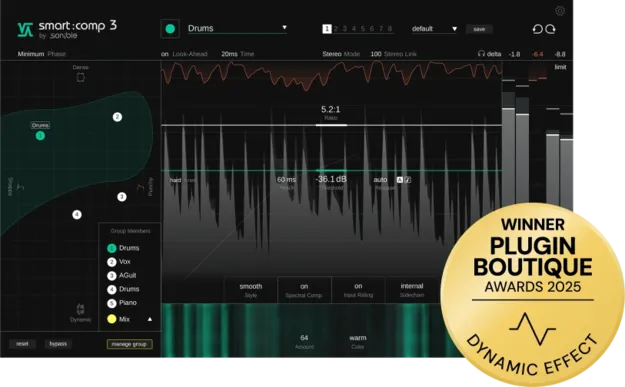
smart:comp 3 by sonible compressor plugin interface showing Compression Matrix

smart:comp 3: AI-Assisted Compressor Plugin by sonible Free Download

Rated 4.8/5 on Plugin Boutique (14 ratings)

smart:comp 3 is a compressor plugin from sonible that uses a Compression Matrix to map a range of viable compressor settings for the incoming audio. It is available in VST3, VST2, AU and AAX formats for Windows and macOS.

VST3VST2AUAAXWindowsmacOS64-bit
AVAILABLE ATPlugin Boutique
Free trial available from the developer
01Overview

smart:comp 3 is built around sonible's Sonic Intelligence approach, which combines data-driven analysis with mixing practice. Instead of offering one suggested setup, the plugin shows a field of possible compression configurations derived from the input signal, so you can explore how far the material can be shaped in dynamic range. A Compression Scope visualizes the viable range of the analyzed signal, and a Group Mode lets several instances be adjusted together from one interface. The plugin supports zero-latency processing for live use and recording, with a linear-phase mode kept for mixing and post-production.

Best for

  • Mix bus compression
  • Multitrack batch compression
  • Live recording
  • Vocal compression
  • Mixing and post-production
Developer
sonible
Category
Compressors
Store
Plugin Boutique
02Key features

What you get

  • Compression Matrix showing a range of compressor settings
  • Smooth transitions between different compression characters
  • Compression Scope visualizing the viable compression range
  • Group Mode for shared control of threshold, ratio, attack, release and mix
  • Zero-latency minimum-phase mode for live use and recording
  • Linear-phase mode for mixing and post-production
  • Refined Input Riding that stabilizes level variations before compression
  • Updated compression engines with refined saturation characteristics
03In depth

Compression Matrix and Compression Scope

The Compression Matrix displays a range of compressor settings and allows smooth transitions between different compression characters. Instead of generating a single suggested setup, it maps a field of configurations that can be explored in real time, with settings organized around common musical terms.

The Compression Scope complements it by visualizing the viable compression range of the analyzed signal. Together they give you a view of how far the material can be shaped before you commit to a setting.
Group Mode, Zero-Latency Mode and Input Riding

Group Mode links multiple plugin instances for shared control of threshold, ratio, attack, release and mix. This allows batch adjustments from a single interface when you want consistent compression across several tracks.

Zero-latency mode uses minimum-phase processing for live use and recording with no delay, while linear-phase mode remains available for mixing and post-production. Refined Input Riding stabilizes level variations before compression is applied. Sonible also describes the spectral compression technology as distributing gain reduction across the frequency spectrum in real time, without manual multiband setup.

04Specs

Will it run?

Formats, systems and requirements as listed by Plugin Boutique. Missing details are left out, not guessed.

Developersonible
TypePlugin
CategoryCompressor
FormatsVST3, VST2, AU, AAX
Operating systemsWindows, macOS
Architecture64-bit
Free trialYes
05Upgrades

Upgrade and crossgrade options

06FAQ

Questions, answered

What formats does smart:comp 3 support?

smart:comp 3 is available in VST3, VST2, AU and AAX formats. It runs on Windows and macOS and is 64-bit only.

What do I need to run smart:comp 3?

On Mac it requires macOS 10.9 or later, with M1 Apple Silicon supported. On PC it requires Windows 10 or later. Both platforms list at least 4 GB of RAM and an Intel Dual-Core i5 CPU as recommended, with supported sample rates from 44.1 kHz to 192 kHz.

Does smart:comp 3 add latency?

Zero-latency mode uses minimum-phase processing for live use and recording with no delay. Linear-phase mode is also available for mixing and post-production.

Can I control several instances at once?

Yes. Group Mode links multiple plugin instances for shared control of threshold, ratio, attack, release and mix, enabling batch adjustments from a single interface.

08Developer

More from sonible

All sonible products →