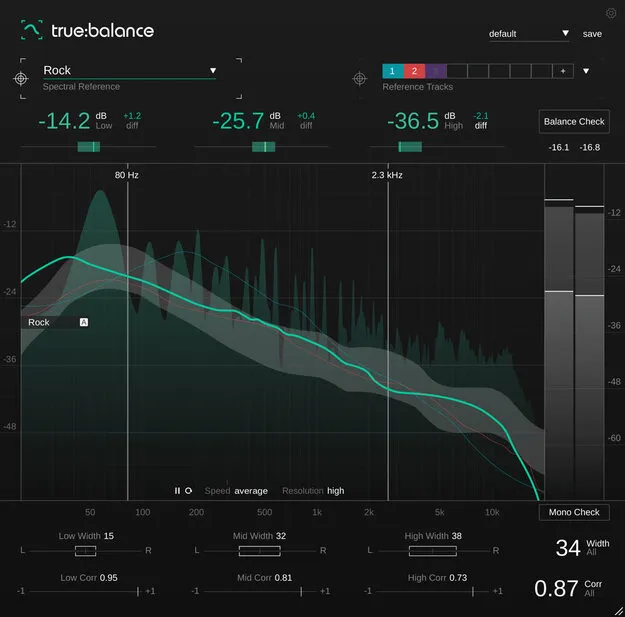
true:balance by sonible spectral balance metering plugin interface

true:balance: Spectral Balance and Mono Compatibility Metering Plugin by sonible Free Download

Rated 4.7/5 on Plugin Boutique (249 ratings)

true:balance is a metering plugin from sonible that analyzes the spectral distribution and stereo width of a mix, helping producers check its balance and mono compatibility.

VST3VST2AUAAXWindowsmacOS64-bit
AVAILABLE ATPlugin Boutique
Free trial available from the developer
01Overview

true:balance is an effects plugin in the spectral analysis category. It shows a real-time spectrum of the input signal alongside an average spectrum over time, and compares the lows, mids and highs against a chosen reference. Its channel data section reports stereo width and correlation, so you can judge how a mix will translate to mono. It is available in VST3, VST2, AU and AAX formats for Windows and macOS, and includes a trial.

Best for

  • Mix balance checking
  • Mono compatibility testing
  • Genre reference matching
  • Project-wide mix consistency
  • Stereo width analysis
Developer
sonible
Store
Plugin Boutique
02Key features

What you get

  • Real-time spectrum analyzer with average spectrum over time
  • Genre-based reference curves for comparison
  • Custom reference option with up to 8 reference tracks
  • Target indicators for lows, mids and highs
  • Balance Check with text-based suggestions
  • Mono Check for mono compatibility issues
  • Channel data section with stereo width and correlation values
03In depth

Spectral Balance Metering and Reference Comparison

The adjustable spectrum analyzer displays both the real-time spectrum and the average spectrum over time. Level readings for the lows, mids and highs are shown relative to the selected reference, so you can focus on the overall balance of a mix rather than fine detail.

You can compare your mix against genre-based references or load up to 8 custom reference tracks, which helps keep a whole project consistent. Target indicators show at a glance whether your levels are close to the reference values.
Balance Check and Stereo Width Analysis

For text-based guidance, the Balance Check analyzes the current spectral distribution, compares it with the reference and suggests adjustments. The Mono Check flags potential mono compatibility problems.

The channel data section shows stereo width and correlation values, giving insight into the proportion of left and right channels in your mix. The developer notes this helps avoid mono compatibility issues or a blurry low end.

04Specs

Will it run?

Formats, systems and requirements as listed by Plugin Boutique. Missing details are left out, not guessed.

Developersonible
TypePlugin
CategorySpectral Analysis
FormatsVST3, VST2, AU, AAX
Operating systemsWindows, macOS
Architecture64-bit
Free trialYes
05FAQ

Questions, answered

What formats is true:balance available in?

true:balance is available in VST3, VST2, AU and AAX formats. It is a 64-bit plugin.

Which operating systems does true:balance support?

true:balance runs on Windows 10 and later (64-bit) and on macOS 10.12 and later, with Apple Silicon M1 support on macOS.

What do I need to use true:balance?

true:balance requires a compatible DAW such as Logic Pro, Ableton Live, Pro Tools 11 or later, Reaper, Cubase, Nuendo, FL Studio or Studio One. The listed requirements include at least 4 GB of RAM and an Intel Dual Core i5 CPU, with supported sample rates from 44.1 kHz to 192 kHz.

Can I compare my mix to my own reference tracks?

Yes. Besides the included genre-based references, you can load up to 8 custom reference tracks to compare your mix's spectral distribution against them.

07Developer

More from sonible

All sonible products →