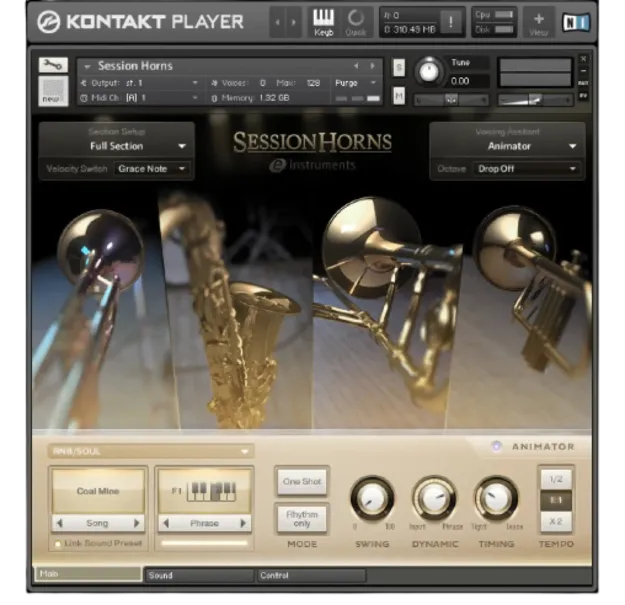
Session Horns Kontakt horn section instrument by Native Instruments

Session Horns: Kontakt Horn Section Instrument by Native Instruments

Rated 4.6/5 on Plugin Boutique (14 ratings)

Session Horns is a Kontakt instrument from Native Instruments that samples a four-piece brass section: trombone, tenor sax and two trumpets. It includes Smart Voice Split and an Animator phrase generator for building horn parts.

REQUIRESKontaktHost player sold separately
Kontakt
AVAILABLE ATPlugin Boutique
Opens the store in a new tab
01Overview

Session Horns is a sampled horn section built for contemporary production. The ensemble combines two trumpets, a tenor sax and a trombone, recorded in high quality and designed to be played by producers without brass experience. Developed in collaboration with e-instruments, it targets genres such as funk, pop, reggae, indie and neo-soul. The instrument runs inside Kontakt and is available through the free Kontakt Player or Kontakt 7.

Best for

  • Funk horn parts
  • Pop brass arrangements
  • Reggae stabs and licks
  • Neo-soul horn lines
  • Indie horn accompaniment
Requires
Kontakt
Store
Plugin Boutique
02Key features

What you get

  • Four-piece horn section: trombone, tenor sax and two trumpets
  • High-quality multi-sampled instrument with wide articulation range
  • Legato mode with sampled transitions between all instruments
  • Smart Voice Split assigns chord notes to each brass instrument
  • Animator with over 170 flexible, playable phrases
  • Phrases cover funk, pop, reggae, neo-soul and indie styles
  • Runs in Kontakt; requires the free Kontakt Player or Kontakt 7
03In depth

Sound and Playability of the Horn Section

Session Horns uses a tight, modern four-piece brass ensemble sampled across a wide range of articulations. Native Instruments says all possible note transitions between the four instruments were sampled, and these transitions are handled by Legato mode. When you play melodies, the instrument smooths the movement between notes, which the developer presents as adding expression and authenticity.

You can play the full four-piece section or split it into subsections, such as only the two trumpets or only the sax and trombone.
Smart Voice Split and the Animator

Smart Voice Split assigns each note of a chord to a brass instrument, similar to how an arranger would voice a horn part. Playing two keys divides the section into higher and lower ranges, with trumpets at the top and sax and trombone below. Adding a third key maps the trombone to the lowest note, and a fourth note below moves the trombone to the new bass note while the rest of the ensemble takes the higher pitches.

The Animator provides over 170 playable phrases, including licks, stabs and progressions. You hold a chord with one hand and select phrases with the other, and the phrases are designed to adapt to your track in sync with it.

04Specs

Will it run?

Formats, systems and requirements as listed by Plugin Boutique. Missing details are left out, not guessed.

DeveloperNative Instruments
TypePlugin
CategoryKontakt Instrument
RequiresKontakt
FormatsKontakt
05FAQ

Questions, answered

What do I need to use Session Horns?

Session Horns requires Kontakt. You can use the free Kontakt Player or Kontakt 7 to run this instrument. The download size is 4.88 GB.

What is Smart Voice Split?

Smart Voice Split automatically assigns each note of a chord to the matching brass instrument, so you can create horn arrangements from the keyboard. Playing two keys splits the section into higher and lower ranges.

What genres is Session Horns designed for?

The instrument is aimed at contemporary genres, including funk, pop, reggae, indie and neo-soul. Its Animator phrases cover a similar range of styles and moods.

07Developer

More from Native Instruments

All Native Instruments products →