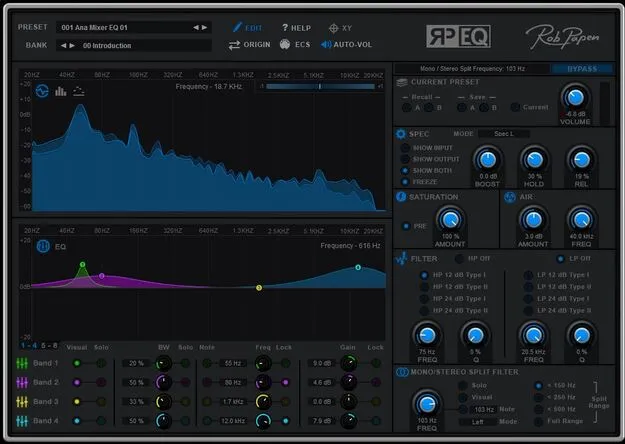
RP-EQ by Rob Papen equalizer plugin interface

RP-EQ: Equalizer Plugin by Rob Papen with Mid/Side Mode and XY Pad Free Download

Rated 4.3/5 on Plugin Boutique (9 ratings)

RP-EQ is an equalizer plugin from Rob Papen that offers an 8-band EQ with Mid/Side mode, a Mono/Stereo split filter, saturation, an Air section and a programmable XY pad. It is available in VST2, AU and AAX formats.

VST2AUAAXWindowsmacOS64-bit
AVAILABLE ATPlugin Boutique
Free trial available from the developer
01Overview

RP-EQ goes beyond a basic equalizer by adding several tools to its core EQ unit. Its Mid/Side mode, Mono/Stereo split filter and Air section sit alongside a filter section with selectable slopes and an XY pad that can record and replay movement paths. The developer says the Mono/Stereo split is used often in modern EDM and dance production. The plugin also includes several banks of presets to help you start working quickly.

Best for

  • Mid/Side mixing
  • Mix-bus processing
  • Mastering EQ
  • EDM filter sweeps
  • Removing low-end rumble
  • Dynamic rhythmic filtering
Developer
Rob Papen
Category
EQ
Store
Plugin Boutique
02Key features

What you get

  • 8-band EQ with normal and Mid/Side processing modes
  • Mono/Stereo split filter with separate processing per part
  • Saturation section for analogue tape-style warmth
  • Air section for a wide high-frequency boost
  • XY pad with live control and recordable movement paths
  • High-pass and low-pass filters with 12 or 24 dB slopes
  • FFT, 30-band bar and single-line spectrogram displays
  • A/B preset slots and a bypass button for comparison
03In depth

Mid/Side EQ, Stereo Split and Air Control

RP-EQ's 8-band EQ can run in normal mode or Mid/Side mode. In Mid/Side mode, bands 1 to 4 process the Mid signal and bands 5 to 8 process the Side signal, which gives you separate control over the center and width of a mix.

The Mono/Stereo Split Filter divides the signal at a chosen frequency into a mono low-frequency part and a stereo high-frequency part. Each part can be processed separately. Rob Papen describes the Air section as an additional wide high-frequency booster that adds a sense of breathing space to the audio.

The Saturation section adds warmth modeled on saturated analogue tape recordings.
XY Pad, Filters and Spectrogram Display

The XY section works as two programmable LFOs. Movement in each direction controls one or more RP-EQ parameters. In Live mode you move the dot manually with the mouse. In Rec mode you draw a path that is saved with the preset, and in Replay mode the path plays back when a note is triggered, runs freely, or starts with a manual button.

The filter section includes a high-pass filter, which the developer suggests setting around 75 Hz to remove rumble, and a low-pass filter for creative filter effects. Slopes are selectable at 12 dB or 24 dB per octave, and each filter offers two filter types.

The spectrogram shows input and output as an FFT display, a 30-band bar display or a 30-band single-line display, with left, right, stereo or Mid/Side views.

04Specs

Will it run?

Formats, systems and requirements as listed by Plugin Boutique. Missing details are left out, not guessed.

DeveloperRob Papen
TypePlugin
CategoryEQ
FormatsVST2, AU, AAX
Operating systemsWindows, macOS
Architecture64-bit
Free trialYes
05FAQ

Questions, answered

What formats does RP-EQ support?

RP-EQ is available in VST2, AU and AAX formats. The AAX version is listed for PT 12 or higher on PC.

Which operating systems can run RP-EQ?

RP-EQ runs on Windows 7, 8 and 10 in 32 and 64-bit versions, and on macOS 10.9 to 10.15 in 64-bit only.

Does RP-EQ have a trial version?

Yes, RP-EQ offers a trial. The product requires a serial and license activation when you register it.

Can I use a second serial on another computer?

A second serial for a secondary computer or laptop is available after you register the original serial or license.

07Developer

More from Rob Papen

All Rob Papen products →