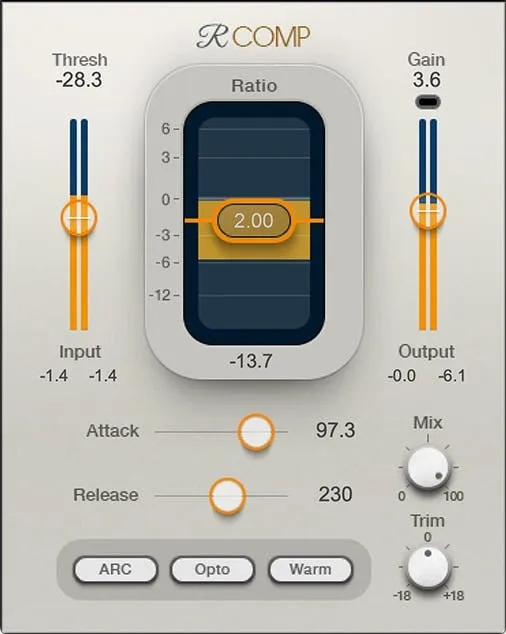
Renaissance Compressor by Waves compressor plugin interface

Renaissance Compressor: Compressor Plugin by Waves

Renaissance Compressor is a compressor plugin from Waves that offers warm or smooth character, auto-release gain reduction, and upward expansion. It is available in VST2, AU and AAX formats.

VST2AUAAXWindowsmacOS
AVAILABLE ATPlugin Boutique
Opens the store in a new tab
01Overview

Renaissance Compressor is a dynamics processor from Waves, sold as a plugin for Windows and macOS. Waves positions it as a modern take on the warmth of vintage analog compressors, with the clarity and extra control that software design allows. The plugin covers both compression and upward expansion, each with a soft knee, and includes a limiter built on Ultramaximizer technology. It suits producers who want one compressor that can handle the common scenarios in a mix or a master.

Best for

  • Mix bus compression
  • Vocal compression
  • Drum bus dynamics
  • Mastering peak control
  • Upward expansion
Developer
Waves
Category
Compressors
Store
Plugin Boutique
02Key features

What you get

  • Warm or smooth character selection
  • Auto-release for silky gain reduction when pushed
  • Classic opto or modern electro attack and release times
  • Compression and upward expansion with soft knee
  • Parameters that control feel as well as performance
  • Ultramaximizer-based limiter for catching peaks
  • Metering with a limiting indicator
  • Three selectable interface skins
03In depth

Sound Character and Auto-Release

Renaissance Compressor lets you choose between a warm or a smooth character, so you can shape how the compression colors the signal. Waves says the auto-release mode provides silky gain reduction, even when the compressor is pushed hard.

The plugin offers the classic opto or modern electro attack and release times, giving you a choice of timing behavior depending on the source. Parameters are designed to control the feel of the compression as well as its raw performance.
Workflow, Limiting and Metering

Beyond compression, the plugin includes upward expansion with a soft knee, which can bring up quieter passages without the abruptness of a hard threshold. Compression and expansion share the same soft-knee behavior, keeping the response consistent.

An Ultramaximizer-based limiter catches peaks at the end of the chain. The metering includes a limiting indicator, so you can see when the limiter is working. Three skins change the look of the interface if you want a different visual style.

04Specs

Will it run?

Formats, systems and requirements as listed by Plugin Boutique. Missing details are left out, not guessed.

DeveloperWaves
TypePlugin
CategoryCompressor
FormatsVST2, AU, AAX
Operating systemsWindows, macOS
05FAQ

Questions, answered

What formats does Renaissance Compressor support?

Renaissance Compressor is available in VST2, AU and AAX formats.

Which operating systems does Renaissance Compressor run on?

It runs on Windows and macOS. The macOS versions listed are Monterey 12, Ventura 13, Sonoma 14 and Sequoia 15, and the Windows version requires Windows 10 or later.

What is upward expansion in Renaissance Compressor?

Upward expansion raises the level of signals below the threshold, which can bring up quieter passages. It works with a soft knee alongside the compression.

07Developer

More from Waves

All Waves products →