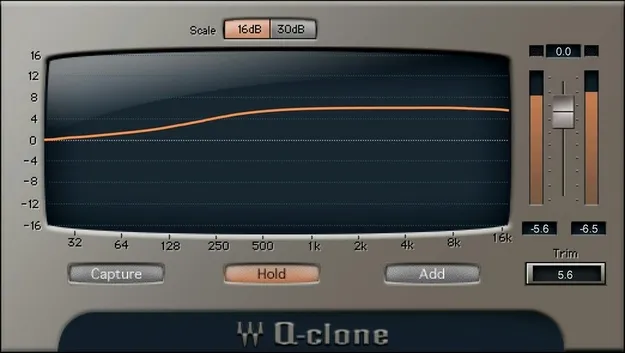
Q-Clone by Waves studio utility plugin interface showing EQ curve display

Q-Clone: EQ Curve Cloning Plugin by Waves

Q-Clone is a Waves studio utility plugin that applies captured hardware EQ curves to DAW tracks, so you can reuse analog EQ sounds as saved presets.

VST2AUAAXWindowsmacOS
AVAILABLE ATPlugin Boutique
Opens the store in a new tab
01Overview

Q-Clone is designed to work with curves captured by Q-Capture, a companion tool that samples the response of a hardware EQ. Once a curve is saved as a Q-Clone preset, it can be inserted on as many tracks as needed. Q-Clone also shows the captured curve graphically, which helps you see what the hardware is actually doing rather than relying on the panel markings. It is available in VST2, AU and AAX formats for Windows and macOS.

Best for

  • Reusing hardware EQ sounds
  • Vintage EQ curves in mixing
  • Consistent EQ across tracks
  • Recalling analog EQ settings
  • Combining multiple EQ curves
Developer
Waves
Category
Utilities
Store
Plugin Boutique
02Key features

What you get

  • Apply hardware EQ curves to as many DAW tracks as needed
  • Save analog EQ settings as reusable plugin presets
  • Mix and match curves captured from different EQs
  • Combine curves from several series EQs into one preset
  • Includes presets based on vintage hardware EQs
  • Graphical display of the actual analog EQ curve
  • Virtual cables for cloning plugins without an audio interface
03In depth

Capturing and reusing analog EQ curves

Outboard analog EQs have three practical limits: a single unit can only process one signal at a time, its settings are hard to recall, and the curve it applies often differs from what the knobs suggest. Q-Clone addresses this by letting you load captured hardware curves into your DAW.

You can save the settings from a hardware EQ as a plugin preset and place it on any number of tracks. Curves from several series EQs can also be combined into one preset, and you can mix and match curves from different units.
Presets and visual curve display

Q-Clone comes with a collection of presets built from vintage hardware EQs, giving you a starting point without needing the hardware itself. The plugin displays the curve being applied, so you can compare the graph with the EQ settings and adjust with a clearer picture of the result.

Virtual cables let you clone plugins without an audio interface, which is useful when you want to build curves inside a session.

04Specs

Will it run?

Formats, systems and requirements as listed by Plugin Boutique. Missing details are left out, not guessed.

DeveloperWaves
TypePlugin
CategoryUtility
FormatsVST2, AU, AAX
Operating systemsWindows, macOS
05FAQ

Questions, answered

What formats does Q-Clone support?

Q-Clone is available in VST2, AU and AAX formats.

Which operating systems does Q-Clone run on?

Q-Clone supports Windows and macOS. The listed macOS versions are Monterey 12, Ventura 13, Sonoma 14 and Sequoia 15, and the listed Windows version is Windows 10 or later.

Can I use Q-Clone without an audio interface?

Yes. Q-Clone includes virtual cables that let you clone plugins without an audio interface.

Does Q-Clone come with presets?

Yes. It includes a collection of presets from vintage hardware EQs.

07Developer

More from Waves

All Waves products →