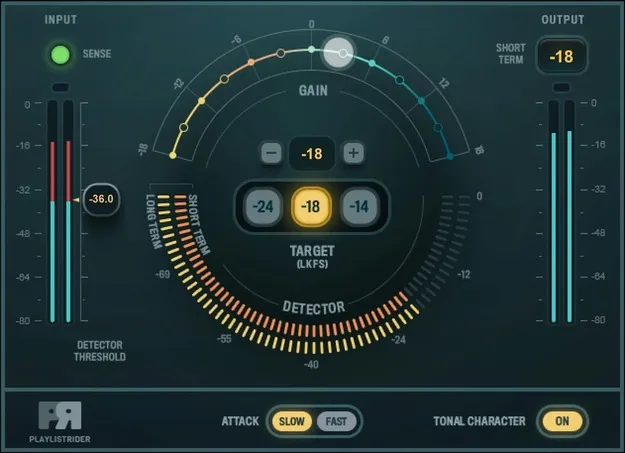
Playlist Rider by Waves audio utility plugin interface

Playlist Rider: Automatic Output Level Rider by Waves

Playlist Rider is a Waves utility plugin that automatically rides the master output level to one of three LKFS loudness targets, built for balancing audio feeds in broadcasts, podcasts and shows.

VST2AUAAXWindowsmacOS
AVAILABLE ATPlugin Boutique
Opens the store in a new tab
01Overview

Playlist Rider is a utility plugin from Waves for keeping the overall level of a mix steady when many audio sources are combined. Waves positions it for broadcasts, podcasts, panel discussions, theater productions and pre-show music. You load it on the master bus, set your mixer input levels, and the plugin adjusts the output toward the target you choose. It is available as VST2, AU and AAX.

Best for

  • Podcast loudness leveling
  • Broadcast audio balancing
  • Panel discussion mixing
  • Theater pre-show music
  • Live multi-source output
Developer
Waves
Category
Utilities
Store
Plugin Boutique
02Key features

What you get

  • Matches output to -24, -18 or -14 LKFS target levels
  • Rides output level dynamically in real time
  • Variable threshold for a natural, uncompressed sound
  • Detector can exclude low-level sections such as fades
  • Selectable fast or slow attack times
  • Optional tone shaper to smooth tonal differences
  • Designed to work with Waves eMotion LV1 and SuperRack
  • Multipoint touch-compatible operation
03In depth

How Playlist Rider Levels Your Output

Playlist Rider matches the audio output to one of three loudness targets: -24, -18 or -14 LKFS. Its level rider adjusts the output dynamically, so the signal stays close to the chosen target as the content changes.

A variable threshold is intended to keep the result natural and uncompressed. A detector option can exclude low-level sections such as fades, so quiet passages do not pull the level up. You can also choose fast or slow attack times to control how quickly the rider responds.
Tone Shaping and Workflow Notes

An optional tone shaper is included to smooth out tonal differences between feeds, which can help when sources come from different microphones or playback devices. Waves notes that the plugin works in real time and is multipoint touch-compatible.

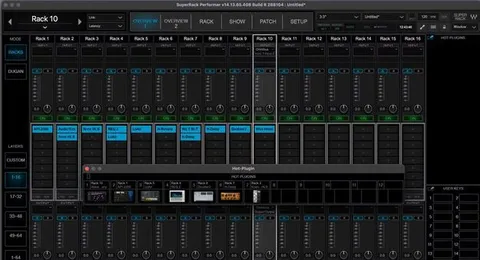
Waves recommends using Playlist Rider with its eMotion LV1 mixing console and SuperRack plugin host.

04Specs

Will it run?

Formats, systems and requirements as listed by Plugin Boutique. Missing details are left out, not guessed.

DeveloperWaves
TypePlugin
CategoryUtility
FormatsVST2, AU, AAX
Operating systemsWindows, macOS
05FAQ

Questions, answered

What is Playlist Rider used for?

Playlist Rider balances the overall output level of a mix that combines several audio feeds, such as broadcasts, podcasts, panel discussions or pre-show music. It rides the master output to a selected LKFS target.

Which loudness targets does Playlist Rider offer?

It offers three targets: -24, -18 and -14 LKFS. You choose the target that fits your delivery requirements.

What formats and operating systems does Playlist Rider support?

Playlist Rider is available in VST2, AU and AAX formats. It runs on Windows and macOS. Windows support is listed for VST and AAX, and macOS support covers VST, AU and AAX.

What do I need to run Playlist Rider?

On Mac, it requires macOS Monterey 12, Ventura 13, Sonoma 14 or Sequoia 15. On PC, it requires Windows 10 or later. Waves suggests pairing it with eMotion LV1 or SuperRack.

07Developer

More from Waves

All Waves products →