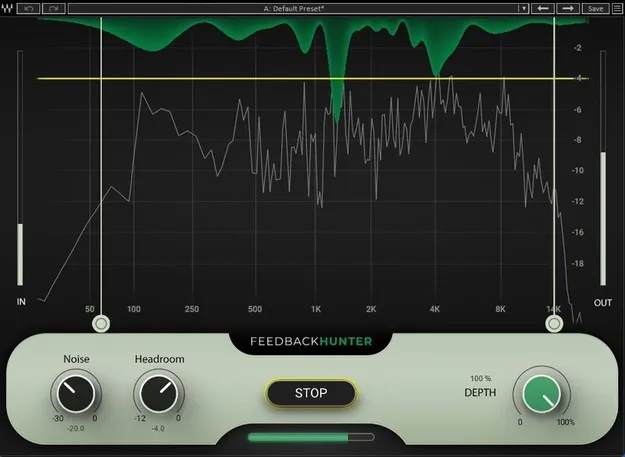
Feedback Hunter by Waves live sound feedback control plugin interface

Feedback Hunter: Feedback-Control Tool for Live Sound by Waves

Feedback Hunter is a live sound utility plugin from Waves that analyzes microphone and monitor response to build an EQ curve that raises gain before feedback. It is designed for FOH and live sound engineers.

VST2AUAAXWindowsmacOS
AVAILABLE ATPlugin Boutique
Opens the store in a new tab
01Overview

Feedback Hunter is built for setting up stage monitors and PA systems before a show. Instead of ringing out wedges by hand, the tool analyzes how the microphone and monitor respond together and creates an EQ curve to optimize that relationship. The developer says the goal is clearer sound with less risk of feedback. The setup process can take as little as 30 seconds, and it is meant to run during setup rather than during a live performance.

Best for

  • Live FOH setup
  • Stage monitor tuning
  • PA system setup
  • Pre-show feedback control
  • Festival and outdoor sound
Developer
Waves
Category
Utilities
Store
Plugin Boutique
02Key features

What you get

  • Maximizes gain before feedback across the full frequency spectrum
  • Removes the need to ring out speakers by hand
  • Setup process takes as little as 30 seconds
  • Customizable affected frequency ranges
  • Works in noisy environments
  • Adjustable target headroom
03In depth

How Feedback Hunter Sets Up Your Gain Structure

The core job of Feedback Hunter is to help you maximize gain before feedback. It processes the whole frequency spectrum, rather than placing a few narrow notches on problem frequencies. That approach is the main difference the developer draws from X-FDBK, which can run during a live show and produces single notch bands.

Because the process eliminates the need for ringing out speakers, setup time is shorter. Engineers can adjust the affected frequency ranges and the target headroom to suit the room and the system.
Using Feedback Hunter in Noisy Live Environments

Feedback Hunter is designed to work in noisy environments, which are common at festivals, clubs and outdoor stages. The tool is meant to be run during the setup stage, when you are ready to ring out your wedges or PA.

The interface is aimed at both experienced engineers and those who are newer to live sound. Its adjustable settings let you keep control of the final result.

04Specs

Will it run?

Formats, systems and requirements as listed by Plugin Boutique. Missing details are left out, not guessed.

DeveloperWaves
TypePlugin
CategoryUtility
FormatsVST2, AU, AAX
Operating systemsWindows, macOS
05FAQ

Questions, answered

What does Feedback Hunter do?

Feedback Hunter analyzes the response of the microphone and monitor and creates an EQ curve that helps you maximize gain before feedback. It is meant for setup before a show.

Which formats and operating systems does Feedback Hunter support?

Feedback Hunter is available in VST2, AU and AAX formats. It runs on Windows and macOS. On macOS it supports Monterey 12, Ventura 13, Sonoma 14 and Sequoia 15, and on Windows it requires Windows 10 or later.

How long does setup take?

The developer says the entire process can take as little as 30 seconds.

Can Feedback Hunter be used during a live show?

Feedback Hunter is intended to be used during setup, when you are ready to ring out your wedges or PA, rather than during a live show.

07Developer

More from Waves

All Waves products →