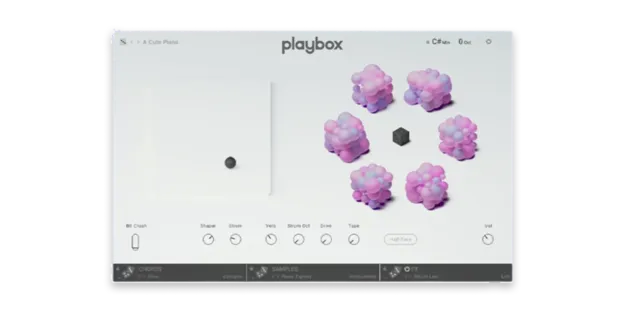
Playbox Kontakt instrument by Native Instruments sample and chord interface

Playbox: Randomizing Kontakt Instrument for Chords and Samples

Rated 4.9/5 on Plugin Boutique (8 ratings)

Playbox is a Kontakt instrument from Native Instruments that generates musical ideas with over 900 samples, more than 200 chord sets, and randomizable sounds.

REQUIRESKontaktHost player sold separately
Kontakt
AVAILABLE ATPlugin Boutique
Opens the store in a new tab
01Overview

Playbox is a Kontakt instrument built for finding new starting points. Its six cubes hold samples in categories such as synths, instruments, bass, voices and noises, and you can randomize them or build layers one note at a time. The developer describes it as a tool for beatmakers, composers, hobbyists and sound designers. It requires Kontakt, either the free Kontakt Player or Kontakt 6 version 6.7 or higher, and the download is about 1.2 GB.

Best for

  • Overcoming writer's block
  • Chord progression ideas
  • Layered pads and stabs
  • Sound design starting points
  • Reusing old sample libraries
Requires
Kontakt
Store
Plugin Boutique
02Key features

What you get

  • Over 900 samples arranged in six cubes
  • More than 200 chord sets that can be randomized and tweaked
  • Import MIDI files or play custom chords in piano mode
  • Export generated chords for any instrument in your DAW
  • Load up to 450 of your own samples into the User cube
  • Up to 14 onboard effects with adjustable processing order
  • Arp, Strum and Grain effects for rhythm and texture
  • Humanized velocity and timing with assignable modulation
03In depth

Samples and Chord Sets for Generating Ideas

Playbox organizes its sounds into six cubes: Synths, Instruments, Bass, Voices, Noises and User. The Synths cube offers deep pads, shimmering stabs, dynamic pulses and multilayered swells. Instruments covers acoustic sampled sounds such as bowed and plucked strings, organs, pianos and treated percussion. The User cube lets you load up to 450 of your own samples.

The instrument includes over 200 chord sets. You can randomize them or tweak individual notes, import MIDI files, or play custom chords in piano mode. Chords generated in Playbox can be exported for use with any instrument in your DAW.
Effects, Modulation and Workflow

Playbox includes a set of onboard effects in one interface. The XY pad supports simple sound design, and the Arp, Strum and Grain effects add rhythm and texture. The Ambience collection contains over 50 samples, including forest sounds, busy stations and vinyl crackle.

You can choose up to 14 effects and change their order in the processing chain. Humanized velocity and timing controls and assignable modulation sources let you shape how the sounds move.

04Specs

Will it run?

Formats, systems and requirements as listed by Plugin Boutique. Missing details are left out, not guessed.

DeveloperNative Instruments
TypePlugin
CategoryKontakt Instrument
RequiresKontakt
FormatsKontakt
05FAQ

Questions, answered

What do I need to use Playbox?

Playbox requires Kontakt. You can use the free Kontakt Player or Kontakt 6 version 6.7 or higher. The download is about 1.2 GB.

Does Playbox work with my own samples?

Yes. The User cube accepts up to 450 of your own samples, which you can drag and drop onto it. Playbox handles pitching them to the chord for you.

Can I use the chords from Playbox in other instruments?

Yes. All chords generated by Playbox can be exported and used with any instrument in your DAW.

Do I need music theory knowledge to use it?

The developer says the chords are playable with one finger, so in-depth music theory knowledge is not required to build chord patterns.

07Developer

More from Native Instruments

All Native Instruments products →