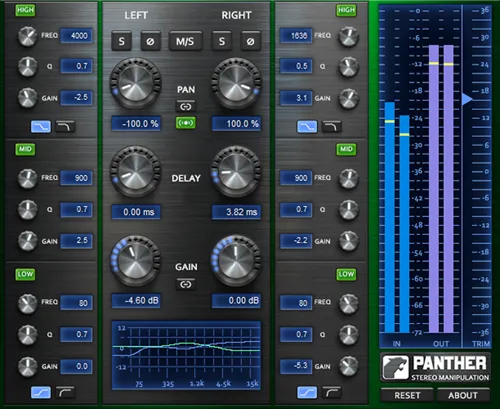
Panther Stereo Manipulation by Boz Digital Labs stereo effects plugin interface

Panther Stereo Manipulation: Stereo Channel Processor by Boz Digital Labs Free Download

Rated 4.6/5 on Plugin Boutique (51 ratings)

Panther Stereo Manipulation is an effects plugin from Boz Digital Labs that gives independent control over the left and right channels of a stereo track. It offers EQ, gain, pan and delay per channel, plus a Mid/Side mode.

VST2AUAAXRTASWindowsmacOS
AVAILABLE ATPlugin Boutique
Free trial available from the developer
01Overview

Panther Stereo Manipulation is built for a common mixing problem: the left and right sides of a stereo instrument often differ in volume, phase or tone. The plugin lets you treat each side separately, adjusting EQ, gain, pan and delay on the left and right channels independently. Boz Digital Labs also includes a Mid/Side option, so you can work on the center and the sides of the stereo field directly. It is categorized under dynamics processing in the Effects group.

Best for

  • Stereo instrument balancing
  • Stereo field widening
  • Mid/Side mixing
  • Channel imbalance correction
  • Creative stereo effects
Store
Plugin Boutique
02Key features

What you get

  • Independent EQ, gain, pan and delay for left and right channels
  • Mid/Side mode for control over the stereo field
  • Designed for stereo-tracked instruments
  • Corrects or creates volume, phase and tonal differences between channels
  • Available in VST2, AU, AAX and RTAS formats
  • Windows and macOS support
  • Free trial available
03In depth

Independent Left and Right Channel Control

Panther processes the left and right channels of a stereo track separately. Each channel has its own EQ, gain, pan and delay controls. Boz Digital Labs says this is aimed at the volume, phase and tonal differences that can appear between the two sides of a stereo-tracked instrument.

Because you can add or reduce these differences on purpose, the plugin works both for correcting unwanted imbalances and for shaping a wider or more lopsided image.
Mid/Side Mode for Stereo Field Control

Mid/Side mode gives you direct access to the center and side content of a track. This makes it possible to adjust the stereo field of a mix element without changing its core signal.

Use it when you want to widen, narrow or rebalance the stereo image of a track rather than process left and right as separate signals.

04Specs

Will it run?

Formats, systems and requirements as listed by Plugin Boutique. Missing details are left out, not guessed.

DeveloperBoz Digital Labs
TypePlugin
CategoryDynamics Processor
FormatsVST2, AU, AAX, RTAS
Operating systemsWindows, macOS
Free trialYes
05FAQ

Questions, answered

What is Panther Stereo Manipulation used for?

It is used to control the left and right channels of a stereo track independently. You can adjust EQ, gain, pan and delay per channel, which helps with stereo-tracked instruments that have uneven channels.

Which formats and operating systems does Panther support?

Panther is available in VST2, AU, AAX and RTAS formats. Windows uses VST2, RTAS and AAX. macOS supports AU, VST2, RTAS and AAX. It supports Windows XP or later and Mac OS X 10.5 or later.

Does Panther run natively on Apple M1 Macs?

Not yet. Boz Digital Labs says the plugin is not yet compiled to run natively on M1 Macs and is being rewritten. In the meantime, it should work under Rosetta on M1 Macs.

Is there a trial version?

Yes, a trial is available for Panther Stereo Manipulation.

07Developer

More from Boz Digital Labs

All Boz Digital Labs products →