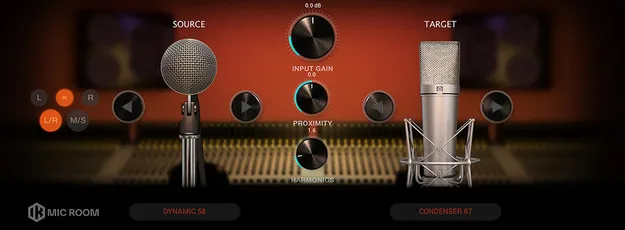
Mic Room microphone modeling plugin interface by IK Multimedia

Mic Room: Microphone Modeling Plugin by IK Multimedia

Rated 4.8/5 on Plugin Boutique (29 ratings)

Mic Room is an IK Multimedia microphone-modeling plugin that lets you process recordings to match the sound of over 20 dynamic, condenser, ribbon and other mic models.

VST3VST2AUAAXWindowsmacOS64-bit
AVAILABLE ATPlugin Boutique
Opens the store in a new tab
01Overview

Mic Room is a microphone-modeling effect from IK Multimedia, designed to work as a module within T-RackS. Its collection of more than 20 microphone models covers dynamic, condenser and ribbon styles, along with some more unconventional designs. You apply it to a track recorded with a microphone, select the mic that captured the original audio, and then choose the model you want to re-mike it as. Proximity and harmonic content controls add further shaping options for vocals, acoustic guitar and drums.

Best for

  • Vocal tone shaping
  • Acoustic guitar re-miking
  • Drum track coloration
  • Lo-fi grit on clean recordings
  • Adding warmth to dynamic mic recordings
Developer
IK Multimedia
Store
Plugin Boutique
02Key features

What you get

  • Microphone modeling module for T-RackS
  • Over 20 microphone models across dynamic, condenser and ribbon styles
  • Plug-and-play interface
  • Adjustable input level
  • Stereo control of left and right channels
  • Level meter
  • Master bypass switch
  • Proximity effect adjustment
  • Harmonic content adjustment for saturation and texture
03In depth

Microphone Models and Tone Character

Mic Room's core function is to re-mike a recording. You select the microphone that captured the original audio, then choose a new model to shape the tone of the track. The developer says each virtual model aims to reproduce the frequency response and character of its physical counterpart, including the harmonic complexity of tube condensers, the forward tone of dynamic mics and the smooth top end of ribbon mics.

The model collection also includes quirkier options, which can be useful when you want a more unusual color. Because the module can be placed on individual tracks, you can apply different mic characters to different sources in the same mix.
Proximity and Harmonic Controls

The proximity adjustment emulates the proximity effect that occurs when a source sits close to a microphone. Increasing it adds the warm low end associated with close-miked vocals, while turning it counterclockwise scoops out bass frequencies.

The harmonic content control adds saturation, character and texture. It can add a little warmth and personality to a flat vocal, and pushing it to the maximum produces more unusual sounds.

04Specs

Will it run?

Formats, systems and requirements as listed by Plugin Boutique. Missing details are left out, not guessed.

DeveloperIK Multimedia
TypePlugin
CategoryVocal Processing
FormatsVST3, VST2, AU, AAX
Operating systemsWindows, macOS
Architecture64-bit
05FAQ

Questions, answered

What formats does Mic Room support?

Mic Room is available in VST3, VST2, AU and AAX formats.

Which operating systems can run Mic Room?

Mic Room runs on Windows and macOS. The developer lists 64-bit support on both platforms.

What do I need to use Mic Room?

Mic Room is a T-RackS module and can be used standalone or as a configurable plug-in in your DAW. On Windows it requires an ASIO-compatible sound card. The minimum macOS requirements are an Apple M1 or Intel Core i5 processor, 8 GB of RAM and macOS 10.15 or newer. The Windows minimum is a Core i5 or equivalent, 8 GB of RAM and Windows 10 (64-bit) or newer. Both platforms need about 9 GB of hard drive space.

Is Mic Room included with other IK Multimedia bundles?

Yes. Mic Room is also included in T-RackS 6 PRO, T-RackS 6 MAX, Total Studio 4 MAX.

07Developer

More from IK Multimedia

All IK Multimedia products →