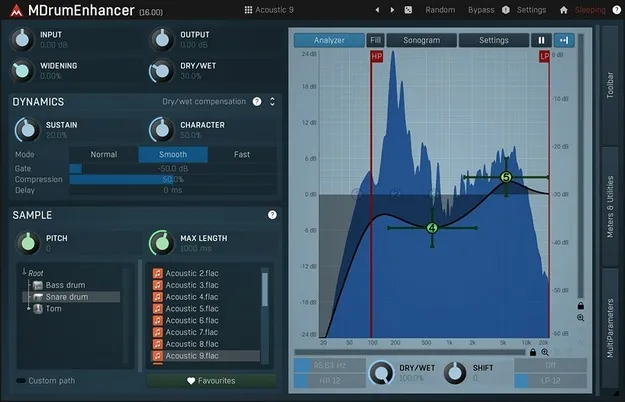
MDrumEnhancer by MeldaProduction drum enhancer plugin interface

MDrumEnhancer: Drum Enhancer Plugin by MeldaProduction Free Download

Rated 4.4/5 on Plugin Boutique (31 ratings)

MDrumEnhancer is an effects plugin by MeldaProduction that follows a drum track and blends in its own sample-based signal to add body, snap or boom. It is a drum enhancer that works as an alternative to drum replacing.

VST3VST2AUAAXWindowsmacOS64-bit
AVAILABLE ATPlugin Boutique
Free trial available from the developer
01Overview

MDrumEnhancer follows the incoming drum track and synthesizes its own signal from samples. The developer says this lets you add snare noise, strengthen the boom or snap of a kick, or resynthesize a sound completely. Because the plugin generates material that was never captured, it can add elements a recording lacks, which equalization and compression cannot do. The developer also states that it has no latency, so it can be used on live drum mixes.

Best for

  • Snare enhancement
  • Kick drum punch
  • Live drum mixing
  • Drum replacement alternative
  • Surround drum processing
Category
Enhancers
Store
Plugin Boutique
02Key features

What you get

  • Follows the drum track and blends in a sample-based enhancement signal
  • Adds snare noise, bass drum boom or snap, or full resynthesis
  • Developer states no latency, suitable for live drum mixing
  • Full dynamic equalizer for shaping the enhancement spectrum
  • Sustain control to shorten or lengthen drum hits
  • Four modulators with LFO, envelope, follower and randomizer modes
  • Automatic gain compensation keeps output level matched to input
  • Safety brickwall limiter keeps output below 0 dB
  • Mono, stereo, mid/side and up to 8 channels of surround
03In depth

Drum Enhancement Without the Drawbacks of Drum Replacing

Drum replacing can introduce latency, missed or extra notes, incorrect velocities and a loss of dynamics. The developer positions MDrumEnhancer as a modern alternative that avoids these problems. You select a preset or sample, adjust a few parameters if needed and blend the enhancement into your track.

The plugin can fill in missing parts of a recording, so a snare that was captured with only one microphone can still gain the body and snare buzz it lacks. This removes the need to record several tracks for one drum.

For live use, the developer notes that the plugin has no latency, so you can select a preset and apply it without the long equalizer and compressor adjustments a live mix often requires.
Controls for Blending With Any Material

MDrumEnhancer has a straightforward interface with enough controls to fit different material. You can change the pitch of the samples to match your drum track. A full dynamic equalizer shapes the spectrum of the enhancement signal. Sustain control makes hits shorter or longer than they were recorded, and the plugin can add reverberation.

Four modulators can each work as an LFO, level follower, MIDI or audio triggered ADSR envelope, randomizer or pitch detector, and they can listen to the plugin's side-chain. This lets parameters respond to input level or input pitch, so the enhancement can move with the performance.

MDrumEnhancer also includes automatic gain compensation, so the output stays as loud as the input when you change settings or browse presets, and a safety limiter keeps the output below 0 dB.

04Specs

Will it run?

Formats, systems and requirements as listed by Plugin Boutique. Missing details are left out, not guessed.

DeveloperMeldaProduction
TypePlugin
CategoryEnhancer
FormatsVST3, VST2, AU, AAX
Operating systemsWindows, macOS
Architecture64-bit
Free trialYes
05FAQ

Questions, answered

What is MDrumEnhancer?

MDrumEnhancer is a drum enhancer plugin by MeldaProduction. It follows your drum track and adds its own sample-based signal to make drums sound bigger.

What formats and operating systems does MDrumEnhancer support?

MDrumEnhancer is available in VST3, VST2, AU and AAX formats. It runs on Windows 8, 10 and 11 (64-bit) and macOS 10.14 and newer (64-bit), including native Apple Silicon support on macOS.

What do I need to use MDrumEnhancer?

You need a 64-bit VST, VST3, AU or AAX compatible host with an Intel or AMD processor that supports SSE2 on Windows, or an Intel, AMD or M1 processor with SSE2 support on macOS.

Does MDrumEnhancer have a trial?

Yes, a trial version is available.

07Developer

More from MeldaProduction

All MeldaProduction products →