InPhase LT by Waves phase alignment plugin interface

InPhase LT: Phase Alignment Plugin by Waves

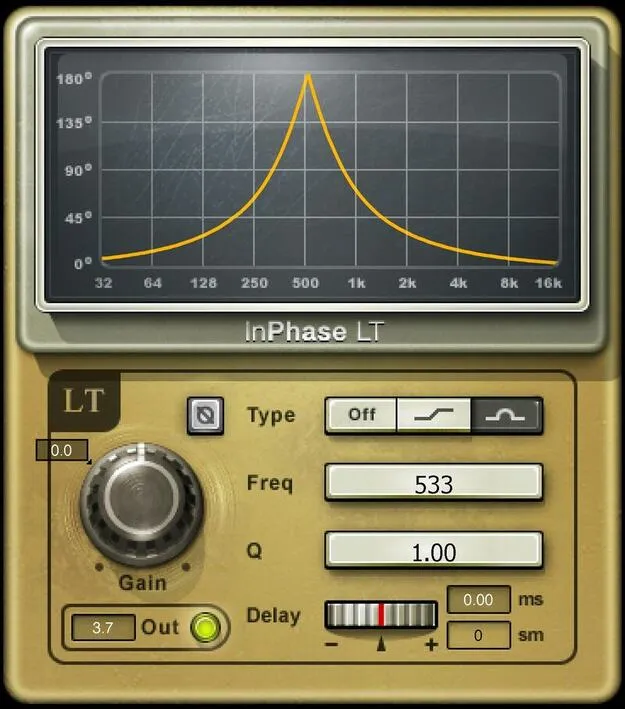
InPhase LT is a phase alignment plugin from Waves that lets you shift timing and adjust phase response to line up two related tracks. It also supports creative effects like through-zero flanging.

VST2AUAAXWindowsmacOS
AVAILABLE ATPlugin Boutique
Opens the store in a new tab
01Overview

InPhase LT is a lighter-weight member of the InPhase family, built for the common job of getting two related recordings to sound aligned. Typical pairs include a DI bass and a miked bass amp, or an overhead microphone and a snare. Insert the plugin on one track, then adjust delay and phase until the signals reinforce each other. Beyond correction, its filters let you shape phase at different frequencies, which opens up creative use as well.

Best for

  • Bass DI and amp blend
  • Drum overhead phase alignment
  • Miswired cable correction
  • Through-zero flanging
  • Multi-mic recording correction
  • Creative phase effects
Developer
Waves
Category
Utilities
Store
Plugin Boutique
02Key features

What you get

  • Phase-aligns DI and miked bass, snare and overheads
  • Dual allpass filters for frequency-dependent phase control
  • Timing shift of plus or minus 20 ms
  • Plus 20 ms extension available in LT Live component
  • Shelf or bell filter responses with variable Q on bell
  • Phase flip button for miswired XLR cables
  • Mono, stereo and live components included
  • Automatable Delay for flanging effects
03In depth

Phase Alignment and Timing Correction for Multi-Mic Recordings

The core job of InPhase LT is lining up tracks that were captured at different points in time or through different signal paths. Recording a bass both direct and through an amp, or placing microphones around a drum kit, often produces tracks that partially cancel each other. Waves' plugin lets you shift a track's timing by up to plus or minus 20 ms, which covers the offsets typical of these setups. The phase flip button handles simpler faults, such as a miswired XLR cable, without any other adjustment.

If you need a wider timing range, note that the +20 ms extension is available only in the LT Live component.
Phase Filters and Flanging Effects

Two allpass filters let you change how much phase shift occurs at different frequencies, so you can correct phase in one band without disturbing another. You can choose between shelf and bell filter responses, and the bell filter offers variable Q.

The same controls can be pushed into creative territory. Copy a track, automate the Delay parameter on the copy, and the interaction with the original produces flanging. Waves describes the result as classic through-zero flanging.

04Specs

Will it run?

Formats, systems and requirements as listed by Plugin Boutique. Missing details are left out, not guessed.

DeveloperWaves
TypePlugin
CategoryUtility
FormatsVST2, AU, AAX
Operating systemsWindows, macOS
05FAQ

Questions, answered

What formats does InPhase LT support?

InPhase LT is available in VST2, AU and AAX formats.

Which operating systems can run InPhase LT?

InPhase LT runs on Windows and macOS. Waves lists macOS Monterey 12 through Sequoia 15 and Windows 10 and later as supported systems.

What is the difference between the mono, stereo and live components?

InPhase LT includes mono, stereo and live components. The plus 20 ms timing extension is available only in the LT Live component.
What do I need to use InPhase LT?

InPhase LT is a plugin and needs a compatible host application that supports VST2, AU or AAX.

07Developer

More from Waves

All Waves products →