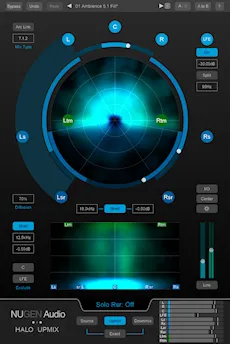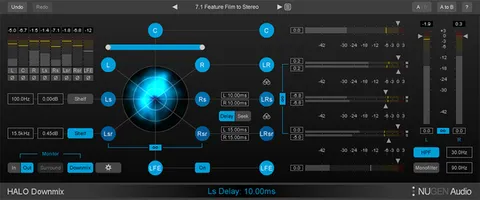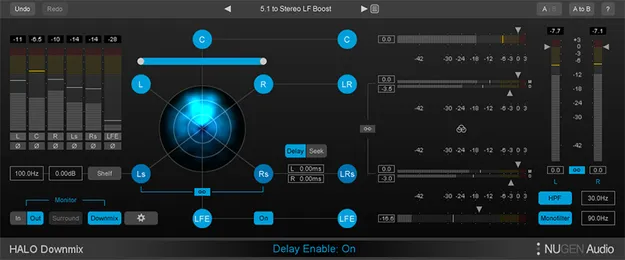
Halo Downmix with 3D Immersive Extension surround downmix plugin interface by NUGEN Audio

Halo Downmix with 3D Immersive Extension: Surround-to-Stereo Downmix Plugin by NUGEN Audio

Halo Downmix with 3D Immersive Extension is a surround downmixing plugin from NUGEN Audio for converting 5.1 and 7.1 mixes to stereo, rebalancing surround material, and monitoring both formats in one place.

VST3VST2AUAAXWindowsmacOS64-bit
AVAILABLE ATPlugin Boutique
Opens the store in a new tab
01Overview

Halo Downmix is built for mixers who deliver in both surround and stereo. It offers 5.1 and 7.1 modes in advanced and compact layouts, with visual controls for channel levels, timing, and the balance between direct and ambient sound. Monitoring tools include quick solo and mute functions and in-place switching between stereo and surround signals. The optional 3D Immersive Extension adds downmixing of 7.1.2 Dolby Atmos bed tracks to 7.1, 5.1 and stereo.

Best for

  • Surround-to-stereo downmix
  • Downmix rescue
  • Surround re-balancing
  • Dialog clarity checks
  • Parallel surround and stereo mixing
  • Dolby Atmos bed downmix
Developer
NUGEN Audio
Category
Stereo Width
Store
Plugin Boutique
02Key features

What you get

  • Surround-to-stereo downmixing for 5.1 and 7.1 mixes
  • Visual controls for relative levels, timing and direct/ambient balance
  • 7.1 and 5.1 modes with advanced and compact interfaces
  • In-place stereo and surround monitoring
  • Linked solo and mute functions at every stage
  • Surround-to-surround adjustment of existing mixes
  • Optional 3D Immersive Extension for 7.1.2 Dolby Atmos bed tracks
  • Included Receive plugin for parallel surround/stereo workflows
03In depth

Surround-to-Stereo Downmixing and Rebalancing

Standard downmix coefficients can produce weak results, especially when the original surround mix was made with legacy upmix methods. NUGEN Audio says Halo Downmix can control excessive diffuse sound from added artificial reverberation and remove delay artefacts in the rear channels, producing a more coherent stereo mix.

The plugin also works on existing 5.1 or 7.1 mixes in surround-to-surround mode. You can adjust individual channel levels and the balance of direct and diffuse sound, which helps when the original mix is no longer available.
Parallel Workflow and Monitoring

Halo Downmix can run alongside the included Receive plugin to set up a parallel surround and stereo workflow. This lets you switch quickly between the full surround mix and the stereo downmix for A/B checks.

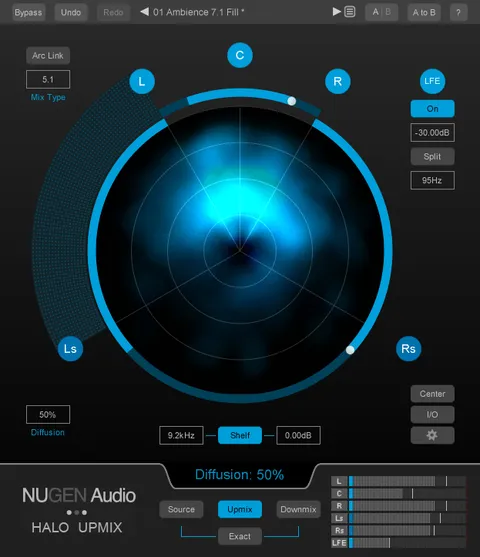
Multiple monitoring modes and linked solo and mute controls at each stage help with rapid assessment. Surround energy distribution is shown visually, so you can see where the level sits in the mix.

04Specs

Will it run?

Formats, systems and requirements as listed by Plugin Boutique. Missing details are left out, not guessed.

DeveloperNUGEN Audio
TypePlugin
CategoryStereo Width
FormatsVST3, VST2, AU, AAX
Operating systemsWindows, macOS
Architecture64-bit
05FAQ

Questions, answered

Which formats does Halo Downmix support?

Halo Downmix is available in VST3, VST2, AU and AAX formats. AAX is 64-bit only, while the VST and AU versions come in 64-bit and 32-bit builds.

Which operating systems are supported?

Halo Downmix runs on Windows and macOS. The listed minimums are Mac OS X 10.7.x with 512 MB RAM and 64-bit Windows Vista or later with 512 MB RAM.

What do I need to use Halo Downmix?

Halo Downmix requires a surround-compatible plugin host that supports 5.1 or 7.1 channel configurations, such as Pro Tools HD.

Can Halo Downmix handle Dolby Atmos mixes?

The optional 3D Immersive Extension downmixes 7.1.2 Dolby Atmos bed tracks to 7.1, 5.1 and stereo.

07Developer

More from NUGEN Audio

All NUGEN Audio products →