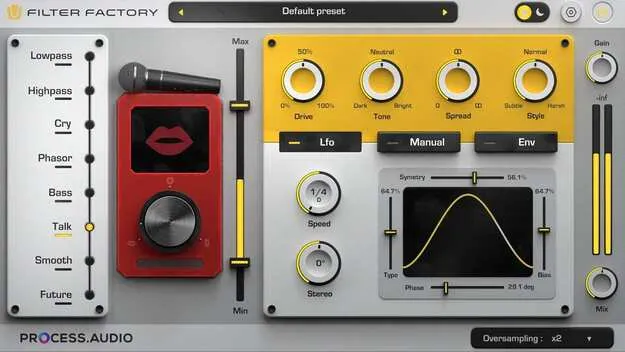
Filter Factory multi-effect filter plugin interface by PROCESS.AUDIO

Filter Factory: Creative Multi-Effect Filter Plugin by PROCESS.AUDIO

Rated 4.7/5 on Plugin Boutique (10 ratings)

Filter Factory is a multi-effect filter plugin from PROCESS.AUDIO for shaping texture, tone and movement in mixes. It offers 8 filter types, flexible modulation and 70+ presets, and runs as VST3, AU or AAX on Windows and macOS.

VST3AUAAXWindowsmacOS64-bit
AVAILABLE ATPlugin Boutique
Opens the store in a new tab
01Overview

Filter Factory is built for producers and sound designers who want filtering that goes beyond a basic low-pass sweep. It combines filter emulations with modulation tools, including an LFO that can sync to tempo or run free, and an envelope that responds to the incoming signal. Vocal-style options such as Cry, Talk and Phasor sit alongside subtler and more experimental flavors. A real-time visualizer shows how modulation and filter behavior change as you edit.

Best for

  • Filter sweeps and pulsing grooves
  • Vocal-style filtering
  • Synth and pad texture
  • Stereo movement on tracks
  • Mid-Side processing
Developer
PROCESS.AUDIO
Store
Plugin Boutique
02Key features

What you get

  • Eight filter types for creative sound shaping
  • Cry, Talk and Phasor for vocal-like, expressive filtering
  • Smooth and Future filter flavors, subtle to experimental
  • LFO syncs to tempo or runs free with stereo control
  • Envelope reacts dynamically to the input signal
  • Drive and Tone controls for warmth, grit or tonal shifts
  • Spread and Resonance for stereo image and filter focus
  • Oversampling for cleaner sound with reduced aliasing
  • Real-time visualizer and Min/Max modulation range controls
  • 70+ presets and Light/Dark UI themes
03In depth

Filter Types and Modulation Options

Filter Factory provides eight filter types. Cry, Talk and Phasor give expressive, vocal-like filtering, while Smooth and Future offer subtle or experimental character.

Modulation is handled by an LFO that can sync to tempo or run freely with stereo control, and by an envelope that reacts to the input signal. Min and Max controls let you set the range of modulation so movement stays within the amount you want. The visualizer makes it easier to see what each change does.
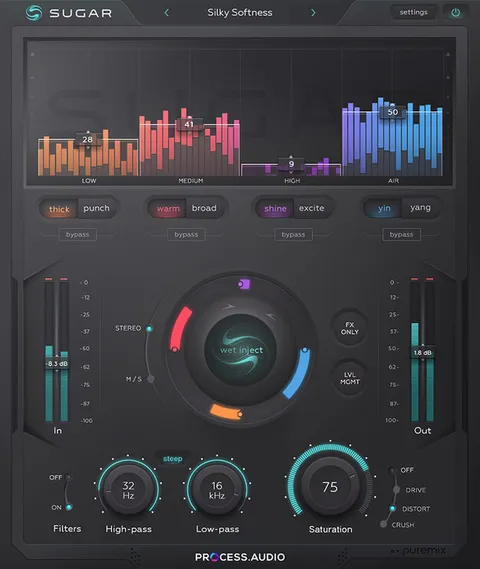
Tone, Stereo and Processing Controls

Drive and Tone add warmth or grit and let you shift the tonal balance. Texture Shaping is included for richer, more controlled sound, and Spread and Resonance affect the stereo image and the focus of the filter.

Oversampling is available for a cleaner result with reduced aliasing. The plugin is described as CPU-efficient and suits mono, stereo or Mid-Side processing. The interface uses drag-and-drop with no deep menus, and Light and Dark UI themes are included.

04Specs

Will it run?

Formats, systems and requirements as listed by Plugin Boutique. Missing details are left out, not guessed.

DeveloperPROCESS.AUDIO
TypePlugin
CategoryMulti Effect
FormatsVST3, AU, AAX
Operating systemsWindows, macOS
Architecture64-bit
05FAQ

Questions, answered

What formats and operating systems does Filter Factory support?

Filter Factory is available in VST3, AU and AAX formats. It runs on Windows and macOS, and the plugin is 64-bit.

What do I need to run Filter Factory?

It needs Windows 8, 10 or 11 (64-bit), or macOS 10.13 or later, with at least 4GB of RAM. iLok authorization is required, either through a machine or cloud license, and no dongle is necessary.

Which DAWs are compatible with Filter Factory?

The listed compatible hosts are Ableton Live (8 and later), Cubase (6 and later), Logic (9 and X), Pro Tools (11 and later), Reaper (5 and later) and Studio One (2 and later).

What are the Cry, Talk and Phasor filter types for?

The developer describes them as vocal-like and expressive filtering options for animating sounds in a creative way.

07Developer

More from PROCESS.AUDIO

All PROCESS.AUDIO products →