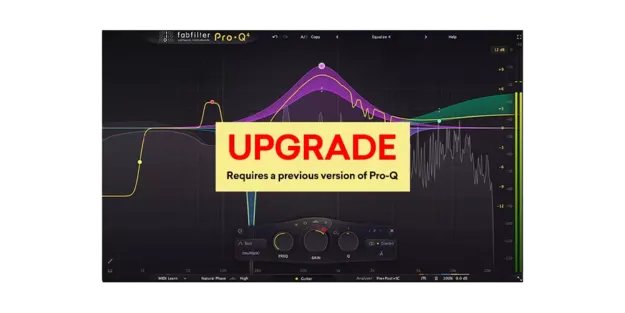
FabFilter Pro-Q 4 Upgrade EQ plugin interface with spectrum display

FabFilter Pro-Q 4 Upgrade from Pro-Q 1, Pro-Q 2, or Pro-Q 3: 24-Band EQ Plugin Free Download

Rated 4.9/5 on Plugin Boutique (239 ratings)

FabFilter Pro-Q 4 Upgrade is an upgrade version of the Pro-Q 4 equalizer plugin, offered to owners of earlier Pro-Q versions. It provides up to 24 EQ bands with dynamic and linear phase processing.

VST2AUAAXWindowsmacOS64-bit
AVAILABLE ATPlugin Boutique
Free trial available from the developer
01Overview

FabFilter Pro-Q 4 Upgrade gives existing Pro-Q users a route to version 4 of the developer's EQ. Pro-Q has been used for many years by engineers and producers, and version 4 adds spectral dynamics, an instance list, EQ Sketch and vintage saturation. The plugin runs as VST2, AU and AAX on Windows and macOS. A trial is available.

Best for

  • Mixing vocals
  • Mastering EQ
  • Dynamic resonance control
  • Surround mixing
  • Session EQ setup
Developer
FabFilter
Category
EQ
Store
Plugin Boutique
02Key features

What you get

  • Up to 24 EQ bands with Bell, Shelf, Cut and Tilt shapes
  • Dynamic EQ for Bell and Shelf bands with side chain option
  • Spectral dynamics for treating specific problem frequencies
  • Zero latency, linear phase and Natural Phase modes
  • Built-in spectrum analyzer with external visualization and collision detection
  • Per-band mid/side or left/right processing
  • Instance list to control all instances from one interface
  • Full surround support up to Dolby Atmos 9.1.6
03In depth

Sound quality and processing modes

Pro-Q 4 offers zero latency processing, linear phase operation with adjustable latency, and the Natural Phase mode. Each band can be set to Bell, Notch, Shelf, Cut, Band Pass, Tilt Shelf or Flat Tilt shapes, with slopes up to 96 dB/oct and an ultra-steep Brickwall setting for LP and HP filters.

Dynamic EQ can be enabled on Bell and Shelf bands at any slope, with optional external side chain triggering. Spectral dynamics, new in version 4, triggers on specific frequencies inside a band rather than changing the whole band's gain.
Workflow and interface

The interface includes a large interactive EQ display, multi-band selection and editing, and a piano roll display that quantizes band frequencies to musical notes. Spectrum Grab lets you adjust a peak directly in the real-time analyzer, and EQ Match can match the spectrum of another Pro-Q 4 instance or an external signal.

The instance list controls all Pro-Q 4 instances in a session from one window, and EQ Sketch lets you draw a starting curve. Per-band mid/side or left/right processing and full surround support up to Dolby Atmos 9.1.6 cover more demanding mixing and mastering work.

04Specs

Will it run?

Formats, systems and requirements as listed by Plugin Boutique. Missing details are left out, not guessed.

DeveloperFabFilter
TypePlugin
CategoryEQ
FormatsVST2, AU, AAX
Operating systemsWindows, macOS
Architecture64-bit
Free trialYes
05FAQ

Questions, answered

What formats does Pro-Q 4 Upgrade support?

The plugin is listed in VST2, AU and AAX formats, all 64-bit, and runs on Windows and macOS.

What system is needed to run it?

It requires macOS 10.13 or higher on Apple Silicon or Intel, or Windows 11, 10, 8, 7 or Vista, with VST-2, VST-3, AU or AAX host support.

Is there a trial version?

Yes, a trial is available for the plugin.

07Developer

More from FabFilter

All FabFilter products →