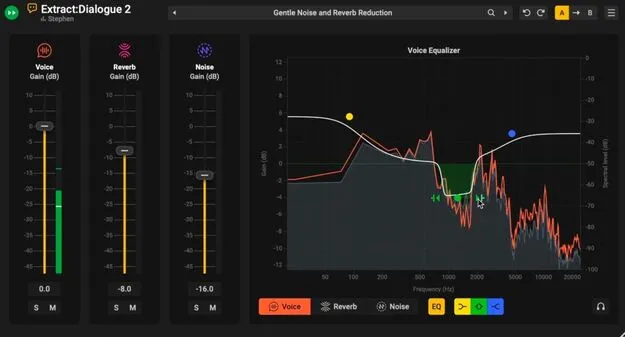
Extract:Dialogue 2 Upgrade by Acon Digital dialogue cleaning plugin interface

Extract:Dialogue 2 Upgrade: AI Dialogue Cleaning Plugin by Acon Digital

Extract:Dialogue 2 Upgrade is an AI-based dialogue cleaning plugin by Acon Digital that separates voice from background noise and reverb. It is an upgrade for owners of Acoustica 7 Post Production Suite, Acoustica 7 Premium or Extract:Dialogue 1.

VST3VST2AUAAXWindowsmacOS
AVAILABLE ATPlugin Boutique
Opens the store in a new tab
01Overview

Extract:Dialogue 2 Upgrade is aimed at dialogue editors, mixers and post-production engineers who need to clean recordings in real time. It builds on the first Extract:Dialogue with reverb reduction, per-channel EQ and true stereo processing. Acon Digital describes the plugin as producing broadcast-quality results and says its controls were shaped with input from working dialogue professionals.

Best for

  • Film and TV dialogue cleaning
  • Documentary interview cleanup
  • ADR and location recording repair
  • Podcast and voiceover clarity
  • Dubbing stem preparation
  • Archival recording restoration
Developer
Acon Digital
Store
Plugin Boutique
02Key features

What you get

  • AI-based separation of voice, reverb and noise
  • Independent volume, mute and solo for each channel
  • Frequency-dependent sensitivity curves per channel
  • Dedicated EQ section for voice, reverb and noise
  • Full stereo processing for centre dialogue and width
  • Audition mode to monitor removed material
  • Resizable interface with mixer-only layout
  • Multi-output stem export for dialogue, reverb and noise
03In depth

Voice, reverb and noise control

Extract:Dialogue 2 splits a recording into voice, reverb and noise components, and each one has its own volume control with mute and solo buttons. Sensitivity settings for each channel use frequency-dependent curves, so you can focus processing on midrange chatter, high-end reflections or other problem areas.

Each element also has a dedicated EQ section. You can soften reverb brightness without removing it entirely, or cut low-frequency rumble while keeping natural room ambience. All Voice, Reverb and Noise controls can be automated in your DAW.
Workflow, interface and stem export

The plugin fits into a post chain and can run in real time during editing or as part of a larger post-mix. The interface is fully resizable, so you can show the full control set or only the mixer panel for compact layouts.

A real-time spectrum display shows the voice, reverb and noise components in separate colour overlays. Multi-output routing exports dialogue, reverb and noise stems separately for further mixing. A/B comparison and undo/redo help you audition settings, and audition mode lets you hear exactly what is being removed.

04Specs

Will it run?

Formats, systems and requirements as listed by Plugin Boutique. Missing details are left out, not guessed.

DeveloperAcon Digital
TypePlugin
CategoryVocal Processing
FormatsVST3, VST2, AU, AAX
Operating systemsWindows, macOS
05FAQ

Questions, answered

What does Extract:Dialogue 2 Upgrade do?

It uses AI models to isolate dialogue from background noise and reverb in real time. You can then adjust the voice, reverb and noise components separately or export them as stems.

Which formats and operating systems are supported?

The plugin is available in VST3, VST2, AU and AAX formats. It runs on Windows and macOS, and the macOS version runs natively on ARM64 and Intel.

Who is this upgrade for?

It is an upgrade for owners of Acoustica 7 Post Production Suite, Acoustica 7 Premium or Extract:Dialogue 1. The standard edition is sold separately.

What do I need to use Extract:Dialogue 2 Upgrade?

You need a compatible host application for the plugin format you choose, such as Pro Tools 12 or higher for AAX. The system requirements list at least 1 GB of RAM (4 GB recommended) and 1 GB of free disk space.

07Developer

More from Acon Digital

All Acon Digital products →