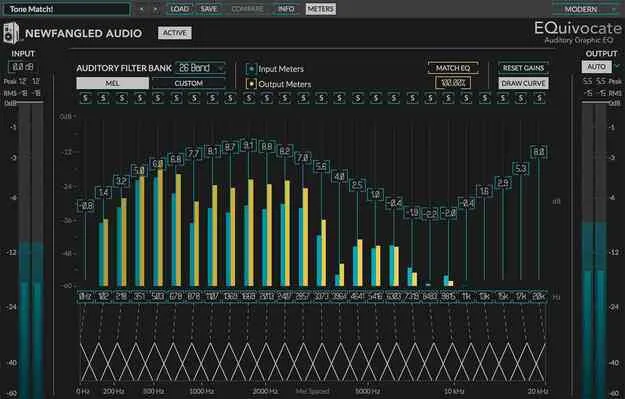
EQuivocate EQ plugin interface by Newfangled Audio

EQuivocate: Human-Ear Linear-Phase EQ Plugin by Newfangled Audio Free Download

Rated 4.5/5 on Plugin Boutique (1,117 ratings)

EQuivocate is a linear-phase equalizer plugin from Newfangled Audio, built around 26 filters spaced to match the critical bands of human hearing. It includes a Match EQ feature that adjusts one track's tone toward another.

VST3VST2AUAAXWindowsmacOS64-bit
AVAILABLE ATPlugin Boutique
Free trial available from the developer
01Overview

EQuivocate is an EQ plugin for mixing and mastering, developed by Newfangled Audio. Its 26 filters are distributed along the Mel scale and shaped to approximate the critical bands of the inner ear, which the developer says helps the processed sound stay natural. Because it uses a linear-phase FIR design, the curve you see on screen should match what you hear. The plugin is available in VST3, VST2, AU and AAX on Windows and macOS, and a trial is offered.

Best for

  • Mixing corrective EQ
  • Mastering tonal matching
  • Separating dense mixes
  • Matching reference tracks
  • Finding resonant frequencies
Category
EQ
Store
Plugin Boutique
02Key features

What you get

  • 26 linear-phase filters spaced to approximate the critical bands of hearing
  • Match EQ that matches the tone of one track to another
  • Draw EQ curve by clicking and swiping across the gain field
  • Automatic output level compensation via the Auto button
  • Solo one or more bands to find problem frequencies
  • Add or remove filters to customize the EQ curve
  • Artist presets from six named contributors included
  • Compare button to toggle between two settings
03In depth

Ear-Modeled Filters and Linear-Phase Sound

Newfangled Audio says EQuivocate uses triangular, linear-phase FIR filters instead of the IIR shapes common in graphic EQs. The developer notes that IIR filters are not flat when every band is set flat, and that boosting or cutting one band affects its neighbors. EQuivocate's filter design is intended to avoid both issues.

The bands can be customized, so you can add or remove filters and move their frequencies. This lets you adapt the 26-band layout to a specific corrective or tonal task rather than working only within the default spread.
Match EQ and Workflow Controls

The Match EQ feature analyzes a sidechain signal and adjusts your track's tone toward it. You can use it to make two tracks sound like they share a source, to separate them in a dense mix, or to bring a master closer to a reference track.

For editing, you can click and swipe across the gain field to draw a curve, then switch Draw Curve off to fine-tune. The output Auto button compensates for level changes made by the EQ, and soloing individual bands helps locate problem frequencies.

04Specs

Will it run?

Formats, systems and requirements as listed by Plugin Boutique. Missing details are left out, not guessed.

DeveloperNewfangled Audio
TypePlugin
CategoryEQ
FormatsVST3, VST2, AU, AAX
Operating systemsWindows, macOS
Architecture64-bit
Free trialYes
05FAQ

Questions, answered

What formats does EQuivocate support?

EQuivocate is available in VST3, VST2, AU and AAX formats. It runs on Windows 8 and later, including Windows 11, and on macOS 10.9 and later, with Intel and Apple Silicon supported. It is 64-bit only.

Do I need an iLok dongle to use EQuivocate?

No iLok dongle is required. A free iLok account or iLok Manager is needed only for authorization.

What does the Match EQ feature do?

Match EQ adjusts the tone of your track to match or complement the audio sent to its sidechain. It can also help a master take on the tone of a reference track.

Is there a trial version?

Yes, a trial is available for EQuivocate.

07Developer

More from Newfangled Audio

All Newfangled Audio products →