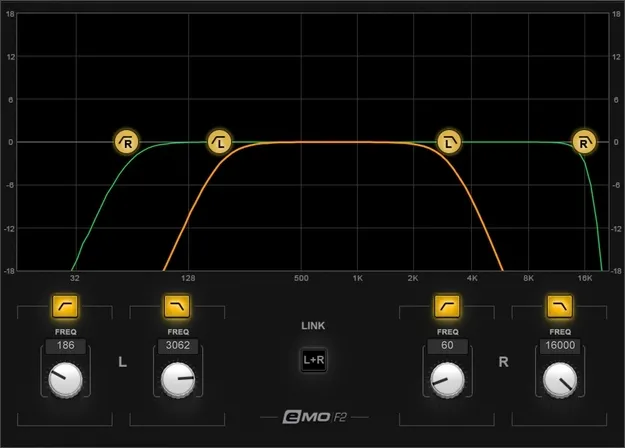
eMo F2 Filter by Waves filter plugin interface

eMo F2 Filter: 2-Band High-Pass and Low-Pass Plugin by Waves

eMo F2 Filter is a 2-band high-pass and low-pass filter plugin by Waves. It is built to fix common problems such as bass buildup, hiss and low frequencies in reverb, and it runs with zero latency.

VST2AUAAXWindowsmacOS
AVAILABLE ATPlugin Boutique
Opens the store in a new tab
01Overview

eMo F2 Filter is a Waves effects plugin in the Filter subcategory. It gives you two filters, one high-pass and one low-pass, each with an 18-dB-per-octave rolloff. You can run it as a standalone insert in a plugin host or as part of the channel strip in the eMotion LV1 live mixer. Waves positions it for jobs that need only a simple filter rather than a multi-stage parametric EQ, including live performance fixes that need to be done quickly.

Best for

  • Live sound mixing
  • Bass buildup cleanup
  • Reverb low-cut
  • Hiss reduction
  • Vocal mic pop control
  • Amp sim harshness fixes
Developer
Waves
Category
Filters
Store
Plugin Boutique
02Key features

What you get

  • 2-band high-pass and low-pass filter in one plugin
  • 18-dB-per-octave rolloff on each filter
  • Zero latency with ultra-low CPU consumption
  • Mono, dual mono, or linked stereo operation
  • Left and right sides filtered independently or linked
  • Controls adjustable by knob, curve drag, or typed value
  • Multi-touch compatibility
  • Optimized for live sound mixing
03In depth

Filter Design and Control Options

Each of the two filters uses an 18-dB-per-octave rolloff, giving a steep cut outside the passband. You can set the controls by turning them, by dragging the curve on the graphic display, or by typing in exact values.

The plugin can work in mono, dual mono, or linked stereo. In stereo, you can filter the left and right sides independently or link them so both sides change together. The interface supports multi-touch, which suits use on a touchscreen during a live show.
Live Mixing and Workflow

Waves says eMo F2 Filter is optimized for live sound mixing. It has zero latency and ultra-low CPU consumption, so it can sit on a live channel without adding delay. When used inside the eMotion LV1 live mixer, it forms part of the channel strip, which keeps the filtering close to the rest of the signal path.

Because it is a dedicated two-band filter, it suits direct, quick fixes rather than detailed shaping. Use it to cut low rumble or high hiss on a channel, or to keep low frequencies out of a reverb send.

04Specs

Will it run?

Formats, systems and requirements as listed by Plugin Boutique. Missing details are left out, not guessed.

DeveloperWaves
TypePlugin
CategoryFilter
FormatsVST2, AU, AAX
Operating systemsWindows, macOS
05FAQ

Questions, answered

What formats does eMo F2 Filter support?

eMo F2 Filter is available in VST2, AU and AAX formats.

Which operating systems does eMo F2 Filter run on?

It runs on Windows and macOS. On Mac it supports macOS Monterey 12 through Sequoia 15, and on PC it supports Windows 10 and later, in VST and AAX formats.

Can I use eMo F2 Filter without the eMotion LV1 mixer?

Yes. You can use it as a separate plugin, or as part of the eMotion LV1 live mixer's channel strip.

07Developer

More from Waves

All Waves products →