FiltR Bank Pro by Minimal System Group filter plugin interface

FiltR Bank Pro: Two-Module Filter Plugin by Minimal System Group Free Download

Rated 4.2/5 on Plugin Boutique (612 ratings)

FiltR Bank Pro is a Windows VST2 effects plugin from Minimal System Group that combines a five-band filter bank with a multi-mode filter. It offers five filter types, a monitoring display and a tempo-syncable LFO.

VST2Windows32-bit only
AVAILABLE ATPlugin Boutique
Free trial available from the developer
01Overview

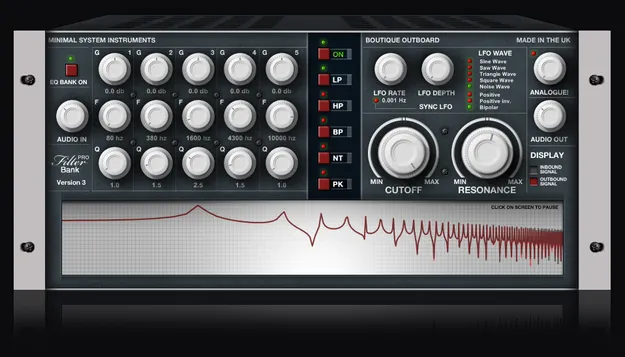
FiltR Bank Pro is a filter effect built around two separate modules. The left module is a bank of five individual filters, each with its own gain, frequency and Q control, so you can cut or boost specific frequency bands. The right module is a more conventional multi-mode filter with Cutoff and Resonance controls and an LFO that can run tempo-synced or free. The developer describes it as an analogue-modelled filter bank. The plugin is available as a VST2 for Windows.

Best for

  • Sound design filtering
  • Frequency sculpting
  • Resonant filter sweeps
  • Tempo-synced filter modulation
  • Mix tonal shaping
Category
Filters
Store
Plugin Boutique
02Key features

What you get

  • Analogue-modelled filter bank with five independent filters
  • Per-filter Gain, frequency (1 to 12,000 Hz) and Q controls
  • Multi-mode filter: Low Pass, High Pass, Band Pass, Notch, Peaking
  • Cutoff and Resonance controls with a dedicated LFO
  • LFO with tempo sync and free mode
  • Display for monitoring incoming and outgoing signal
  • Input and Output level controls for extreme filtered sounds
  • Very low CPU usage according to the developer
03In depth

Filter bank and multi-mode filter workflow

The filter bank on the left gives you five independent filters. Each one has a Gain control for cutting or boosting, a frequency control covering 1 to 12,000 Hz, and a Q control that narrows or widens the band being filtered. This makes it possible to shape narrow resonant peaks or broad tonal changes on the same signal.

The multi-mode filter on the right offers Low Pass, High Pass, Band Pass, Notch and Peaking types. Its Cutoff and Resonance controls sit alongside an LFO with tempo sync and a free mode. Input and Output level controls help manage gain when pushing the filters hard, and a display lets you monitor the incoming and outgoing signal.
Who it suits and what you need to run it

FiltR Bank Pro suits producers working on Windows who want precise, multi-band filtering as well as a traditional filter with modulation. The developer lists low CPU usage as a feature, which is useful when running several instances in a session.

The plugin is 32-bit only. It can run in 64-bit hosts through jBridge, and the developer notes that Cubase, Nuendo, Bitwig Studio, Reaper, Tracktion, Renoise, FL Studio, Sonar, Mixcraft and Samplitude support it through their built-in bridging. A trial is available, and the developer recommends testing it in your host before buying.

04Specs

Will it run?

Formats, systems and requirements as listed by Plugin Boutique. Missing details are left out, not guessed.

DeveloperMinimal System Group
TypePlugin
CategoryFilter
FormatsVST2
Operating systemsWindows
Architecture32-bit only
Free trialYes
05FAQ

Questions, answered

What formats and operating systems does FiltR Bank Pro support?

FiltR Bank Pro is available as a VST2 plugin for Windows only. It is a 32-bit plugin and can run in 64-bit systems using jBridge or the built-in bridging of several 64-bit hosts.

What do I need to use FiltR Bank Pro?

You need a Windows PC and a VST-compatible DAW or VST hosting software. The developer says the plugin has been tested in Ableton Live, Adobe Audition, Cakewalk Sonar, FL Studio, Energy XT, PreSonus Studio One, Renoise and Cubase.

Does FiltR Bank Pro have a trial version?

Yes, a trial is available. The developer recommends trying the demo first to confirm the plugin works with your system and host.

07Developer

More from Minimal System Group

All Minimal System Group products →