DrumComputer by Sugar Bytes synthetic drum machine plugin interface

DrumComputer: Synthetic Drum Machine Plugin by Sugar Bytes Free Download

Rated 4.6/5 on Plugin Boutique (371 ratings)

DrumComputer is a synthetic drum machine plugin by Sugar Bytes. It combines eight sound engines with synthesis, randomizers and a 16-step sequencer to build drum sounds, kits and patterns.

VST3VST2AUAAXStandaloneWindowsmacOS64-bit
AVAILABLE ATPlugin Boutique
Free trial available from the developer
01Overview

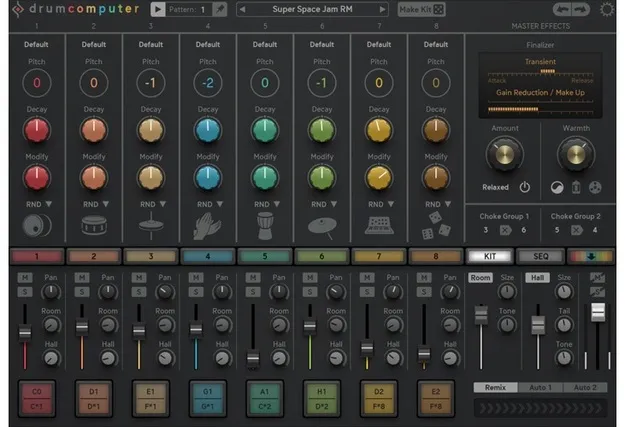
DrumComputer focuses on synthesized drums rather than sample playback. Each of its eight sound engines layers a resonator, a wavetable or analogue oscillator, and a resynth or sampler, with filter, compressor, overdrive and two reverb types available for shaping sound. Sugar Bytes positions the plugin as a source of new drum sounds, and its intelligent randomizers and MakeKit function are built to generate fresh kits. A 16-step sequencer with pattern generation, probability, rolls and swing covers the rhythmic side.

Best for

  • Techno drum programming
  • Synthetic percussion design
  • Live beat arrangement
  • Sample-based drum processing
  • Generative drum patterns
  • Experimental sound design
Developer
Sugar Bytes
Store
Plugin Boutique
02Key features

What you get

  • Eight sound engines layering resonator, oscillator and resynth or sampler
  • Wavetable and analogue oscillator options within each engine
  • Sampler Mode for playing back your own sounds
  • Filter, compressor, overdrive and Room and Hall send reverbs
  • Two ENV/LFO modules with a modulation matrix
  • Intelligent randomizers and MakeKit for generating new drum sounds
  • 16-step sequencer with pattern generator and probability
  • Rolls, step delay, swing and humanize controls
  • Keyboard mapping for patterns, mutes and engine triggers
  • MIDI file drag and drop with multiple audio and MIDI outputs
03In depth

Sound Engines and Drum Synthesis

DrumComputer has eight sound engines that can share presets, so sounds can be moved between engines. Each engine layers three synthesis types: a Resonator, a Wavetable or Analogue Oscillator, and a Resynth or Sampler. The Resynth layer is aimed at processed cymbals, snares and synth-like sounds, and a Sampler Mode, added in version 1.2.0, plays back your own audio.

Each engine has a filter, compressor, overdrive and two send reverbs, Room and Hall. Two ENV/LFO modules with several waveforms feed a modulation matrix, and the developer also includes synth-engine and sequencer modulators.
Sequencing, Patterns and Live Control

The 16-step sequencer offers tempo, direction and step length per track, and it can generate patterns beyond simple triggers. Probability, rolls, step delay, swing and humanize give the rhythm more movement. AutoFill inserts fills and parameter changes at set song positions, and the Remix control creates variations.

For performance, key zones can trigger rolls, pitch and modulation, and eight keys are reserved for muting parts. Sixteen pattern keys with pattern chains allow live arrangement. MIDI files can be dragged in or out, including triggers, modulation and fills.

04Specs

Will it run?

Formats, systems and requirements as listed by Plugin Boutique. Missing details are left out, not guessed.

DeveloperSugar Bytes
TypePlugin
CategoryDrum Machine
FormatsVST3, VST2, AU, AAX, Standalone
Operating systemsWindows, macOS
Architecture64-bit
Free trialYes
05FAQ

Questions, answered

What formats does DrumComputer support?

DrumComputer is available as VST3, VST2, AU, AAX and Standalone. It runs on Windows and macOS.

What do I need to run DrumComputer?

On macOS it requires macOS 10.12 or higher, with Apple Silicon M1 supported. On Windows it requires Windows 7 or higher. It is 64-bit only and will not run on 32-bit systems.

Can I use my own samples in DrumComputer?

Yes. Version 1.2.0 added a Sampler Mode that plays back your own sounds within the sound engines.

Is there a trial version?

Yes, DrumComputer offers a trial.

07Developer

More from Sugar Bytes

All Sugar Bytes products →