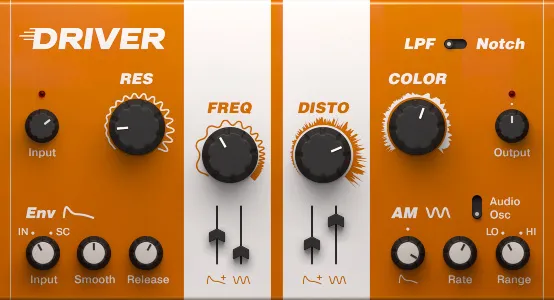
Driver distortion and filter effect plugin interface by Native Instruments

Driver: Distortion and Filter Multi-Effect by Native Instruments

Rated 4.9/5 on Plugin Boutique (22 ratings)

Driver is a distortion and filter multi-effect plugin from Native Instruments. It pairs a resonant filter with a distortion section and two modulation sources to shape sounds from subtle coloration to heavy distortion.

VST3VST2AUAAXWindowsmacOS64-bit
AVAILABLE ATPlugin Boutique
Opens the store in a new tab
01Overview

Driver is an effects plugin from Native Instruments, the developer of Massive. It combines a smooth, resonant filter with a distortion unit, so a single insert can add gentle warmth or push a sound into harsh, fuzzy territory. Two modulation sources, an envelope follower and an audio modulation section, let the filter move in response to the incoming signal. Driver works as a standalone effect in any DAW and is also available as an effect within Maschine.

Best for

  • Sound design textures
  • Buildup and breakdown effects
  • Aggressive distortion
  • Dynamic filter sweeps
  • Adding color to static sounds
Store
Plugin Boutique
02Key features

What you get

  • Resonant filter with low pass and notch settings
  • Distortion section from light saturation to heavy fuzz
  • Envelope follower with Smooth and Release controls
  • Audio modulation section for dynamic filter movement
  • AM section with Clip Cut control in Audio Mode
  • Can be triggered by an incoming audio signal
  • Works as a standalone effect in any DAW
  • Available as an effect within Maschine
03In depth

Filter and Distortion Character

Driver's filter offers low pass and notch modes with resonance control. Native Instruments describes the filter as smooth, with a range that runs from ultra-subtle to rich.

The distortion section covers everything from light saturation to heavy fuzz. Increasing resonance and distortion levels moves the sound from light, crunchy overtones to thick, fuzzed-out tones, and the result reacts to the audio input. In Audio Mode, the AM section's Clip Cut control adds further aggressive shaping.
Modulation and Dynamic Control

The envelope follower and audio modulation sections are the main way to make Driver move. Modulating the filter with these sources can produce shifting textures on otherwise static sounds.

The Smooth and Release controls fine-tune how quickly the envelope follower responds. You can also trigger Driver from an incoming signal, which adds dynamic motion to a track. Native Instruments highlights buildup and breakdown effects as a particular strength.

04Specs

Will it run?

Formats, systems and requirements as listed by Plugin Boutique. Missing details are left out, not guessed.

DeveloperNative Instruments
TypePlugin
CategoryMulti Effect
FormatsVST3, VST2, AU, AAX
Operating systemsWindows, macOS
Architecture64-bit
05FAQ

Questions, answered

What formats does Driver support?

Driver is available in VST3, VST2, AU and AAX formats, all 64-bit.

Which operating systems does Driver run on?

Driver runs on Windows 10 or 11 (64-bit) and macOS 11, 12 or 13, including Apple Silicon Macs in native mode or through Rosetta 2.

What do I need to run Driver?

Driver requires an Intel Core i5 or equivalent AMD CPU and 4 GB of RAM, with 6 GB recommended. An internet connection and a graphics card supporting OpenGL 2.1 or higher are needed to download and activate the product. Once activated, it can be used offline.

07Developer

More from Native Instruments

All Native Instruments products →