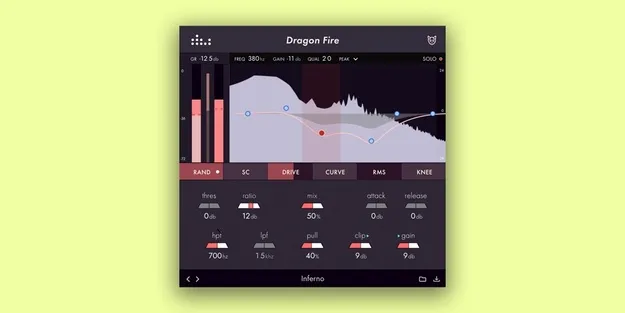
Dragon Fire by Denise Audio tonal compressor plugin interface with push-pull graph

Dragon Fire: Tonal Compressor Plugin by Denise Audio Free Download

Rated 4.7/5 on Plugin Boutique (219 ratings)

Dragon Fire is a tonal compressor plugin from Denise Audio that combines compression with an EQ-style push-pull graph and Shape technology to control dynamics and tone.

VST3VST2AUAAXWindowsmacOS64-bit
AVAILABLE ATPlugin Boutique
Free trial available from the developer
01Overview

Dragon Fire is a compressor plugin from Denise Audio built around a tonal compression approach. Instead of treating dynamics and tone as separate steps, it lets you set how the compressor reacts to different frequency ranges through a graph that works like an equalizer. Shape technology adds further control over the compressor's saturation, release behavior and detector response, so the processing can range from vintage to transparent.

Best for

  • Drum bus compression
  • Snare and kick control
  • Vocal tone shaping
  • Bass compression
  • Mix glue and saturation
  • Vintage compressor character
Developer
Denise Audio
Category
Compressors
Store
Plugin Boutique
02Key features

What you get

  • Tonal compression with an EQ-style push-pull graph
  • Shape technology for tuning compressor character
  • Adaptive saturation tied to gain reduction
  • RMS and knee functions for softer compression
  • Interpolation between fast and slow release curves
  • Transparent clipper at the end of the signal chain
  • Classic mode for single-band compression
  • Included presets for guitars, bass, vocals and drums
03In depth

Tonal Compression and the Push-Pull Graph

Dragon Fire's push-pull graph is the main control for its tonal compression. You draw the response across frequency ranges the way you would with an equalizer, which determines how the compressor reacts in each band.

Denise Audio describes the graph as offering more freedom than a multiband compressor while staying simple to operate. For targeting specific elements in a mix, such as a snare within a full drum beat, the graph lets you direct compression to that part without building separate band settings.
Shape Technology for Vintage and Transparent Sounds

Shape technology is what separates Dragon Fire from a standard compressor. Adaptive saturation lets you control the amount of saturation based on the gain reduction, so the color increases as the compressor works harder.

RMS and knee functions soften the compression character, and you can interpolate between fast and slow release curves for an optical-style response. A transparent clipper at the end of the signal chain adds a final stage of control. Switching to classic mode turns the plugin into a single-band compressor when you want a more traditional sound.

04Specs

Will it run?

Formats, systems and requirements as listed by Plugin Boutique. Missing details are left out, not guessed.

DeveloperDenise Audio
TypePlugin
CategoryCompressor
FormatsVST3, VST2, AU, AAX
Operating systemsWindows, macOS
Architecture64-bit
Free trialYes
05FAQ

Questions, answered

What formats does Dragon Fire support?

Dragon Fire is available in VST3, VST2, AU and AAX formats, and it is 64-bit.

Which operating systems can run Dragon Fire?

Dragon Fire runs on Windows and macOS. The listed requirements are Windows 7 and higher, and Mac OS X 10.7 or newer with native Apple Silicon support.

Does Dragon Fire include presets?

Yes. It comes with presets for instruments including guitars, bass, vocals and drums.

Is there a trial version?

Yes, Dragon Fire offers a trial.

07Developer

More from Denise Audio

All Denise Audio products →