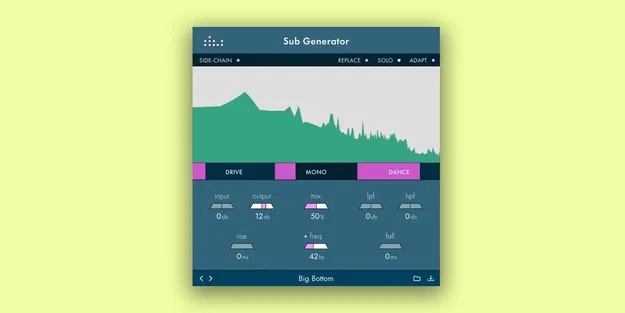
Sub Generator by Denise Audio low-end enhancer plugin interface

Sub Generator: Low-End Enhancer Plugin by Denise Audio Free Download

Rated 4.5/5 on Plugin Boutique (494 ratings)

Sub Generator is a low-frequency enhancer plugin by Denise Audio that adds or replaces sub content on any sound in your DAW. It is available as a VST3, VST2, AU and AAX plugin for Windows and macOS.

VST3VST2AUAAXWindowsmacOS64-bit
AVAILABLE ATPlugin Boutique
Free trial available from the developer
01Overview

Sub Generator is built for shaping the lowest part of a mix. Instead of boosting existing bass, it lets you generate a sub that follows the tone and frequency of the source signal. The developer describes it as inspired by the enveloping filter concept behind its Noize 2 plugin. It can be placed on any sound or signal in your DAW, which makes it useful for drums, bass parts, instruments and sound effects alike.

Best for

  • Kick drum sub boost
  • Bassline deepening
  • Replacing weak low end
  • Distant mic recordings
  • Sound effect low end
  • Side-chained sub bass
Developer
Denise Audio
Category
Enhancers
Store
Plugin Boutique
02Key features

What you get

  • Fine-tune frequency or note on the fly using the graph
  • Adaptive mode that responds dynamically to the music
  • Cut existing sub information and replace it with tighter low end
  • Rise and fall controls for sub attack and release
  • Side-chain control for keying the sub to other signals
  • Resizable interface
  • Available as VST3, VST2, AU and AAX
  • Runs on Windows and macOS in 64-bit
03In depth

Tuning and shaping the sub

The graph lets you fine-tune the frequency or note of the generated sub while you work, so it can match the key or the fundamental of your source. An adaptive mode makes the sub respond dynamically to the music rather than staying fixed.

Rise and fall controls set the attack and release of the sub, so you can shape how quickly it arrives and how long it lingers. Together these controls cover the basic job of adding weight to a kick, a bassline or a sound that feels thin in the low end.
Replacing low end and mixing workflow

Beyond adding sub, the plugin can cut existing low-frequency information and replace it with a tighter, more controlled bottom end. This is useful when a recording has muddy or inconsistent low frequencies, such as distant microphone recordings for drums or vocals.

The interface is resizable and includes a side-chain control, so the sub can be keyed to another signal in the mix. The developer also notes that it can be used as a stand-alone sub source.

04Specs

Will it run?

Formats, systems and requirements as listed by Plugin Boutique. Missing details are left out, not guessed.

DeveloperDenise Audio
TypePlugin
CategoryEnhancer
FormatsVST3, VST2, AU, AAX
Operating systemsWindows, macOS
Architecture64-bit
Free trialYes
05FAQ

Questions, answered

Is Sub Generator a synth or an effect?

It works as an enhancer that generates a sub frequency based on the source signal, and it can be applied to any sound or signal in your DAW. The developer also says it can be used as a stand-alone sub.

Which plugin formats does Sub Generator support?

Sub Generator is available in VST3, VST2, AU and AAX formats. It is 64-bit only.

Which operating systems does Sub Generator run on?

It runs on Windows 7 or newer (64-bit only) and macOS from OS X 10.7 through macOS 10.15 (64-bit only). Windows supports VST, VST3 and AAX, while macOS supports VST, VST3, AU and AAX.

Is there a trial version?

Yes, Sub Generator offers a trial.

07Developer

More from Denise Audio

All Denise Audio products →