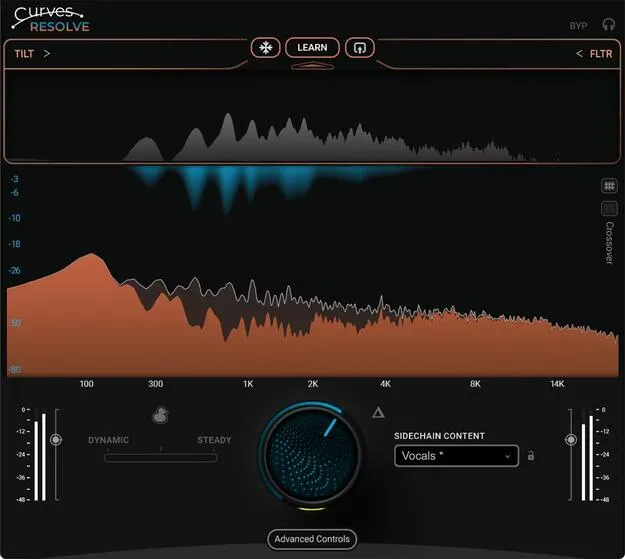
Curves Resolve by Waves mix conflict plugin interface

Curves Resolve: Mix Conflict Solver Plugin by Waves

Curves Resolve is a Waves plugin that solves conflicts between multiple tracks in a mix by carving space only where two tracks clash, processing one track while listening to another.

WindowsmacOS64-bit
AVAILABLE ATPlugin Boutique
Opens the store in a new tab
01Overview

Curves Resolve is designed for producers whose tracks compete for the same frequency space. Instead of applying broad EQ cuts, it listens to a reference track and reduces only the frequency areas where the two overlap. Waves describes the result as a cleaner mix with less masking and congestion. The plugin includes intelligent carving and ducking modes, snapshot controls for specific instruments, and a zero-latency Live version.

Best for

  • Reducing mix masking
  • Kick and bass separation
  • Vocal and instrument clashes
  • Mud reduction in dense mixes
  • Live zero-latency processing
Developer
Waves
Category
Utilities
Store
Plugin Boutique
02Key features

What you get

  • Solves mix conflicts between tracks in real time
  • Dynamic carving that responds to the signal as it plays
  • Steady carving based on a learned profile
  • Wide classic ducking and frequency-specific smart ducking
  • Snapshot carving modes optimized for specific instruments
  • Adjustable sidechain controls for detection
  • Includes Curves Resolve Live, a zero-latency version
03In depth

How Curves Resolve Carves Space in a Mix

The plugin works on one track while listening to another. Its intelligent carving comes in two forms. Dynamic carving responds in real time to the signal, while steady carving uses a learned profile of the material. Intelligent ducking is available in a wide, classic style and a frequency-specific smart style, so you can choose how much of the signal is pulled back when a clash occurs.

Snapshot controls offer carving modes optimized for particular instruments, and sidechain adjustment controls let you refine the detection to suit the material.
Workflow, Controls and Live Version

Waves presents Curves Resolve as a one-knob solution for mix conflicts, though the sidechain and snapshot controls give you more precision when you need it. Because the goal is to carve only where a clash occurs, you can keep other parts of each track intact.

Curves Resolve Live is included as a zero-latency version, which is intended for use where delay is not acceptable, such as live monitoring or performance setups.

04Specs

Will it run?

Formats, systems and requirements as listed by Plugin Boutique. Missing details are left out, not guessed.

DeveloperWaves
TypePlugin
CategoryUtility
Operating systemsWindows, macOS
Architecture64-bit
05FAQ

Questions, answered

Which operating systems does Curves Resolve support?

Curves Resolve is available for Windows and macOS. It is a 64-bit plugin.

What are the system requirements for Curves Resolve?

On macOS, it requires an Intel or Apple Silicon Mac with 16 GB RAM, 30 GB free disk space on the system drive, and macOS Ventura 13 or later. On Windows, it requires a 64-bit Intel or AMD CPU, 16 GB RAM, 30 GB free disk space on the system drive, and Windows 10 or 11. Waves recommends a 1920x1080 display.

What is the difference between dynamic and steady carving?

Dynamic carving works in real time as the signal changes. Steady carving uses a learned profile of the material to apply a more consistent reduction.

What is Curves Resolve Live?

Curves Resolve Live is a zero-latency version of the plugin that is included with Curves Resolve, according to Waves.

07Developer

More from Waves

All Waves products →