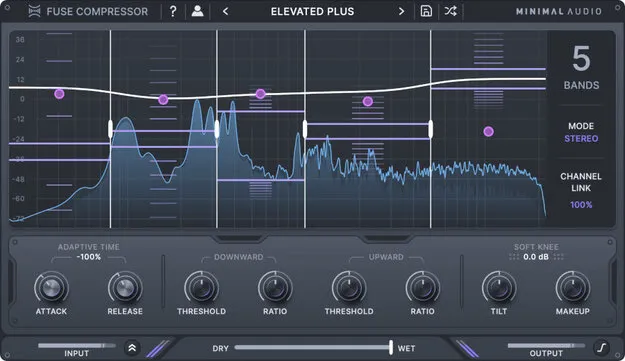
Fuse Compressor by Minimal Audio multi-band compressor plugin interface

Fuse Compressor: Multi-Band Compressor Plugin by Minimal Audio

Rated 4.7/5 on Plugin Boutique (282 ratings)

Fuse Compressor is a multi-band compressor plugin by Minimal Audio that processes up to six bands of independent upward and downward compression. It is available in VST3, VST2, AU and AAX formats.

VST3VST2AUAAXWindowsmacOS64-bit
AVAILABLE ATPlugin Boutique
Opens the store in a new tab
01Overview

Fuse Compressor from Minimal Audio is an effects plugin in the compressor category. Its multi-band engine splits the signal into up to six bands, each with its own dual upward and downward compression. Minimal Audio describes the plugin as built for fast workflows, with macro controls that let you adjust every band at once, so it can behave like a standard compressor when you want it to. The plugin runs on macOS and Windows and ships with a set of presets.

Best for

  • Mix bus compression
  • Transparent glue compression
  • Multi-band mastering
  • Aggressive character compression
  • Stereo image control
Developer
Minimal Audio
Category
Compressors
Store
Plugin Boutique
02Key features

What you get

  • Multi-band engine with up to six independent compression bands
  • Upward and downward compression in each band
  • Dynamic spectrum display showing the response curve
  • Spectral tilt to shift compression between low and high frequencies
  • Adaptive time for per-band attack and release
  • Macro controls for thresholds and ratios across all bands
  • Mid-side and stereo processing with variable channel linking
  • Built-in tooltips and a set of presets
03In depth

Multi-Band Compression Controls and Workflow

Fuse Compressor gives you up to six bands of independent upward and downward compression. Per-band controls cover threshold, ratio, makeup gain, bypass and solo, so you can shape each frequency range on its own.

The macro controls adjust all per-band thresholds or ratios together. This lets you use the plugin much like a conventional compressor before you move into band-by-band detail.

The dynamic spectrum display shows the response curve across the frequency range, so you can see how compression is distributed as you adjust the settings. Spectral tilt shifts the distribution of compression between low and high frequencies. Adaptive time sets attack and release for each band.
Stereo Modes and Presets

Fuse Compressor supports stereo and mid-side modes, and variable channel linking lets you control how the stereo image is treated. Soft knee is also included for smoother gain reduction.

The plugin includes a library of presets covering use cases from transparent mixing to more aggressive, over-the-top compression. Built-in tooltips explain the controls inside the interface.

04Specs

Will it run?

Formats, systems and requirements as listed by Plugin Boutique. Missing details are left out, not guessed.

DeveloperMinimal Audio
TypePlugin
CategoryCompressor
FormatsVST3, VST2, AU, AAX
Operating systemsWindows, macOS
Architecture64-bit
05FAQ

Questions, answered

What formats does Fuse Compressor support?

Fuse Compressor is available in VST3, VST2, AU and AAX formats, in 64-bit.

Which operating systems does Fuse Compressor run on?

Fuse Compressor runs on Windows 10 or higher and macOS 10.9 or higher.

Does Fuse Compressor need an internet connection?

Yes. An internet connection is required for activation.

How many bands does Fuse Compressor have?

The multi-band engine provides up to six bands of dual compression, each with independent upward and downward processing.

07Developer

More from Minimal Audio

All Minimal Audio products →