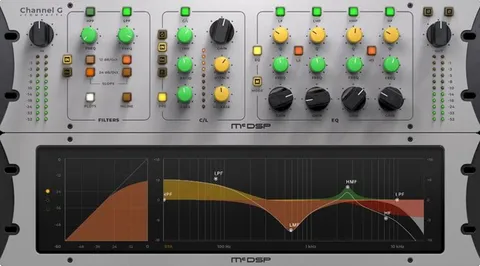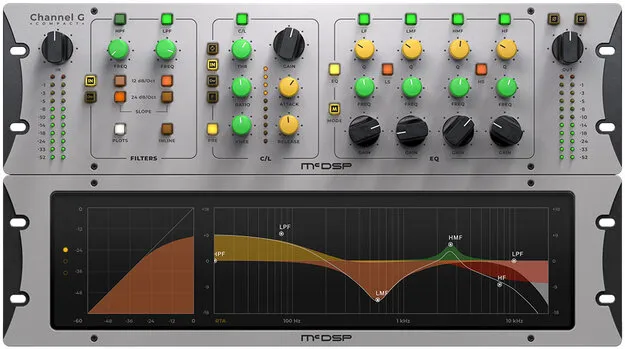
Channel G Compact Native v7 by McDSP channel strip plugin interface

Channel G Compact Native v7: Channel Strip Plugin by McDSP Free Download

Channel G Compact Native v7 is a channel strip plugin from McDSP that combines a four-band EQ, a compressor/limiter, filters and analog saturation modeling in one effect. It is the Native version of the Channel G Compact design.

VST3VST2AUAAXWindowsmacOS64-bit
AVAILABLE ATPlugin Boutique
Free trial available from the developer
01Overview

Channel G Compact Native v7 brings the core channel strip toolkit into a single plugin: high-pass and low-pass filters, a four-band EQ with shelving and parametric sections, and a full-featured compressor/limiter. The developer says it delivers the same sonic character as the full Channel G, with a smaller DSP footprint. It is offered in mono and stereo versions and runs on Windows and macOS.

Best for

  • Channel strip on individual tracks
  • Vocal tone shaping
  • Drum bus processing
  • Mix bus dynamics and EQ
  • Mono source processing
Developer
McDSP
Store
Plugin Boutique
02Key features

What you get

  • Four-band EQ with shelving and parametric sections
  • Full-featured compressor/limiter with pre or post EQ operation
  • High-pass and low-pass filters with 12 and 24 dB/oct slopes
  • Analog saturation modeling
  • Zero latency algorithms and double precision processing
  • Real time analyzers for monitoring the signal
  • Optimized for Apple Silicon and latest Intel processors
  • Mono and stereo versions available
03In depth

Sound Character and Processing Design

McDSP says Channel G Compact carries over the sonic approach of Channel G. The plugin includes analog saturation modeling, which adds harmonic coloration to the signal when you want a more analog feel.

The processing uses zero latency algorithms and double precision processing. McDSP also includes real time analyzers, so you can watch the signal while you adjust the EQ and dynamics.

The compressor/limiter can run before or after the EQ section, which changes how the two stages interact on the same track.
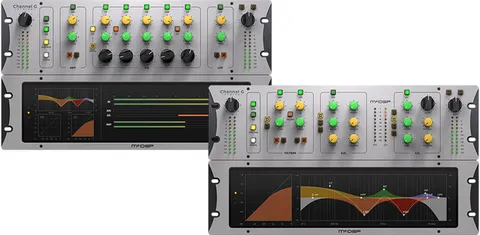
Controls, Filters and Workflow

Each channel strip section is set up for quick, direct changes. The high-pass and low-pass filters offer selectable slopes of 12 and 24 dB/octave, which suits cleaning up low end or taming highs on individual sources.

The four-band EQ mixes shelving and parametric bands, so you can shape broad tonal areas and narrow problem frequencies in the same pass.

McDSP lists a high definition updated user interface and new presets in this version. Two activations are included per license or subscription.

04Specs

Will it run?

Formats, systems and requirements as listed by Plugin Boutique. Missing details are left out, not guessed.

DeveloperMcDSP
TypePlugin
CategoryChannel Strip
FormatsVST3, VST2, AU, AAX
Operating systemsWindows, macOS
Architecture64-bit
Free trialYes
05Upgrades

Upgrade and crossgrade options

06FAQ

Questions, answered

What formats does Channel G Compact Native v7 support?

It is available in VST3, VST2, AU and AAX formats. McDSP's system requirements note that VST support ended with v7.0, so the VST2 format applies to earlier v6 versions and is not updated in v7.

Which operating systems are supported?

The plugin runs on Windows and macOS. McDSP lists Windows 7, 8 and 10 (64-bit only) and macOS 10.13 or higher (64-bit only), with macOS 12 Monterey listed as compatible.

What do I need to use this plugin?

You need an iLok2 or iLok3 USB Smart Key, or a free iLok License Manager account with an iLok Cloud session for authorization. McDSP says each v7 plugin includes two activations per authorization.

Does it work with Pro Tools, Logic Pro and Ableton Live?

McDSP says its HD and Native plugins are compatible with Pro Tools, Logic Pro, Cubase, Nuendo, Ableton Live, LUNA, Reaper, Studio One and other DAWs that support AAX, AU or VST3.

08Developer

More from McDSP

All McDSP products →