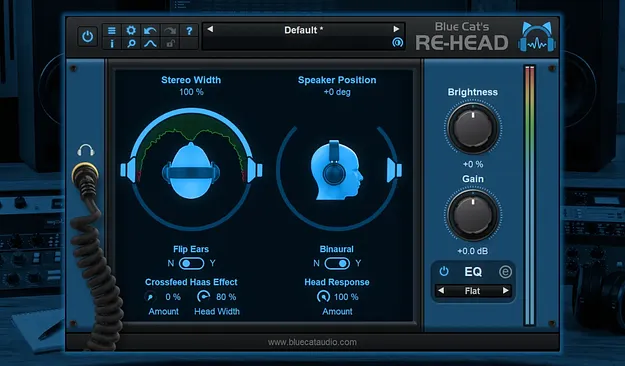
Blue Cat's Re-Head headphone mixing room plugin by Blue Cat Audio interface

Blue Cat's Re-Head: Headphone Mixing Room Plugin by Blue Cat Audio Free Download

Rated 4.5/5 on Plugin Boutique (116 ratings)

Blue Cat's Re-Head is a plugin for Windows and macOS that aims to make headphone mixing sound closer to working on loudspeakers. It uses a head response model, adjustable virtual speakers and an impulse response loader.

WindowsmacOS
AVAILABLE ATPlugin Boutique
Free trial available from the developer
01Overview

Working on headphones can make a mix sound unnatural, especially with distorted guitars and other instruments that feel too close in a headphone mix. Blue Cat's Re-Head is designed to narrow that gap. Developer Blue Cat Audio describes it as a way to bring a mixing room feel to headphone listening, and it is useful for tracking, working away from the studio, or mixing at night. The plugin focuses on tone and stereo image rather than replacing your studio monitors.

Best for

  • Headphone mixing
  • Tracking distorted guitars
  • Late-night mixing
  • Mixing away from the studio
  • Room simulation for headphones
Store
Plugin Boutique
02Key features

What you get

  • Head response model for a more natural headphone tone
  • Adjustable position and angle of virtual speakers
  • Brightness control for tuning the top end
  • Built-in EQ and spectrum analyzer
  • Impulse response loader to mimic a listening room
  • Compensation for actual headphones via IR loading
  • Left and right channel flip
  • No latency
03In depth

Head Response and Stereo Processing for Headphone Mixing

At the core of Re-Head is a head response model that imitates how your own head and skull shape what you hear from loudspeakers. Blue Cat Audio says this gives a more natural tone when you monitor on headphones.

The plugin also processes the stereo field to reduce the hard-panned sound common in headphone listening. You can adjust the position and angle of the virtual speakers, flip the left and right channels, and change the brightness to suit your ears and your headphones.

A built-in EQ and spectrum analyzer let you check and shape the result without leaving the plugin.
Impulse Response Loader and Room Simulation

Re-Head includes an impulse response (IR) loader. You can load an impulse response of a room you know well, such as your usual mixing space, so headphone monitoring feels closer to that environment. The IR loader can also compensate for the character of your actual headphones.

The plugin is described as having no latency, so it can sit in a tracking chain where timing matters. Blue Cat Audio notes that Re-Head is not meant to replace your favorite studio monitors. It is best understood as a way to make switching from speakers to headphones less dramatic.

04Specs

Will it run?

Formats, systems and requirements as listed by Plugin Boutique. Missing details are left out, not guessed.

DeveloperBlue Cat Audio
TypePlugin
CategoryReferencing Tools
Operating systemsWindows, macOS
Free trialYes
05FAQ

Questions, answered

What is Blue Cat's Re-Head used for?

Re-Head is used to make headphone monitoring sound closer to a mixing room. It applies a head response model, stereo processing and optional impulse responses to reduce the unnatural sound of headphone listening.

Which operating systems and formats does Re-Head support?

Re-Head runs on Windows and macOS. Blue Cat Audio lists support for most plug-in formats on both platforms.

What are the system requirements for Re-Head?

On Mac, it requires Apple Silicon or Intel hardware running Mac OS 10.9 or newer. On PC, it requires Windows Vista or newer.

Does Re-Head have a trial version?

Yes, Re-Head is available as a trial.

07Developer

More from Blue Cat Audio

All Blue Cat Audio products →