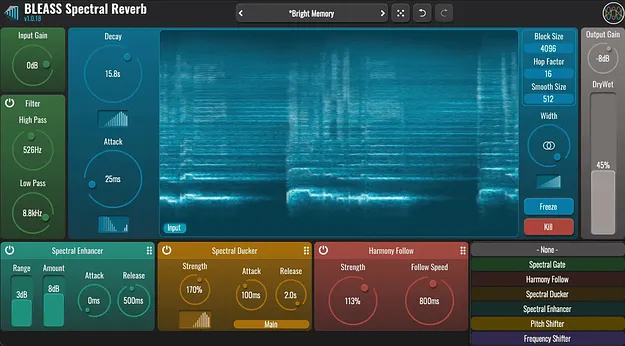
BLEASS Spectral Reverb plugin interface with Spectral Map controls

BLEASS Spectral Reverb: Frequency-Shaped Reverb Plugin

BLEASS Spectral Reverb is a reverb effect plugin from BLEASS that lets you vary decay, attack and stereo width across the frequency spectrum. It uses Spectral Map controls to shape each parameter by frequency.

AVAILABLE ATPlugin Boutique
Opens the store in a new tab
01Overview

BLEASS Spectral Reverb is built around spectral control: instead of applying one reverb time across all frequencies, you can make decay, attack and stereo width change with frequency. BLEASS describes it as a reverb for creating dramatic ambient spaces. Four processing slots host six spectral processors, each adding its own coloration to the reverb. Most parameters can be automated or modulated, and external sidechain input is supported.

Best for

  • Ambient pads
  • Dramatic stage ambience
  • Glitchy lo-fi reverb
  • Frequency-shaped reverb tails
  • Sidechain-driven reverb
  • Stereo width shaping
Developer
BLEASS
Category
Reverbs
Store
Plugin Boutique
02Key features

What you get

  • Spectral Map controls for frequency-based decay, attack and width
  • Four processing slots hosting six spectral processors
  • Freeze and Kill buttons for controlling the reverb tail
  • Adjustable Block Size and Hop Factor for resolution and smoothness
  • Adjustable Smooth Size for cleaner or dirtier results
  • Spectral Gate processing module
  • External sidechain input support
  • Most parameters exposed for DAW automation and modulators
03In depth

Frequency-Based Reverb Shaping with Spectral Maps

The Spectral Map controls shape how a parameter responds across frequencies. Each map is drawn as a series of vertical bars. Dragging horizontally moves the peak or focus point of the spectrum, and dragging to the far left or right creates a ramp across the whole range. Dragging vertically sharpens a peak when moved up and a trough when moved down.

A map works alongside the rotary control for its parameter. For example, you can make the decay shorter at low frequencies and longer at high frequencies, or narrow the stereo width below and above a chosen frequency.
Spectral Processing Settings and Processors

The Block Size sets the size of the audio chunks used for FFT analysis. Larger blocks give finer spectral resolution and more detailed results, at a higher resource cost. The Hop Factor sets how much successive chunks overlap: higher values sound smoother, while lower values produce a glitchy, lo-fi character and use fewer resources.

Four processing slots can each host one of six spectral processors. Many processors include their own Spectral Map for tinting the reverb spectrum. Use the Freeze button to hold the current reverb tail, and Kill to clear it immediately.

04Specs

Will it run?

Formats, systems and requirements as listed by Plugin Boutique. Missing details are left out, not guessed.

DeveloperBLEASS
TypePlugin
CategoryReverb
05FAQ

Questions, answered

What is BLEASS Spectral Reverb?

BLEASS Spectral Reverb is a reverb effect plugin by BLEASS. It lets you vary decay, attack and stereo width by frequency using Spectral Map controls.

What makes Spectral Reverb different from a standard reverb?

Its Spectral Maps let decay, attack and width change across the frequency range instead of applying one setting to all frequencies. Four slots can also host six spectral processors that add their own coloration.

Does BLEASS Spectral Reverb support sidechain and automation?

Yes. It supports external sidechains and exposes most of its parameters as destinations for DAW automation and modulators.

07Developer

More from BLEASS

All BLEASS products →