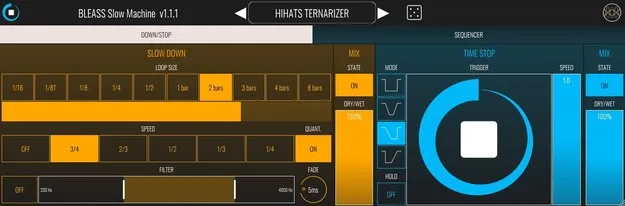
BLEASS Slow Machine tape stop and slow-down multi effect plugin interface

BLEASS Slow Machine: Tape Stop and Slow-Down Multi Effect Free Download

Rated 4.6/5 on Plugin Boutique (852 ratings)

BLEASS Slow Machine is a multi effect plugin from BLEASS that slows down and stops audio with tape-style speed changes. It works in VST3 and Audio Unit hosts on Windows and macOS.

VST3AUStandaloneWindowsmacOS64-bit
AVAILABLE ATPlugin Boutique
Free trial available from the developer
01Overview

BLEASS Slow Machine is built around controlled time manipulation. The developer says it can slow a beat or melody completely or partially, and turn lead sounds into heavier bass-oriented material. It combines a slow-down stage, a performance-oriented time stop stage and a speed sequencer, so you can work with tape stops either live or by programming them. The plugin is available in VST3, AU and Standalone formats and is offered with a trial.

Best for

  • Tape stop transitions
  • Bass from lead sounds
  • Drum break slowdowns
  • Live performance effects
  • Automated speed sequences
  • Electronic music production
Developer
BLEASS
Store
Plugin Boutique
02Key features

What you get

  • Slow Down stage modulating rhythm and pitch together
  • Loop size, play speed and quantization controls
  • Filter frequency band within the slow-down stage
  • Time Stop stage triggered by a Stop button
  • Four time stop modes: Step, Ramp Up & Down, Ramp Down, Ramp Up
  • Hold switch to keep the time stop engaged
  • Speed sequencer with per-step speed and four curve modes
  • Randomness, Fade and Grid Snap controls for the sequencer
03In depth

Slow-down, time stop and sequencer stages

The plugin has three stages. The Slow Down stage is a slowdown effect that modulates both rhythm and pitch. You can adjust loop size, play speed, quantization, a filter frequency band and the crossfade between loops.

The Time Stop stage is designed for performance. Its Stop button triggers a tape stop within a set duration. You can choose between four modes: Step, Ramp Up & Down, Ramp Down and Ramp Up. A Hold switch keeps the trigger active until it is turned off, and a Speed control sets the play speed precisely.

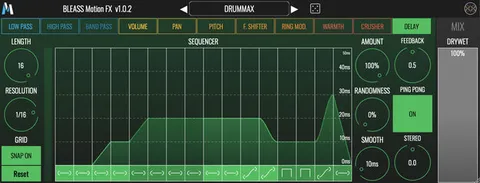
The Sequencer stage lets you program speed changes across a sequence. Length sets the number of steps, Resolution sets the step duration and Grid Snap aligns steps to the grid. Each step has a playing speed and one of four curve modes, and Amount, Randomness and Fade control modulation strength, variation and crossfade between steps.
Who it is for and what you need to run it

Slow Machine suits producers who want tape stops and slow-down moves on drums, melodies or full mixes, whether triggered live or automated in a sequence. The developer describes it as a way to deepen beats and turn leads into basses.

The plugin requires a host. It is not a standalone product, and the developer says it is compatible with nearly all VST3 and Audio Unit compatible DAWs. On Windows it requires Windows 8 or later in 64-bit, and on macOS it requires macOS 10.9 or later in 64-bit, including macOS 11 Big Sur and M1 processors.

04Specs

Will it run?

Formats, systems and requirements as listed by Plugin Boutique. Missing details are left out, not guessed.

DeveloperBLEASS
TypePlugin
CategoryMulti Effect
FormatsVST3, AU, Standalone
Operating systemsWindows, macOS
Architecture64-bit
Free trialYes
05FAQ

Questions, answered

What formats does BLEASS Slow Machine support?

Slow Machine is available in VST3, AU and Standalone formats. It is a 64-bit plugin for Windows and macOS.

What do I need to use BLEASS Slow Machine?

It requires a host. The developer says it is not a standalone product and is compatible with nearly all VST3 and Audio Unit compatible DAWs. On Windows it needs Windows 8 or later (64-bit), and on macOS it needs macOS 10.9 or later (64-bit only), including macOS 11 Big Sur and M1 processors.

Does BLEASS Slow Machine have a trial?

Yes, the plugin is offered with a trial.

07Developer

More from BLEASS

All BLEASS products →