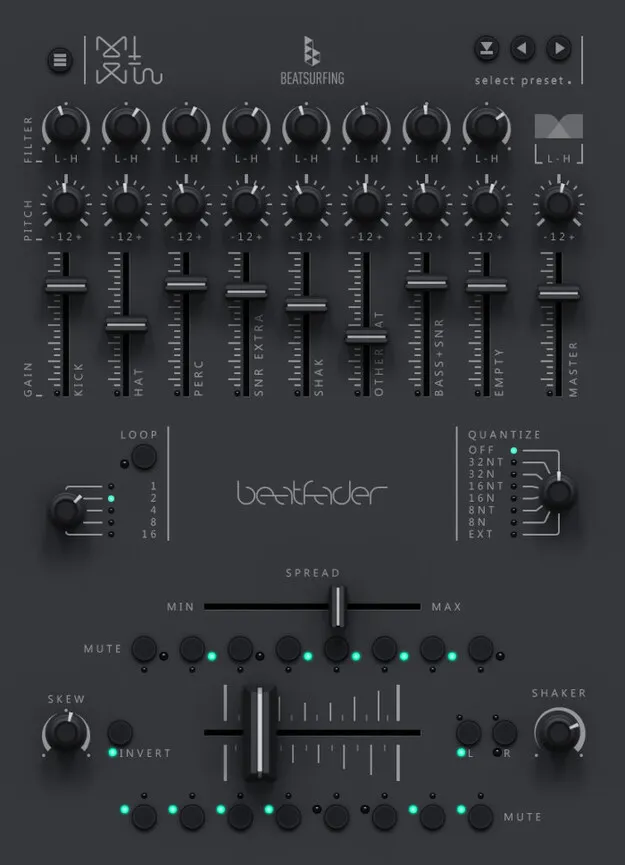
Beatfader drum machine plugin by BEATSURFING fader interface

Beatfader: Fader-Based Drum Machine Plugin by BEATSURFING

Rated 4.5/5 on Plugin Boutique (151 ratings)

Beatfader is a drum machine plugin by BEATSURFING that lets you play beats from any fader, knob or MIDI controller. It runs as VST3, VST2, AU and AAX on Windows and macOS.

VST3VST2AUAAXWindowsmacOS64-bit
AVAILABLE ATPlugin Boutique
Opens the store in a new tab
01Overview

Beatfader is a drum machine that turns a fader into a playable drum instrument. Its layout fits 28 notes on a single fader, and you can trigger them with a DJ mixer, a MIDI controller or a knob inside your DAW. BEATSURFING says the plugin grew out of a Max for Live patch its co-founders, Herrmutt Lobby, released in 2011, and was rebuilt with more features for a wider audience.

Best for

  • Live DJ drum performance
  • Fader-based beat making
  • Live looping drums
  • Breakdowns and transitions
  • Scratch-style drum patterns
  • Building custom MIDI kits
Developer
BEATSURFING
Store
Plugin Boutique
02Key features

What you get

  • Plays 28 notes on a single fader, knob or MIDI controller
  • Works with any DAW and MIDI-enabled controller or DJ mixer
  • Selectable loop lengths for live looping
  • Per-note gain, pitch, filter and mute controls
  • Adjustable quantization amount
  • Spread control compresses notes toward the fader center
  • Skew and invert functions for alternative grooves
  • MIDI out for building your own kits
03In depth

Playing drums with a fader and live looping

Beatfader is built around performance. You can map it to any MIDI-enabled controller or DJ mixer, so the fader becomes your drum surface. Selectable loop lengths let you live loop your beats, and the last bars you played are repeated, so you can overwrite them and build a unique loop on the fly.

The quantization amount can be changed to shift the feel of the rhythm. Muting individual notes gives you a quick way to set up breakdowns and transitions while the loop keeps running.
Sound shaping, spread and skew controls

Each note channel has its own gain, pitch, filter and mute controls, so you can tune individual sounds in the kit. The spread control adds margins at the sides of the fader and compresses the notes toward the middle, which the developer suggests for scratching from the edges of the fader.

Skew and invert functions reshape the order of the notes for alternative grooves. A built-in counter instrument can trigger four sounds from the left or right side, resetting each other, and a shaker plays a note whenever you change direction, with adjustable sensitivity.

04Specs

Will it run?

Formats, systems and requirements as listed by Plugin Boutique. Missing details are left out, not guessed.

DeveloperBEATSURFING
TypePlugin
CategoryDrum Machine
FormatsVST3, VST2, AU, AAX
Operating systemsWindows, macOS
Architecture64-bit
05FAQ

Questions, answered

What formats does Beatfader support?

Beatfader is available in VST3, VST2, AU and AAX formats.

Which operating systems does Beatfader run on?

Beatfader runs on Windows 10 and later and on macOS 10.15 or later, including Intel and Apple Silicon Macs. It is a 64-bit plugin.

What do I need to use Beatfader?

You need a host application that supports 64-bit VST or AudioUnit, at least 130MB of free disk space, and an internet connection every 30 days to validate your license if you access it through a Rent to Own plan or Beatport Studio membership.

Can I control Beatfader with a DJ mixer?

Yes. You can MIDI map Beatfader to any MIDI-enabled controller or DJ mixer and sync it with your preferred DAW.

07Developer

More from BEATSURFING

All BEATSURFING products →