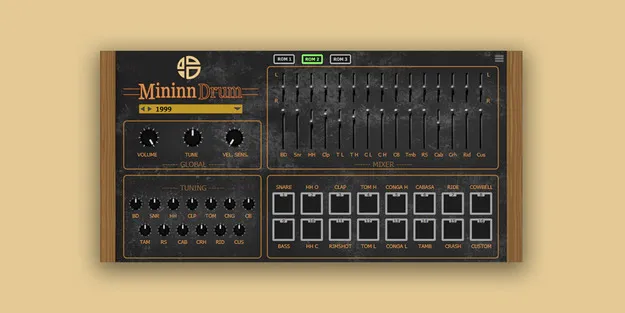
MininnDrum by Audio Blast drum machine plugin interface

MininnDrum: Linn-Inspired Drum Machine Plugin by Audio Blast Free Download

Rated 4.6/5 on Plugin Boutique (111 ratings)

MininnDrum is a drum machine plugin by Audio Blast, inspired by the classic Linn LM-1 drum computer. It offers three sound ROMs, a custom sample pad and multiple outputs for producing drum parts in a DAW.

VST3VST2AUAAXCLAPWindowsmacOS
AVAILABLE ATPlugin Boutique
Free trial available from the developer
01Overview

MininnDrum takes its sound palette from the Linn drum machine tradition. Audio Blast builds the plugin around three sound ROMs, with one recreating the LM-1 sound selection, another capturing the character of the 9000 version, and a third adapted from ’80s drum sounds. The plugin is aimed at producers working across pop, electronic and retro-inspired styles who want classic drum voices inside their own setup.

Best for

  • Retro pop drums
  • Electronic drum programming
  • ’80s-style drum sounds
  • Multi-out drum mixing
  • Custom sample drum kits
Developer
Audio Blast
Store
Plugin Boutique
02Key features

What you get

  • Three sound ROMs with distinct classic drum flavors
  • Based on LM-1 sound selection and 9000 version character
  • Custom pad for loading your own samples into presets
  • Individual pitch, volume and panning control per sound
  • 16 stereo channels or aux outputs for multi-out routing
  • Separate processing of each sound in your DAW
  • Available in VST3, VST2, AU, AAX and CLAP formats
03In depth

Three Sound ROMs and a Custom Pad

Audio Blast includes three sound ROMs, each offering a different flavor of classic drum sounds. ROM 1 is a faithful recreation of the LM-1 sound selection, ROM 2 captures the essence of the 9000 version, and ROM 3 is a custom adaptation inspired by authentic ’80s drum sounds.

The custom pad lets you load your own samples, such as drums, bass or other sounds, directly into your presets. This extends the built-in voices with material from your own library, so the drum palette can be shaped around each project.
Per-Sound Control and Multi-Output Routing

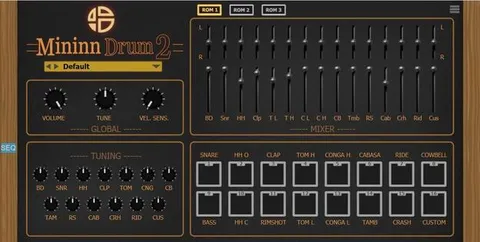
Each drum sound can be adjusted individually for pitch, volume and panning, so every voice can be fitted into the mix. The plugin supports multiple outputs, with 16 stereo channels or aux sends available to assign.

With separate outputs you can process each sound independently in your DAW. Audio Blast notes that EQ, compression and reverb applied at this stage can add punch and extend the sonic range of the classic drum voices.

04Specs

Will it run?

Formats, systems and requirements as listed by Plugin Boutique. Missing details are left out, not guessed.

DeveloperAudio Blast
TypePlugin
CategoryDrum Machine
FormatsVST3, VST2, AU, AAX, CLAP
Operating systemsWindows, macOS
Free trialYes
05FAQ

Questions, answered

What formats does MininnDrum support?

MininnDrum is available in VST3, VST2, AU, AAX and CLAP formats.

Which operating systems can run MininnDrum?

MininnDrum runs on Windows and macOS. On Mac it requires macOS 10.13 or later and supports Apple Silicon, and on Windows it requires Windows 10 or later.

What do I need to use MininnDrum?

You need an Intel Core i5 or equivalent CPU and 2GB of RAM. An internet connection is required to install and update the plugin, and an internet connection is needed every 30 days to validate the license when it is accessed through a Rent to Own plan or Beatport Studio membership.

Can I load my own samples into MininnDrum?

Yes. The custom pad lets you add your own samples, such as drums or bass, directly into your presets.

07Developer

More from Audio Blast

All Audio Blast products →