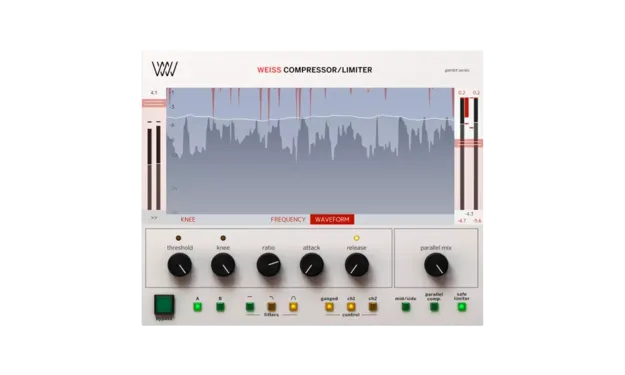
Weiss Compressor/Limiter by Softube compressor plug-in interface

Weiss Compressor/Limiter: Transparent Digital Mastering Compressor by Softube

Rated 4.6/5 on Plugin Boutique (164 ratings)

Weiss Compressor/Limiter is a digital compressor and limiter plug-in by Softube, built on code-ported algorithms from the Weiss DS1-MK3 mastering processor. It is available in VST3, VST2, AU, AAX and RTAS formats.

VST3VST2AUAAXRTASWindowsmacOS64-bit
AVAILABLE ATPlugin Boutique
Opens the store in a new tab
01Overview

Softube's Weiss Compressor/Limiter brings the code base of the Weiss DS1-MK3 dynamics processor into a standalone plug-in. It is aimed at the body of a mix, such as the mix bus or a mastering chain. Beyond the core compressor, it includes two newly added limiter algorithms alongside the original Weiss limiter. Detailed visualisations show how the processor is acting on the signal at any moment.

Best for

  • Mix bus compression
  • Mastering limiting
  • Bass low-end control
  • Vocal dynamics processing
  • Loudness pushing
Developer
Softube
Category
Compressors
Store
Plugin Boutique
02Key features

What you get

  • Digital compressor and limiter with code-ported algorithms from the Weiss DS1-MK3
  • Adjustable attack and release times, knee, ratio and threshold
  • Low pass and band pass filters for frequency-selective compression
  • Two new advanced limiter algorithms alongside the original Weiss limiter
  • Visualisations showing the compression applied to the signal
  • Clean main faceplate with expert controls in a side menu
  • Available standalone or as part of the Weiss DS1-MK3 collection
03In depth

Sound, Transparency and Control

The compressor focuses on transparency. Softube says the Weiss digital compression algorithms are designed to keep dynamics processing clean, including at high loudness levels where limiting can introduce artifacts.

The main controls cover attack and release times, knee settings, ratio and threshold. Low pass and band pass filters let you limit the processing to a specific frequency range. The default faceplate is kept clean, and the more detailed expert controls sit in a hidden side menu.
Workflow and Using It on Individual Tracks

Because it is a plug-in, you can run as many instances as you need. A common approach is to apply the filtered mode to individual tracks. For example, a low pass filter can restrain only the lowest frequencies of a bass part, similar to a multi-band compressor. On vocals, it can be paired with Softube's Weiss Deess to handle dynamics across the frequency range separately.

The visualisations show where the signal is being compressed heavily and where it is barely processed, which helps with decisions about how much compression is appropriate.

04Specs

Will it run?

Formats, systems and requirements as listed by Plugin Boutique. Missing details are left out, not guessed.

DeveloperSoftube
TypePlugin
CategoryCompressor
FormatsVST3, VST2, AU, AAX, RTAS
Operating systemsWindows, macOS
Architecture64-bit
05FAQ

Questions, answered

What formats does Weiss Compressor/Limiter support?

It is listed in VST3, VST2, AU, AAX and RTAS formats. Softube recommends VST3, as some of its plug-ins include features that are not available in the older VST format.

Which operating systems are supported?

Softube lists support for macOS (Big Sur 11, Monterey 12 and Ventura 13) and Windows 10 (64-bit) and Windows 11. Apple silicon is supported natively on macOS.

What do I need to run Weiss Compressor/Limiter?

You need a Softube account and an iLok account, plus an AU, VST, VST3 or AAX compatible DAW. The latest iLok License Manager is required and can be downloaded from ilok.com. Internet access is needed to download installers and manage licenses.

Can I use it on individual tracks, not just the mix bus?

Yes. Since it is a plug-in, you can run multiple instances on different tracks. The low pass and band pass filters let you compress only part of the frequency range, such as the low end of a bass guitar.

07Developer

More from Softube

All Softube products →