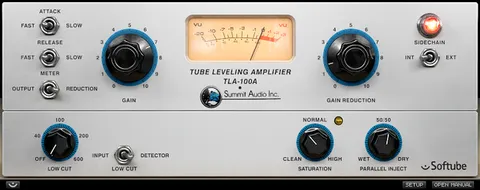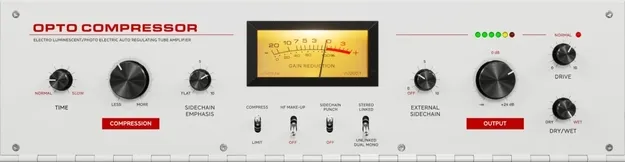
OPTO Compressor by Softube compressor plugin interface

OPTO Compressor: Optical Tube Compressor Plugin by Softube

Rated 4.9/5 on Plugin Boutique (48 ratings)

OPTO Compressor is a Softube compressor plugin that emulates the classic T4 Opto Cell optical tube compressor. It adds modern DAW features such as Drive, Stereo Link, a sidechain section and Dry/Wet control.

VST3VST2AUAAXRTASWindowsmacOS64-bit
AVAILABLE ATPlugin Boutique
Opens the store in a new tab
01Overview

Softube's OPTO Compressor models the optical tube compressor used in many classic recording chains and adds the controls needed for a modern mixing workflow. The plugin is built around the slow attack and smooth, warm character associated with the early-60s T4 Opto Cell design. Softube's developers describe its tube character as subtle and natural, enhancing the quieter parts of a performance. Its added features aim to make it practical for mixing and mastering sessions.

Best for

  • Vocal compression
  • Bass compression
  • Guitar compression
  • Mix bus and mastering
  • Parallel compression
Developer
Softube
Category
Compressors
Store
Plugin Boutique
02Key features

What you get

  • Emulation of the T4 Opto Cell optical tube compressor
  • Separate Drive control for distortion and character
  • High Frequency Make-up to compensate for lost highs
  • Stereo Link switch with linked and Unlinked Dual Mono modes
  • Sidechain section for added control
  • Dry/Wet control for parallel processing
  • Modeled subtle tube distortion character
03In depth

Sound and Character of the OPTO Compressor

The OPTO Compressor is modeled on an optical tube compressor with a slow attack and smooth response. Softube says the plugin reproduces the warmth and subtle tube distortion of the original hardware.

The Drive control sets the amount of distortion and character separately from the gain reduction. This lets you add color without compressing more heavily, which the original unit could not do on its own.

The High Frequency Make-up feature compensates for the slight loss of high frequencies that can occur during compression.

Workflow Features and Stereo Control

The Stereo Link switch toggles between linked mode, which applies matched left and right gain reduction, and Unlinked Dual Mono, which lets each channel compress independently.

A Sidechain section and Dry/Wet control add flexibility for mixing and mastering. Dry/Wet lets you blend the compressed signal with the original for parallel-style processing.

Softube positions the plugin for vocals, guitar and bass. It can also be used as a second gain reduction stage after the FET Compressor Mk II on a vocal track.

04Specs

Will it run?

Formats, systems and requirements as listed by Plugin Boutique. Missing details are left out, not guessed.

DeveloperSoftube
TypePlugin
CategoryCompressor
FormatsVST3, VST2, AU, AAX, RTAS
Operating systemsWindows, macOS
Architecture64-bit
05FAQ

Questions, answered

What formats does OPTO Compressor support?

OPTO Compressor is available in VST3, VST2, AU, AAX and RTAS formats. It runs on Windows and macOS.

What do I need to run OPTO Compressor?

You need a Softube account and an iLok account, plus a computer with an AU, VST, VST3 or AAX-compatible DAW. Windows 10 or 11 and macOS Big Sur 11, Monterey 12 or Ventura 13 are supported. Softube recommends using the VST3 format.

Which DAWs does Softube officially test OPTO Compressor in?

Softube officially tests its plugins in the most recent versions of Pro Tools, Logic Pro, Cubase, Ableton Live, Studio One and Reaper. Other 64-bit hosts should work if the system requirements are met, but are not regularly tested.

Is OPTO Compressor a 64-bit plugin?

Yes, OPTO Compressor is a 64-bit plugin.

07Developer

More from Softube

All Softube products →