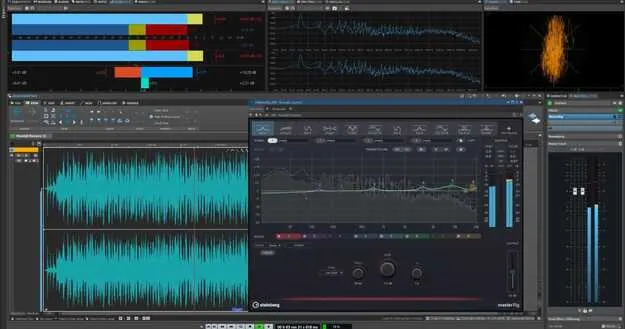
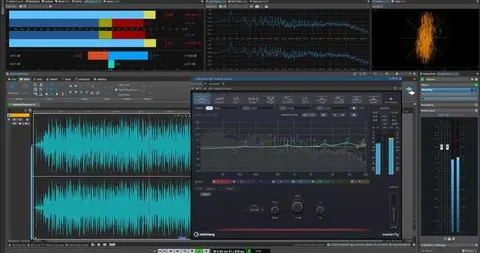
WaveLab Elements 13 mastering and audio editing plugin interface by Steinberg

WaveLab Elements 13: Mastering and Audio Editing Plugin by Steinberg

WaveLab Elements 13 is a mastering and audio editing plugin from Steinberg, available in VST3 and VST2 formats for Windows and macOS. It includes MasterRig 2, a mastering suite now available in WaveLab Elements for the first time.

VST3VST2WindowsmacOS64-bit
AVAILABLE ATPlugin Boutique
Opens the store in a new tab
01Overview

WaveLab Elements 13 is a 64-bit effects plugin in Steinberg's Mastering Suite category. It is built around mastering and clip editing workflows, with the MasterRig 2 mastering plug-in suite added in this version. Steinberg has updated several everyday editing tools, including a dynamic clip toolbar, drag-and-drop plug-in removal, pop-up clip gain sliders and random track colors, to reduce clicks during editing.

Best for

  • Mastering albums
  • Clip gain editing
  • Session organization
  • Mastering chain processing
  • Track color coding
Developer
Steinberg
Store
Plugin Boutique
02Key features

What you get

  • MasterRig 2 mastering pro plug-in suite, updated and now in Elements
  • Dynamic Clip Toolbar for instant access to clip menus
  • Drag-and-drop removal of plug-ins from effect slots
  • Pop-up sliders for quick clip gain adjustment pre or post effects
  • Random color assignment for all tracks
  • VST3 and VST2 formats for Windows and macOS
  • 64-bit architecture
03In depth

MasterRig 2 and mastering workflow

MasterRig 2 is the next-generation mastering pro plug-in suite in this release. Steinberg has updated it significantly, and it is now available in WaveLab Elements for the first time.

This makes the suite accessible to users of the Elements edition, which is aimed at producers who want mastering tools in a more focused package.
Editing speed and clip workflow

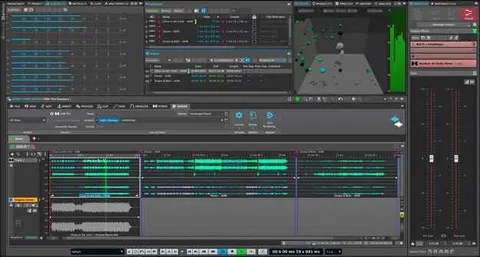
The Dynamic Clip Toolbar gives instant access to clip-related menus, which reduces the number of clicks needed during editing.

Clip gain can be adjusted before or after effects using pop-up sliders. Plug-ins can be removed from a slot by dragging them out of it, and random colors can be applied to all tracks to help organize a session.

Formats and system requirements

WaveLab Elements 13 is offered in VST3 and VST2 formats for Windows and macOS. It is a 64-bit plugin.

On macOS, the listed systems are macOS Tahoe, macOS Sonoma and macOS Sequoia, with Rosetta 2 and a native app for Silicon Macs. On Windows, the listed systems are Windows 11 (version 24H2 or higher) and Windows 10 (version 22H2 or higher), both 64-bit.

04Specs

Will it run?

Formats, systems and requirements as listed by Plugin Boutique. Missing details are left out, not guessed.

DeveloperSteinberg
TypePlugin
CategoryMastering Suite
FormatsVST3, VST2
Operating systemsWindows, macOS
Architecture64-bit
05FAQ

Questions, answered

What formats does WaveLab Elements 13 support?

WaveLab Elements 13 is available in VST3 and VST2 formats. It runs on Windows and macOS.

Which operating systems are supported?

On macOS, the listed systems are macOS Tahoe, Sonoma and Sequoia, with Rosetta 2 and a native app for Silicon Macs. On Windows, Windows 11 (version 24H2 or higher) and Windows 10 (version 22H2 or higher) are listed, both 64-bit.

What is new in MasterRig 2 in WaveLab Elements 13?

MasterRig 2 is the next-generation mastering pro plug-in suite and has undergone a major update. It is now available in WaveLab Elements for the first time.

07Developer

More from Steinberg

All Steinberg products →