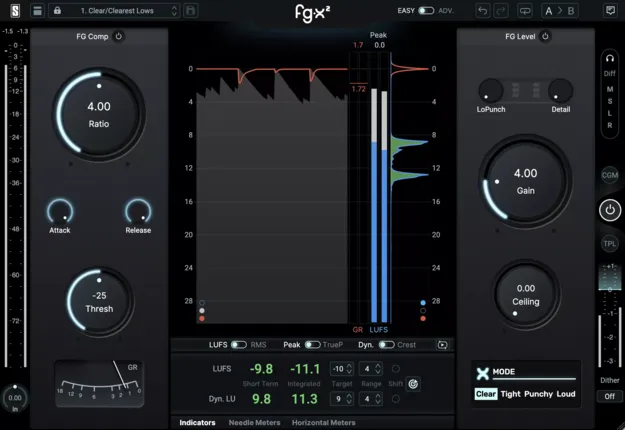
FG-X 2 mastering plugin interface by Slate Digital

FG-X 2: Mastering Plugin with Compression and Limiting by Slate Digital

Rated 4.9/5 on Plugin Boutique (8 ratings)

FG-X 2 is a mastering plugin from Slate Digital that combines two processing modules, FG-Comp and FG-Level, with four limiter modes. It is available in VST3, VST2, AU and AAX formats for Windows and macOS.

VST3VST2AUAAXWindowsmacOS64-bit
AVAILABLE ATPlugin Boutique
Opens the store in a new tab
01Overview

FG-X 2 is built around two modules. FG-Comp is designed to keep the punch and transients of a mix intact during processing. FG-Level analyzes the incoming signal and decides whether to apply saturation or limiting, based on the frequency content of the track. Four limiter modes cover everything from transparent control to louder, colored processing. A Gain knob sets the overall output level once the sound is in place.

Best for

  • Final mix mastering
  • Loudness control
  • Mix bus limiting
  • Saturation and color
  • Beginner mastering
Developer
Slate Digital
Store
Plugin Boutique
02Key features

What you get

  • FG-Comp module designed to preserve punch and transients
  • FG-Level module that chooses between saturation and limiting
  • Four limiter modes for transparent or colorful processing
  • Easy view for quick results
  • Advanced view with additional parameters for detailed control
  • Gain knob for precise overall level adjustment
  • Available in VST3, VST2, AU and AAX formats
03In depth

How FG-Comp and FG-Level Work Together

FG-X 2 pairs two processors in one plugin. FG-Comp is meant to preserve the original transients and punch of a mix, so the track keeps its energy while it is being controlled.

FG-Level handles loudness. Slate Digital describes it as an intelligent processor that chooses between saturation and limiting depending on the frequency content of the signal, rather than applying one fixed treatment to every track.
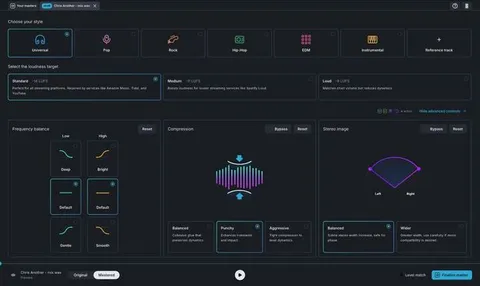
Easy and Advanced Views for Mastering

FG-X 2 offers two views. Easy view is built for fast results. Advanced view exposes additional parameters for users who want detailed control over the mastering chain.

The four limiter modes let you choose between transparent limiting and louder, colorful processing, so the same plugin can serve different material and different levels of experience.

04Specs

Will it run?

Formats, systems and requirements as listed by Plugin Boutique. Missing details are left out, not guessed.

DeveloperSlate Digital
TypePlugin
CategoryMastering Suite
FormatsVST3, VST2, AU, AAX
Operating systemsWindows, macOS
Architecture64-bit
05FAQ

Questions, answered

What formats does FG-X 2 support?

FG-X 2 is available in VST3, VST2, AU and AAX formats. It runs on Windows and macOS.

What operating systems are supported?

FG-X 2 supports Windows 10 or Windows 11, and macOS 13 or later. The developer lists 64-bit hosts for AAX use.

What do I need to use FG-X 2?

You need a host that supports one of the listed plugin formats and a free iLok license manager account, which is required to run Slate Digital software. The minimum listed requirements are 4GB of RAM and an Intel, AMD or Apple Silicon processor, depending on platform.

Is FG-X 2 suitable for beginners?

Slate Digital positions FG-X 2 for both beginners and professional mastering engineers. Easy view is intended for quick results, while Advanced view offers more parameters for experienced users.

07Developer

More from Slate Digital

All Slate Digital products →