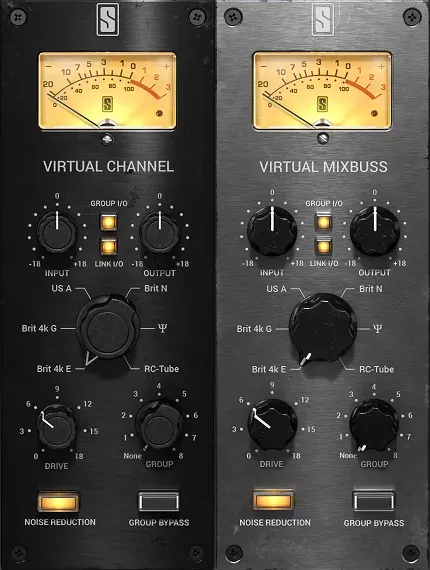
Virtual Console Collection by Slate Digital analog mixing console plugin interface

Virtual Console Collection: Analog Mixing Console Emulations by Slate Digital

Rated 4.8/5 on Plugin Boutique (65 ratings)

Virtual Console Collection is a channel strip plugin bundle from Slate Digital that emulates six classic analog mixing consoles inside your DAW. It includes Virtual Channel for individual tracks and Virtual Mixbuss for the master fader.

VST3VST2AUAAXWindowsmacOS64-bit
AVAILABLE ATPlugin Boutique
Opens the store in a new tab
01Overview

Virtual Console Collection brings the sound of analog mixing desks into a digital workflow. The bundle models six inline recording consoles, including models from Britain and the US. Its two plugins cover both the individual channel and the summing bus, so you can shape the character of a track and of the whole mix. Control groups let you audition different console models across several tracks at once, making it easier to choose the one that suits your material.

Best for

  • Mixing with analog character
  • Master bus summing
  • Channel strip processing
  • Mix auditioning and comparison
  • Cohesive full mixes
Developer
Slate Digital
Store
Plugin Boutique
02Key features

What you get

  • Emulates six analog mixing consoles inside your DAW
  • Virtual Channel plugin for individual tracks
  • Virtual Mixbuss plugin for the master fader
  • Models both channel behavior and summing bus interaction
  • Adds analog-style depth, imaging and harmonic character
  • Up to eight control groups for global adjustments
  • Quick A/B auditioning of console models across tracks
  • Available in VST3, VST2, AU and AAX formats
03In depth

Channel and Mixbus Emulation for Analog Character

The collection is built from two plugins. Virtual Channel is inserted on individual tracks, while Virtual Mixbuss goes on the first insert of the master fader. Slate Digital models both channel behavior and summing bus interaction, since the two contribute different things to the sound of a console.

Slate Digital says the emulations aim to add analog-style depth, imaging and harmonic character to a mix. Pushing the DAW faders can also help you find each console's own sweet spot.
Global Control Groups for Faster Auditioning

You can create up to eight control groups in a session. Each group lets you adjust multiple channels from any module assigned to it, which makes global changes quicker.

The groups also make it straightforward to compare console models across several tracks, and you can bypass group members to A/B the processed and unprocessed sound.

04Specs

Will it run?

Formats, systems and requirements as listed by Plugin Boutique. Missing details are left out, not guessed.

DeveloperSlate Digital
TypePlugin
CategoryChannel Strip
FormatsVST3, VST2, AU, AAX
Operating systemsWindows, macOS
Architecture64-bit
05FAQ

Questions, answered

What is included in Virtual Console Collection?

The collection includes two plugins: Virtual Channel, which is inserted on individual tracks, and Virtual Mixbuss, which is placed on the master fader. Both let you choose from six analog console emulations.

Which formats and operating systems does it support?

It is available in VST3, VST2, AU and AAX formats. It runs on Windows and macOS, with Windows 10 or 11 and macOS 13 or later listed as minimum operating systems.

What do I need to use Virtual Console Collection?

You need a DAW that can host the plugin formats listed above, 4GB of RAM, and a free iLok license manager account, which is required to run Slate Digital software.

07Developer

More from Slate Digital

All Slate Digital products →