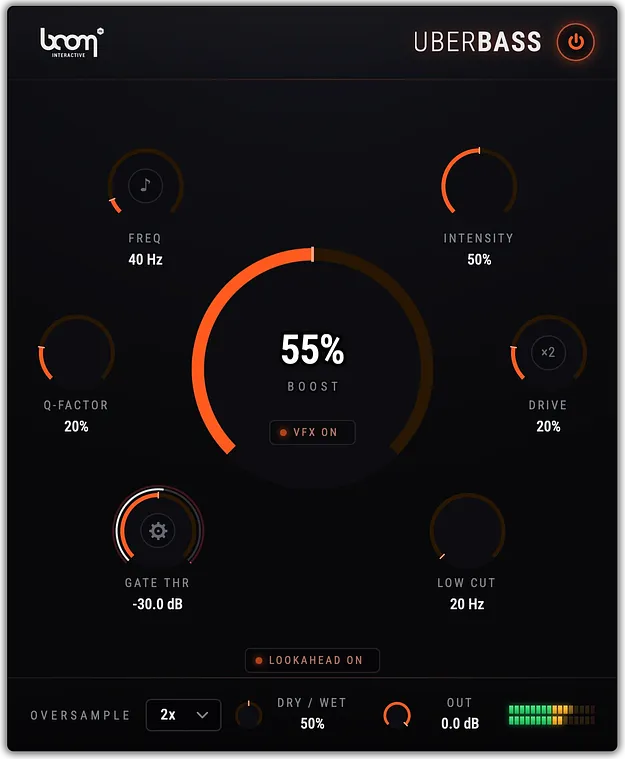
UBERBASS by Boom bass enhancer plugin interface

UBERBASS: Bass Enhancer Plugin by Boom

UBERBASS is a bass enhancer effects plugin from Boom that adds harmonics around a frequency you choose. It shapes the added low end with drive and gate controls and removes rumble with a low cut filter.

VST2AUAAXStandaloneWindowsmacOS64-bit
AVAILABLE ATPlugin Boutique
Opens the store in a new tab
01Overview

UBERBASS is built to add low-end weight without simply raising the volume of the bottom of the mix. Its enhancer generates harmonics around a resonant focus frequency, then blends them back into the signal. The developer positions it for music, sound design and sound for picture. A single BOOST control sets the overall amount, while DRIVE, GATE and LOW CUT shape the result and keep unwanted low content out of the output.

Best for

  • Kick and bassline weight
  • Snare and percussion body
  • Sound effect impacts
  • Mechanical sound design
  • Film and TV scoring
  • Mix bus presence
  • Vocal and voice over warmth
Developer
Boom
Category
Enhancers
Store
Plugin Boutique
02Key features

What you get

  • BOOST: one hero control for the whole added low-end effect
  • FREQUENCY set in Hertz or musical pitch from E0 to B2
  • Q-FACTOR narrows or widens the focus around the target frequency
  • DRIVE adds harmonic saturation with a dedicated extreme-distortion stage
  • GATE keeps the effect out of quiet passages
  • LOW CUT removes rumble from the signal
  • Up to 4x oversampling to reduce aliasing under heavy drive
  • Zero latency with lookahead off; 10 ms with lookahead on
03In depth

Shaping the Low End: Frequency, Q-Factor and Drive

The FREQUENCY control sets the exact point the effect targets. You can enter it in Hertz or switch to musical pitch, with notes from E0 to B2, which helps when you need to match a key.

Q-FACTOR controls how tightly the effect is focused around that frequency. A high setting keeps it narrow, suited to the fundamental of a kick drum. A low setting spreads it wider, which suits a full mix bus.

DRIVE adds harmonic saturation to the generated low end, moving it from clean reinforcement to a more aggressive character. Harmonics like these are what make low frequencies audible on small speakers. A dedicated stage handles more extreme distortion.
Gating, Low Cut and Processing Quality

GATE keeps the effect out of quiet passages, so the enhancement only appears when the source needs it. Its attack, release and ratio controls shape how the effect responds to the input, from tight and percussive to a longer tail.

LOW CUT removes content below a set point from the output after the dry and wet signals are blended. It targets rumble already present in the source as well as the added low end.

Up to 4x oversampling reduces aliasing under heavy drive. With lookahead off the plugin adds no latency; with lookahead on, latency is 10 ms.

04Specs

Will it run?

Formats, systems and requirements as listed by Plugin Boutique. Missing details are left out, not guessed.

DeveloperBoom
TypePlugin
CategoryEnhancer
FormatsVST2, AU, AAX, Standalone
Operating systemsWindows, macOS
Architecture64-bit
05FAQ

Questions, answered

What is UBERBASS used for?

UBERBASS is a bass enhancer for music, sound design and sound for picture. It adds harmonics around a frequency you select, which can add weight to kicks, basslines, impacts and other low-frequency material.

What formats and operating systems does UBERBASS support?

UBERBASS is available in VST2, AU, AAX and Standalone formats. It runs on Windows and macOS, and the system requirements list 64-bit support on both platforms.

What do I need to use UBERBASS?

UBERBASS requires a free iLok account and an audio host that supports VST 2.4 and 3, AU or AAX plugins. The developer notes that it does not work as a standalone application. The listed minimums are 8 GB of RAM and an OpenGL 2.1 capable GPU.

Does UBERBASS add latency?

With lookahead off, UBERBASS has zero latency. With lookahead on, the latency is 10 ms.

07Developer

More from Boom

All Boom products →