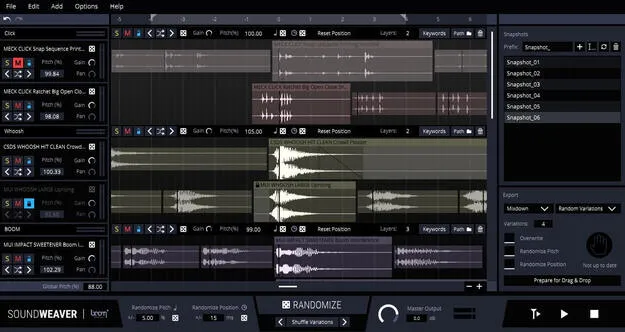
SoundWeaver audio layering wizard plugin interface by Boom

SoundWeaver: Audio Layering Wizard by Boom

Rated 5.0/5 on Plugin Boutique (5 ratings)

SoundWeaver is a standalone audio layering tool by Boom that builds sound designs from existing audio in your library. It picks, aligns and layers sounds automatically, then generates variations on export.

StandaloneWindowsmacOS64-bit
AVAILABLE ATPlugin Boutique
Opens the store in a new tab
01Overview

SoundWeaver is aimed at sound designers who need to produce many assets quickly. You point it at your library using keywords, folder paths or drag and drop, and it selects matching sounds, sorts them, slices them into regions and layers them together. From there you can pitch, offset, gain, shuffle and randomize individual sounds, groups or the entire project. Its Randomize feature proposes combinations you might not try by hand, which helps when your library has grown large.

Best for

  • Sound design asset production
  • Generating sound variations
  • Layered sound combinations
  • Library exploration
  • Session setup for sound design
Developer
Boom
Category
Utilities
Store
Plugin Boutique
02Key features

What you get

  • Automatically picks, slices, aligns and layers sounds from your library
  • Search by keywords, folder paths or drag and drop
  • Pitch, offset, gain and shuffle individual sounds, groups or the whole project
  • Randomize each parameter to discover new combinations
  • Drag and drop the project into your DAW
  • Export as individual layers, groups or a mixdown
  • Generate variations using pitch, offset or random takes during export
  • Save snapshots of combinations, settings and sounds to revisit later
03In depth

Automated layering and variation workflow

SoundWeaver handles the repetitive parts of building a sound design session. It searches your library, sorts and groups the results, and aligns them into layers. If a file contains several variations, the plugin splits it into regions so each one can be used separately.

Variations are where it saves the most time. Pitch, offset, gain and take changes can be applied during export to generate many versions of a project at once. You can review the results and keep the ones that work.

Take snapshots to save combinations of sounds and parameter settings, so you can return to earlier versions later in the process.

Standalone use and export options

SoundWeaver runs as a standalone application and does not need a host audio program. When you are ready, drag the project into your DAW for further editing, or export it as individual layers, groups or a mixdown.

The plugin is available for Windows and macOS and is 64-bit only. Running it requires a free account at ilok.com; a physical iLok USB key is not needed.

04Specs

Will it run?

Formats, systems and requirements as listed by Plugin Boutique. Missing details are left out, not guessed.

DeveloperBoom
TypePlugin
CategoryUtility
FormatsStandalone
Operating systemsWindows, macOS
Architecture64-bit
05FAQ

Questions, answered

Does SoundWeaver work without a DAW?

Yes. SoundWeaver is a standalone application and works without any host audio software. You can drag the finished project into your DAW later.

Which operating systems does SoundWeaver support?

SoundWeaver runs on Windows and macOS. It is 64-bit only, with Windows 7 (64-bit) and Mac OS X 10.9 or later listed as minimum versions.

What do I need to use SoundWeaver?

You need a free account at ilok.com. A physical iLok USB key is not required. The listed system requirements include 8 GB of RAM, a 40 MB hard disk footprint and an Intel Core i5 or Apple M1 processor.

07Developer

More from Boom

All Boom products →