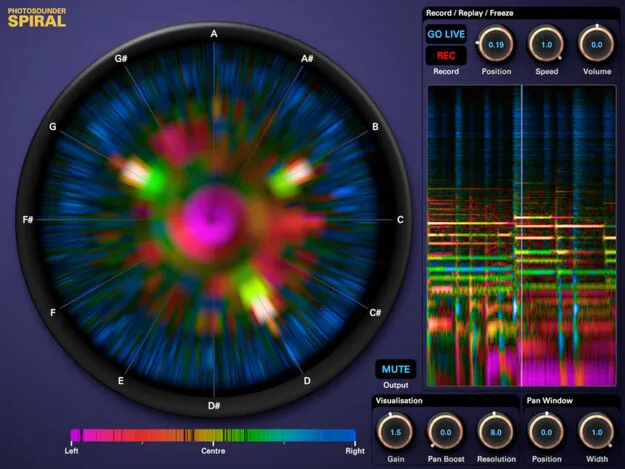
spiral spectral analysis plugin by Photosounder showing a coiled spectrum display

spiral: Spectral Analysis Plugin by Photosounder Free Download

Rated 4.3/5 on Plugin Boutique (118 ratings)

spiral is a music analysis plugin by Photosounder that displays the spectrum as a coiled spiral framed by a chromatic circle, so you can see the notes and harmonics in a mix.

VST2AUWindowsmacOS64-bit
AVAILABLE ATPlugin Boutique
Free trial available from the developer
01Overview

spiral is an effects plugin from Photosounder built for analyzing music rather than shaping it. Instead of a conventional spectrum display, it coils the frequency spectrum into a spiral framed by a chromatic circle, which makes pitch relationships easier to read at a glance. Colors show where sounds sit in the stereo field, so instruments are often easy to tell apart. It is available as a VST2 and AU plugin for Windows and macOS.

Best for

  • Chord analysis
  • Transcribing melodies
  • Tuning instruments
  • Identifying notes in a mix
  • Studying harmony
Developer
Photosounder
Store
Plugin Boutique
02Key features

What you get

  • Spiral spectrum display framed by a chromatic circle
  • Colors indicate position in the stereo mix
  • Record audio into memory and play back at 0–100% speed
  • Adjustable analysis resolution for time or frequency precision
  • Rotatable spiral to place the scale root at the top
  • Click-to-create harmonic overlays for individual note identification
03In depth

Visualizing notes and chords in a spiral display

The spiral view places the spectrum around a chromatic circle, so notes that share a pitch class line up visually even across octaves. Photosounder's own description is that this lets you see what is happening musically and spectrally at once.

The display can be rotated so the root of the scale sits at the top, which helps you recognize notes more quickly. Clicking the visualization creates overlays for the harmonics of a chosen note. Adjusting those overlays helps you pick out the individual notes that make up a chord.
Recording, slowing down and adjusting resolution

spiral can record a portion of the sound into its memory and play it back at a slower rate, from 0% to 100% of the original speed. This is useful when you want to write down notes or work through a chord that moves too fast to follow in real time.

Analysis resolution is adjustable. Lower settings give more precision in time, which suits fast passages. Higher settings give more detail for complex chords, bass instruments and tuning an instrument.

04Specs

Will it run?

Formats, systems and requirements as listed by Plugin Boutique. Missing details are left out, not guessed.

DeveloperPhotosounder
TypePlugin
CategorySpectral Analysis
FormatsVST2, AU
Operating systemsWindows, macOS
Architecture64-bit
Free trialYes
05FAQ

Questions, answered

What is spiral?

spiral is a music analysis plugin by Photosounder. It shows the spectrum coiled into a spiral with a chromatic circle, so you can see notes and chords as you listen.

What formats and operating systems does spiral support?

spiral is available in VST2 and AU formats, as 64-bit plugins for Windows and macOS. The listed requirements say Windows 7 and later, and macOS versions up to 10.15 for VST and Audio Unit builds.

Can I slow down audio to write down notes in spiral?

Yes. You can record a portion of the sound into spiral's memory and play it back at a slower rate, between 0% and 100% of the original speed.

07Developer

More from Photosounder

All Photosounder products →