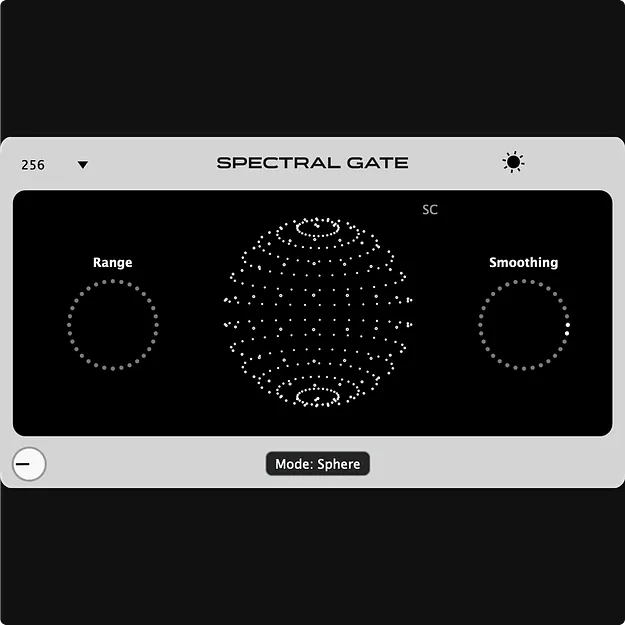
SPECTRAL GATE 2 by iFeature FFT gate plugin interface

SPECTRAL GATE 2: Frequency-Selective Gate Plugin by iFeature

SPECTRAL GATE 2 is a frequency-selective gate plugin by iFeature that uses FFT processing to threshold each frequency band separately instead of gating the full signal by overall volume. It is available in VST3 and AUv2 formats for Windows and macOS.

VST3WindowsmacOS
AVAILABLE ATPlugin Boutique
Opens the store in a new tab
01Overview

Traditional gates respond to the overall level of a signal. SPECTRAL GATE 2 listens to the spectrum instead, so each band is passed or reduced on its own terms. The developer presents it as a way to remove noise and shape textures without affecting the whole mix. Version 2 adds dedicated attack and release controls, a revised tilt control for brightness, a dry/wet mix, and a redesigned interface with project persistence.

Best for

  • Noise reduction
  • Transient isolation
  • Reverb tail cleanup
  • Textured sound design
  • Creative gating effects
  • Mix bus cleanup
Developer
iFeature
Category
Gates
Store
Plugin Boutique
02Key features

What you get

  • FFT-based gating that applies thresholds per frequency band
  • Dedicated attack and release controls
  • Tilt shift for brightness, also compensating high-frequency lag
  • Dry and wet mix control for blending the effect
  • Fixed, stated latency
  • Automatic project persistence for saved settings
  • Revamped, interactive user interface
  • Runs in any VST3 or AUv2 compatible DAW
03In depth

Frequency-Selective Gating and Sound Control

The threshold sets which frequencies pass and which are muted or reduced. Because processing happens per frequency bin through FFT, the gate can isolate transients, clean up noise or reverb tails, and shape textures.

According to iFeature, a low threshold produces a gritty, textured effect, while a high threshold lets only the strongest parts of the sound through. The developer also notes that noise gating can cause a slight lag in the high frequencies, which the tilt control is designed to compensate for so highs stay clear.
Attack, Release and Mix Controls

Dedicated attack and release parameters let you set how quickly the gate responds to incoming audio, which allows both natural and more creatively shaped results.

The dry/wet mix blends the unprocessed signal with the processed one, so you can keep the effect subtle or push it further. The tilt shift, shown as a spinning sun in the interface, adjusts brightness of the processed audio.

04Specs

Will it run?

Formats, systems and requirements as listed by Plugin Boutique. Missing details are left out, not guessed.

DeveloperiFeature
TypePlugin
CategoryGate
FormatsVST3
Operating systemsWindows, macOS
05FAQ

Questions, answered

What formats does SPECTRAL GATE 2 support?

SPECTRAL GATE 2 is available in VST3 format. The system requirements also list AUv2, and it runs on Windows 10 and later as well as macOS 10.13 and later (Universal).

Which DAWs can I use SPECTRAL GATE 2 in?

The plugin works in any host that supports VST3 or AUv2, on both Mac and Windows.

How is SPECTRAL GATE 2 different from a regular gate?

A regular gate reacts to the overall volume of the signal. SPECTRAL GATE 2 uses FFT processing to apply the threshold to each frequency band separately.

What do I need to use SPECTRAL GATE 2?

You need a host that supports VST3 or AUv2 on Windows 10 or later, or macOS 10.13 or later.

07Developer

More from iFeature

All iFeature products →