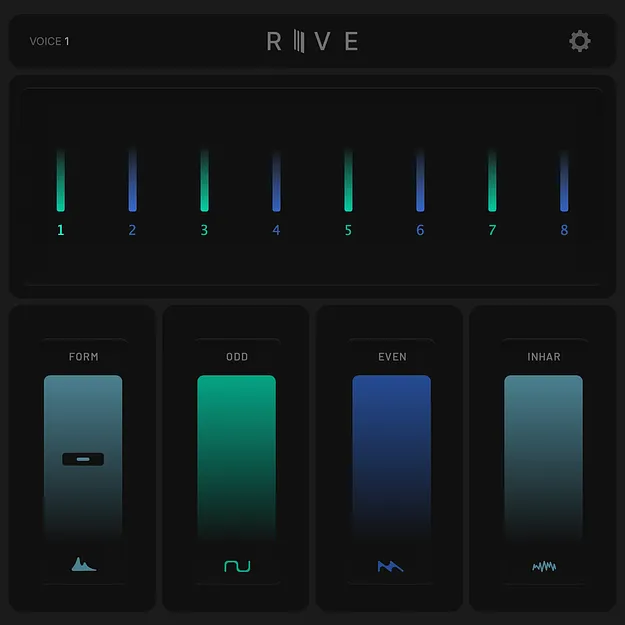
RIVE by iFeature harmonic splitter plugin interface

RIVE: Real-Time Harmonic Splitter Effect by iFeature

RIVE is a real-time polyphonic harmonic splitter plugin by iFeature that separates any sound into its odd, even, and inharmonic components so each part can be shaped independently.

VST3WindowsmacOS
AVAILABLE ATPlugin Boutique
Opens the store in a new tab
01Overview

RIVE is an effects plugin from iFeature built around harmonic control. It splits incoming audio into odd, even, and inharmonic components, letting you work on the internal structure of a sound rather than only its overall tone. The developer says it handles monophonic and polyphonic material with up to 8 voices, and that it runs in real time with low CPU use. RIVE is available as a VST3 plugin for Windows and macOS.

Best for

  • Sound design
  • Harmonic shaping
  • Mixing individual sources
  • Real-time tone tweaking
  • Experimental processing
Developer
iFeature
Store
Plugin Boutique
02Key features

What you get

  • Real-time harmonic splitter using about 2% CPU
  • Splits sound into odd, even, and inharmonic components
  • Monophonic and polyphonic operation up to 8 voices
  • Formant Shift control on each slider
  • Display showing harmonic content and active voices
  • Three quality modes: rapid, neutral, and detail
  • Four mini Easter-egg games included
03In depth

Real-Time Harmonic Splitting and Shaping

RIVE separates a sound into three parts: odd harmonics, even harmonics, and inharmonic content. Each part can be shaped, shifted, or emphasized on its own, which gives direct access to the harmonic makeup of a signal.

Formant Shift is available per slider, so you can move the tonal character of each component without changing the others. The plugin works on monophonic and polyphonic sources, with up to 8 voices.

The developer states the plugin runs in real time and takes only about 2% CPU, which keeps it practical inside a busy session.
Display, Quality Modes and Workflow

A built-in display shows the harmonic content and active voices, so you can see what each slider is changing as you work.

RIVE offers three quality modes: rapid, neutral, and detail. Rapid is suited to quick tweaking, while detail is the option to reach for when you want finer processing.

The interface also includes a screensaver and four mini Easter-egg games, which are extras rather than part of the processing workflow.

04Specs

Will it run?

Formats, systems and requirements as listed by Plugin Boutique. Missing details are left out, not guessed.

DeveloperiFeature
TypePlugin
CategoryMulti Effect
FormatsVST3
Operating systemsWindows, macOS
05FAQ

Questions, answered

What formats and operating systems does RIVE support?

RIVE is available in VST3 format. It runs on Windows 10 and later and on macOS 10.13 and later, with a Universal build for macOS.

What do I need to use RIVE?

RIVE needs a host that supports VST3 or AUv2. The developer lists compatibility with any host that supports either format.

How many voices can RIVE process?

RIVE works in monophonic or polyphonic mode and handles up to 8 voices.

07Developer

More from iFeature

All iFeature products →