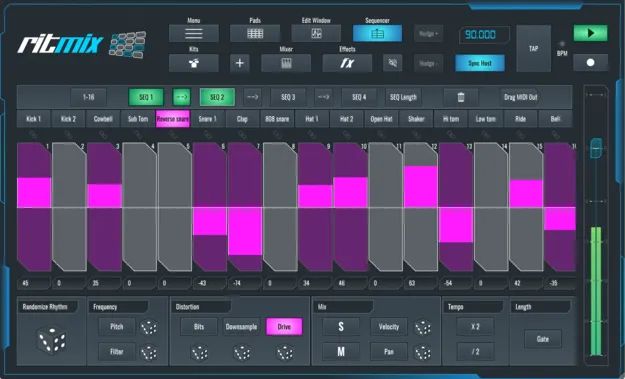
RitMix Drum Machine by SoundBridge drum machine plugin interface with pad section and step sequencer

RitMix Drum Machine – Lifetime License: MPC-Style Pad and Step Sequencer Plugin

RitMix Drum Machine – Lifetime License is a drum machine plugin from SoundBridge that combines an MPC-style pad section with a 16-step sequencer. It is available in VST3 and AU formats for Windows and macOS.

VST3AUWindowsmacOS
AVAILABLE ATPlugin Boutique
Opens the store in a new tab
01Overview

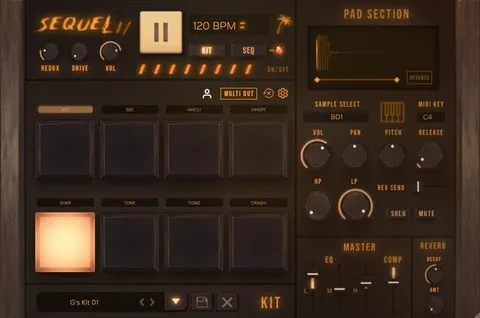
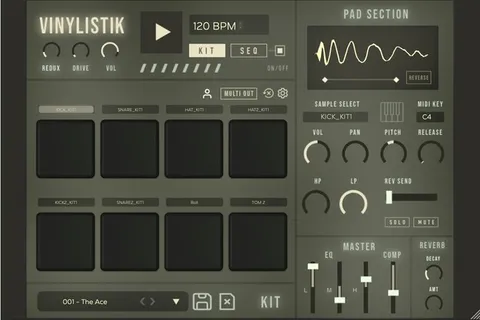
RitMix Drum Machine – Lifetime License puts two drum machine workflows into one plugin. The pad section is built for playing ideas live, and the 16-step sequencer lets you build patterns by clicking steps or by recording your pad performances. SoundBridge describes the design as a deliberate simplification: editing features are limited to the essentials, and the parameters are large so they are easy to find. A mixing and mastering FX section is included on the same instrument.

Best for

  • Live beat sketching
  • Pad-based drum programming
  • Randomized rhythm generation
  • Beat making in DAW sessions
  • Drum bus processing
Developer
SoundBridge
Store
Plugin Boutique
02Key features

What you get

  • MPC-style pad section for performing ideas live
  • 16-step sequencer with click-to-program steps
  • Record pad performances directly into the sequencer
  • Randomization buttons and parameters for experimentation
  • Enlargeable interface with multi-touch screen support
  • Built-in mixing and mastering FX section
  • Editing controls reduced to the essentials with large parameters
  • VST3 and AU plugin formats
03In depth

MPC-Style Pad Section for Performing Ideas

The pad section is designed for performing rhythms rather than editing them in detail. SoundBridge says the interface can be enlarged so it is easier to play, and that it supports multi-touch screens.

Because the pads are meant for live input, the plugin suits producers who sketch beats by playing them in rather than programming each hit one at a time.
16-Step Sequencer and Randomization

The 16-step sequencer generates rhythms either by clicking steps or by recording your pad performances. Randomization buttons and parameters are included for experimenting with patterns and mangling the audio.

This combination lets you move between a played take and a programmed pattern within the same plugin, then refine the result with the sequencer's editing controls.

Mixing and Mastering FX Section

A built-in FX section covers mixing and mastering processing, so drum sounds can be shaped inside the instrument before they reach your DAW's channel strip. SoundBridge describes it as containing the parameters you would expect from a drum machine.

The effects keep the drum bus processing in the same place as the sequencing, which simplifies sessions where the beat is built and finished in one plugin.

04Specs

Will it run?

Formats, systems and requirements as listed by Plugin Boutique. Missing details are left out, not guessed.

DeveloperSoundBridge
TypePlugin
CategoryDrum Machine
FormatsVST3, AU
Operating systemsWindows, macOS
05FAQ

Questions, answered

What formats does RitMix Drum Machine support?

RitMix Drum Machine is available as a VST3 and AU plugin.

Which operating systems does RitMix run on?

It runs on Windows 10 or 11 and macOS Sonoma 14.0 or later.

What do I need to run RitMix Drum Machine?

On Windows you need an Intel Core i5 or AMD multi-core processor, 8 GB RAM and ASIO-compatible audio hardware. On macOS you need an Intel Core i5 or Apple Silicon processor, 8 GB RAM and a Core Audio-compliant interface is recommended. Both platforms need 2 GB of free disk space and an internet connection for authorization.

Can I record pad performances into the sequencer?

Yes. The 16-step sequencer can be filled by recording your performances from the MPC Pad Section, as well as by clicking steps.

07Developer

More from SoundBridge

All SoundBridge products →