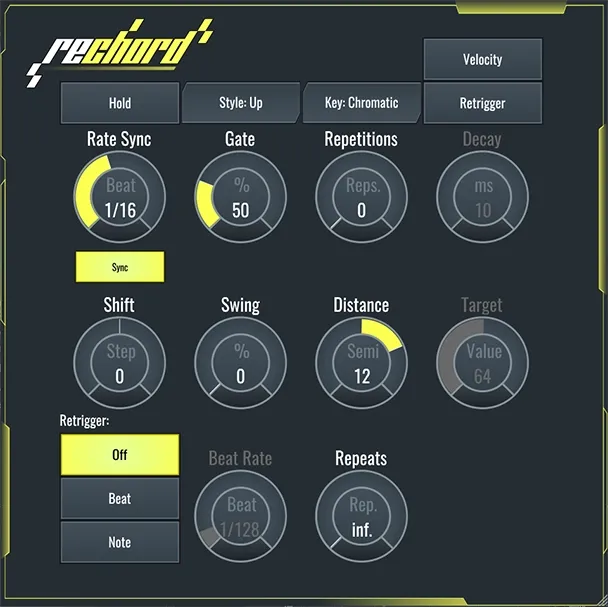
reChord Arpeggiator by SoundBridge MIDI arp plugin interface

reChord Arpeggiator – Lifetime License: MIDI Arp Plugin by SoundBridge

reChord Arpeggiator – Lifetime License is a MIDI arpeggiator plugin from SoundBridge that turns chords into melodic patterns. It is available in VST3 and AU formats for Windows and macOS.

VST3AUWindowsmacOS
AVAILABLE ATPlugin Boutique
Opens the store in a new tab
01Overview

reChord Arpeggiator is a compact MIDI effect for producers who want to turn chord input into melodic lines. According to SoundBridge, a few knob adjustments are enough to automate complex motifs and phrases. Randomization, velocity sensitivity and beat re-triggering are the main tools for shaping how the arpeggio moves. The plugin is offered as a lifetime license, and it runs in VST3 and AU hosts on Windows and macOS.

Best for

  • Melodic arpeggios
  • Chord-to-melody sketching
  • Rhythmic pattern variation
  • Electronic music production
  • Idea generation in DAW
Developer
SoundBridge
Category
MIDI Arps
Store
Plugin Boutique
02Key features

What you get

  • Turns chords into melodic arpeggio phrases
  • Randomization for varied note patterns
  • Velocity sensitivity for dynamic movement
  • Beat re-triggering for rhythmic variation
  • Few controls for quick automation of motifs
  • VST3 and AU plugin formats
  • Runs on Windows 10/11 and macOS Sonoma 14.0+
  • Lifetime license
03In depth

Shaping arpeggios from chords

reChord works on MIDI, so it takes the chords you play or sequence and reshapes them into moving melodic material. SoundBridge describes its controls as a way to generate complex motifs and melodic phrases with only a few parameters.

Randomization adds variation so repeated passes do not sound identical. Velocity sensitivity lets the arpeggio respond to how notes are played or sequenced, which can add dynamic movement to a pattern.
Beat re-triggering and rhythmic ideas

Beat re-triggering is one of the main features of reChord. It lets the arpeggio restart on the beat, which helps producers lock patterns to the grid and build rhythmic variations quickly.

Because the controls are few, reChord suits fast sketching of melodic ideas inside a DAW session, where the goal is to test many patterns from one chord progression.

Compatibility and setup

reChord is available in VST3 and AU formats. It runs on Windows 10 or 11 and on macOS Sonoma 14.0 or later. Both platforms need an internet connection for authorization and about 2 GB of free space on the system drive for the basic installation.

On Windows, an ASIO-compatible audio interface is listed as a requirement. On Mac, a Core Audio–compliant interface is recommended.

04Specs

Will it run?

Formats, systems and requirements as listed by Plugin Boutique. Missing details are left out, not guessed.

DeveloperSoundBridge
TypePlugin
CategoryMIDI Arp
FormatsVST3, AU
Operating systemsWindows, macOS
05FAQ

Questions, answered

What is reChord Arpeggiator?

reChord Arpeggiator is a MIDI arpeggiator plugin by SoundBridge. It takes chords and turns them into melodic phrases using randomization, velocity sensitivity and beat re-triggering.

Which formats and operating systems does reChord support?

reChord is available as a VST3 and AU plugin. It supports Windows 10 or 11 and macOS Sonoma 14.0 or later.

Does reChord need an internet connection?

Yes. An internet connection is required for authorization on both Windows and macOS. The basic installation needs about 2 GB of free space on the system drive.

What do I need to use reChord Arpeggiator?

You need a VST3 or AU compatible host on Windows 10/11 or macOS Sonoma 14.0 or later, with at least 8 GB RAM and a 1280×740 display. Windows requires an ASIO-compatible audio interface, and a Core Audio–compliant interface is recommended on Mac.

07Developer

More from SoundBridge

All SoundBridge products →