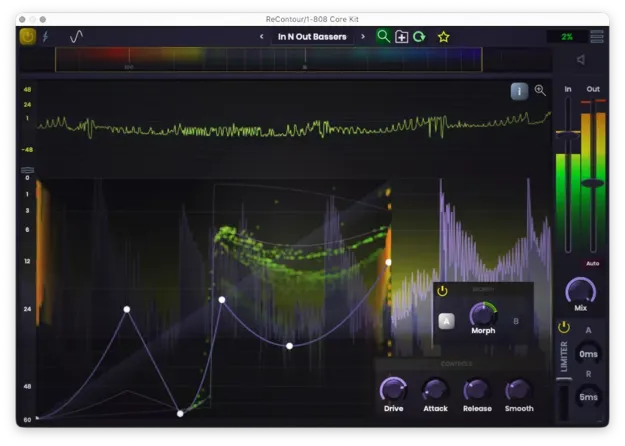
ReContour by Stagecraft Software compressor plugin interface showing compression curve

ReContour: Draw-to-Shape Compressor Plugin by Stagecraft Software

Rated 4.6/5 on Plugin Boutique (8 ratings)

ReContour is a compressor-style effect plugin from Stagecraft Software that shapes audio by drawing a compression curve. It can be used for gentle dynamic control or pushed hard for distortion.

WindowsmacOS
AVAILABLE ATPlugin Boutique
Opens the store in a new tab
01Overview

ReContour is a compressor plugin from Stagecraft Software that sits between a compressor and a waveshaper. Instead of setting a ratio and threshold, you draw the compression curve directly, which lets you decide which parts of the incoming audio are cut off or emphasized. Attack, release and smoothing controls work much as they do on a standard compressor, and a detailed graph shows the effect over time as the audio plays.

Best for

  • Drum bus compression
  • Mix dynamic control
  • Distortion and saturation
  • Sound design textures
  • Creative effects processing
Category
Compressors
Store
Plugin Boutique
02Key features

What you get

  • Compression shaped by drawing and adjusting a curve
  • Adjustable attack and release times
  • Drive control to change how the signal is compressed
  • Smoothing control for how much changes are softened
  • Real-time compression graph shows effect over time
  • Hover for specific values during playback
  • Click and hold to freeze the graph at a chosen moment
03In depth

Drawing the Curve: Compression and Distortion

The core of ReContour is its curve editor. By drawing and adjusting the curve, you control how the signal is compressed, and the same tool covers both ends of the range. Used as a conventional compressor, it can carve out space for individual instruments in a mix, for example by bringing forward drums that sit too far back.

Driving the signal harder changes the character of the processing. Stagecraft Software describes the plugin as able to produce a range of distortions, from hissing high-frequency textures to heavy, boomy tones. Because the curve is drawn by hand, these results can be explored quickly.
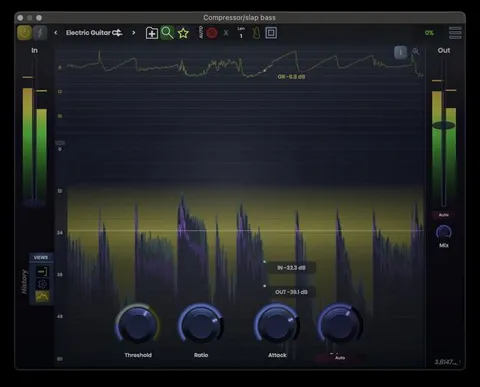
Attack, Release and Metering

ReContour gives you control over attack and release times, as you would expect from a compressor. You can also adjust how much the changes are smoothed, which shapes how abruptly the processing responds to the input.

The compression graph displays what the plugin is doing to the signal over time. Hover over it during playback to read specific values, or click and hold to freeze the display at a particular moment. This makes it easier to see exactly where the curve is affecting the sound.

04Specs

Will it run?

Formats, systems and requirements as listed by Plugin Boutique. Missing details are left out, not guessed.

DeveloperStagecraft Software
TypePlugin
CategoryCompressor
Operating systemsWindows, macOS
05FAQ

Questions, answered

What is ReContour?

ReContour is an effect plugin from Stagecraft Software that combines compression and waveshaping. You shape the processing by drawing a compression curve.

Can ReContour be used as a regular compressor?

Yes. Used conservatively, the curve can work like a standard compressor to help individual instruments stand out in a mix. Attack, release and smoothing controls are also available.

Which operating systems does ReContour support?

ReContour runs on Windows and macOS. The listed requirements are Windows 10 or later and macOS 11 (Big Sur) or later.

07Developer

More from Stagecraft Software

All Stagecraft Software products →